
LiveCanvas
LiveCanvas is an open-source Skill for Codex, Claude Code, and other AI coding assistants. It researches and checks source material, builds a Remotion animation with a designed cover, scenes, images, emoji, timelines, or charts, and can package Apple Live Photo resources on a supported macOS environment.
Project overview
LiveCanvas turns a short topic request into a traceable production workflow. The agent researches facts and definitions, plans the cover hierarchy and storyboard, and generates a short Remotion animation. On supported macOS systems, it can pair a JPEG cover with a silent H.264 video, validate identifiers and timing metadata, and package the result as `.pvt`. The project records cover, MP4 preview, Live Photo package, Photos import, and phone playback as separate states so file generation is not mistaken for device acceptance.
Core capabilities
Research and data verification
The Skill records sources, definitions, date ranges, units, time zones, and processing methods. Market value, weather, and non-time-series content have separate guidance, while scripts only validate structure.
Cover and storyboard design
The repository provides rules for choosing a conclusion, visual subject, and timed action. A static cover should still communicate the subject, finding, unit, and source on its own.
Deterministic Remotion rendering
Motion is frame-driven. The starter installs from a lockfile and exports H.264 MP4, a JPEG cover, and inspection frames without relying on wall clocks, free randomness, or uncontrolled web animation.
Image and emoji composition
Assets should participate in the explanation and retain source, author, license, edits, and role. The Remotion project favors local media and checks transparency, fonts, cropping, and overlap.
Live Photo pairing and packaging
A Swift tool writes paired identifiers and timed metadata. A Python tool packages locally validated image, video, and metadata files into `.pvt` and verifies hashes.
Stage-specific validation
Sources, rendering, pairing metadata, local loading, package integrity, and phone playback are recorded separately, so an earlier pass does not imply a later one.
Installation and usage
Install the complete `livecanvas/` directory through Skills CLI. Start a new session and verify the Skill with a small non-sensitive topic before adding FFmpeg, fonts, and Remotion dependencies for a real render.
Let an AI Agent install it
Send this prompt to Codex, Claude Code, or another AI agent that can work with your local environment.
Help me evaluate and install LiveCanvas from https://github.com/pengchujin/livecanvas at commit d232e19f0021f266e1c7e54f546546ce56b76b5d. Read README.md, livecanvas/SKILL.md, livecanvas/references/production.md, livecanvas/references/direct-delivery.md, LICENSE, and THIRD_PARTY_NOTICES.md first. Check whether the target Skills directory already contains `livecanvas`, and stop if it has custom content. Do not overwrite files, request Photos permissions, import into Photos, upload assets, or publish anything without confirmation. After approval, run `npx skills add pengchujin/livecanvas --skill livecanvas -g -a codex`, inspect the complete installed directory, and start a new session. Use a non-sensitive topic to verify that the Skill first defines evidence, cover, storyboard, and environment. Do not install Remotion dependencies, render video, or generate `.pvt` until I separately approve those steps.- Node.js, npm, and npx
- Write access to the target agent's user-level Skills directory
- Python 3, FFmpeg, and required fonts for animation production
- Permission for web research and local code execution in an isolated project directory
- macOS and Xcode Command Line Tools when `.pvt` output is required
- A check for an existing LiveCanvas Skill before installation
npx skills add pengchujin/livecanvas --skill livecanvas -g- 1Install the complete Skill
Run `npx skills add pengchujin/livecanvas --skill livecanvas -g`, or add `-a codex` for Codex only. Check for an existing directory first and start a new session afterward.
- 2Define the topic and evidence scope
Provide the subject, metric, dates, comparison, and purpose. Save raw evidence and sources before writing the conclusion, cover hierarchy, storyboard, and asset plan.
- 3Copy the Remotion starter
Copy `livecanvas/assets/remotion/` into an isolated project directory, install from the lockfile with `npm ci`, and rewrite the composition around the storyboard and local assets.
- 4Validate and render
Check the content-specific data structure and sources, run TypeScript checks and rendering, then inspect the cover, mid-motion, transitions, extrema, and ending frames.
- 5Pair only when the environment supports it
Without macOS, deliver the cover, MP4, sources, and project while marking Live Photo as unavailable. On macOS, validate identifiers, timing metadata, and local PhotoKit loading.
- 6Package and record the tested scope
Package validated resources as `.pvt`, save hashes and delivery.json, and leave phone preview, Photos import, and social upload as untested or not requested.
In a new session, ask LiveCanvas to plan a Chinese motion card for a low-risk topic. Confirm that it defines the source scope, cover hierarchy, storyboard, assets, and environment before rendering. If you continue, inspect the cover, MP4, source record, and editable project. Mark the Live Photo package as locally validated only after pairing, PhotoKit loading, and `.pvt` hash checks pass on macOS. Phone preview still requires a separate test.
- Manual installation must copy the entire `livecanvas/` directory, not only `SKILL.md`.
- Copy the Remotion starter into a separate project directory instead of installing dependencies inside the installed Skill.
- Remotion and other dependencies retain their own terms and should be reviewed for the actual version used.
- Pairing does not import into Photos and does not prove iPhone, social platform, or wallpaper compatibility.
Use cases
Data-change motion cards
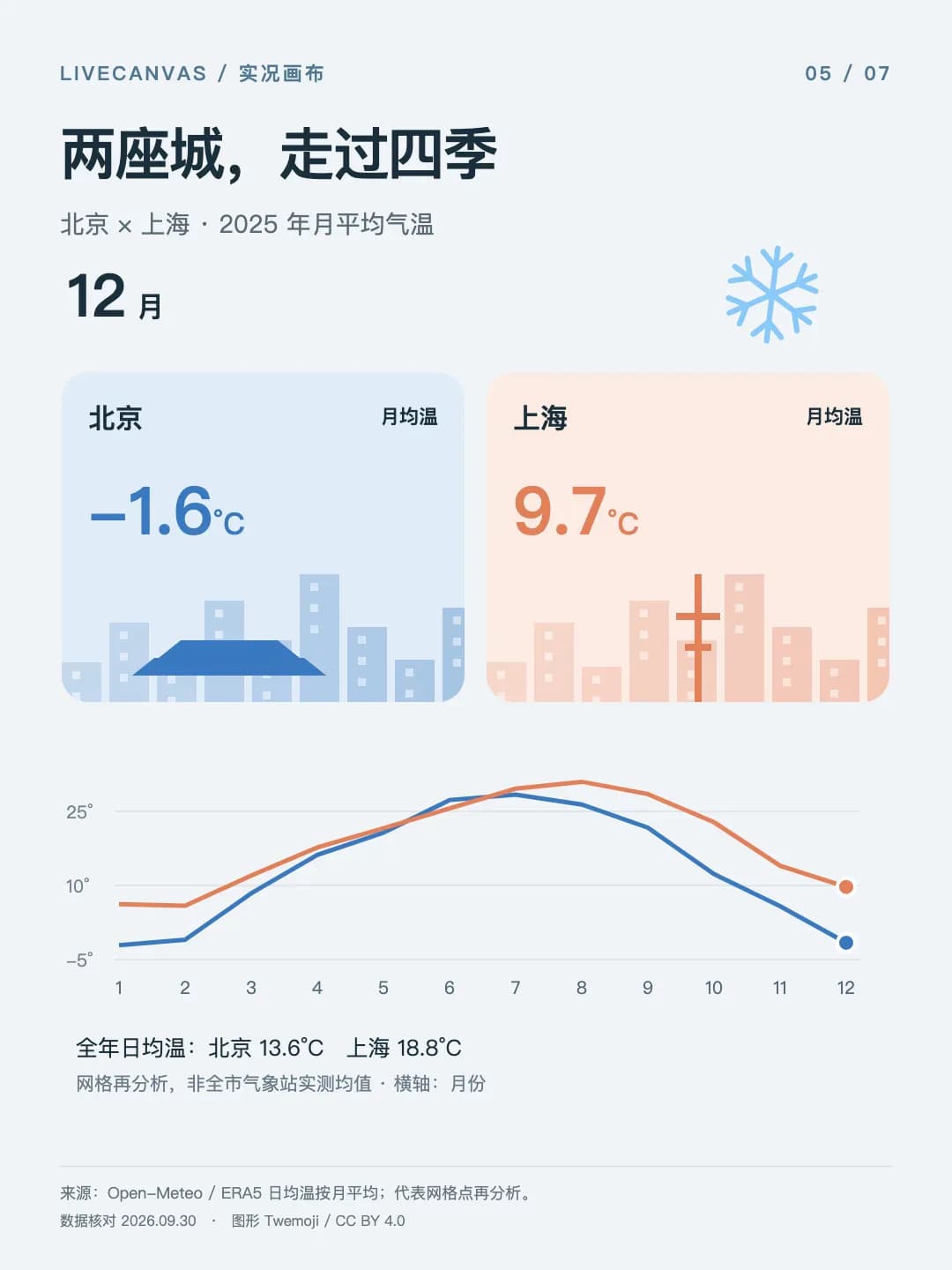
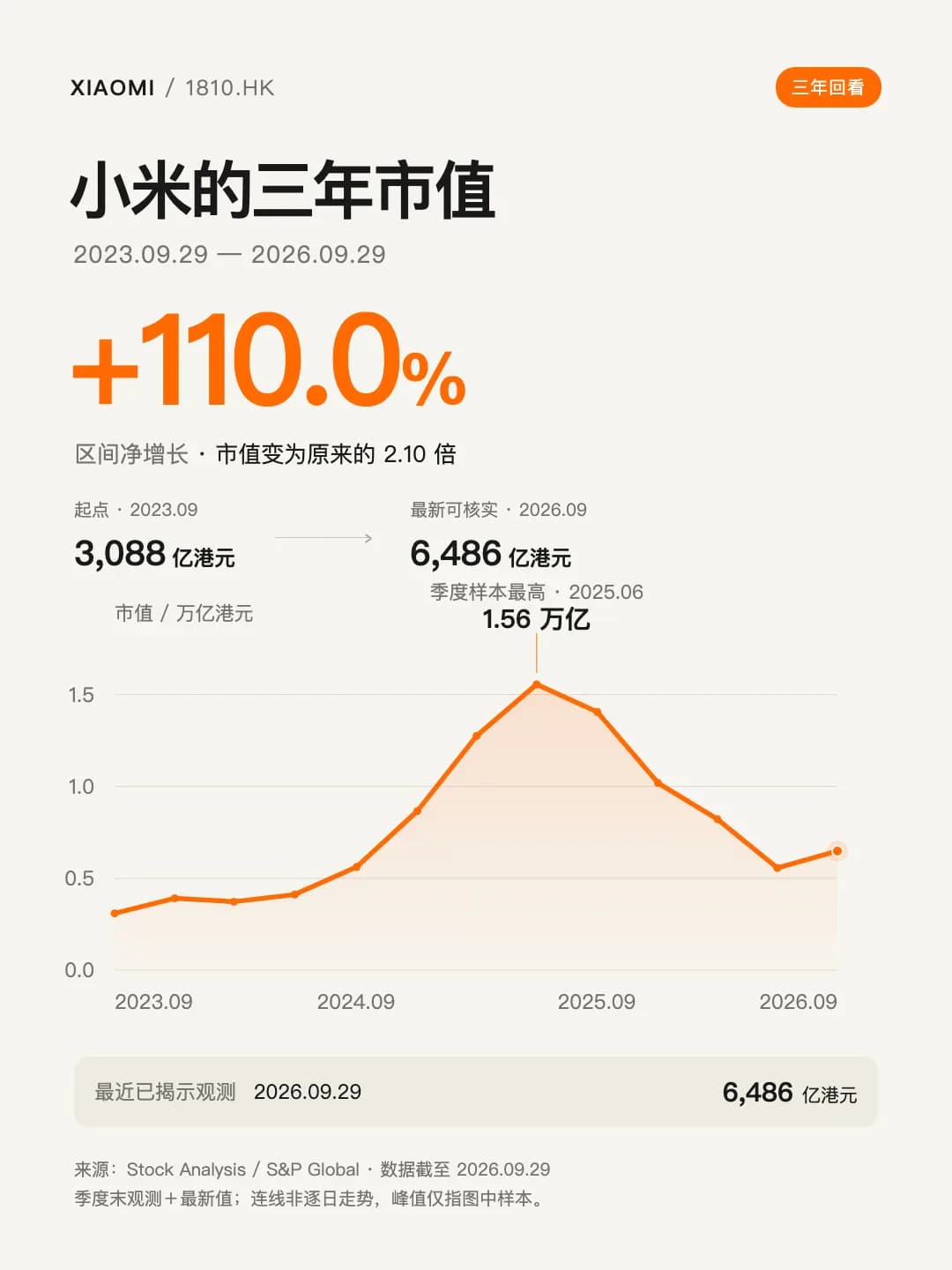
Turn market value, temperature, population, store, vehicle, or energy time series into vertical motion cards with sources, units, and dates.
Product comparisons and launch explainers
Use product imagery, capability cards, and staged motion to explain differences while retaining benchmark names and qualifications.
Process and knowledge explanation
Explain mechanisms and steps through scenes, timelines, object arrays, or state changes without forcing every subject into a line chart.
Apple Live Photo file delivery
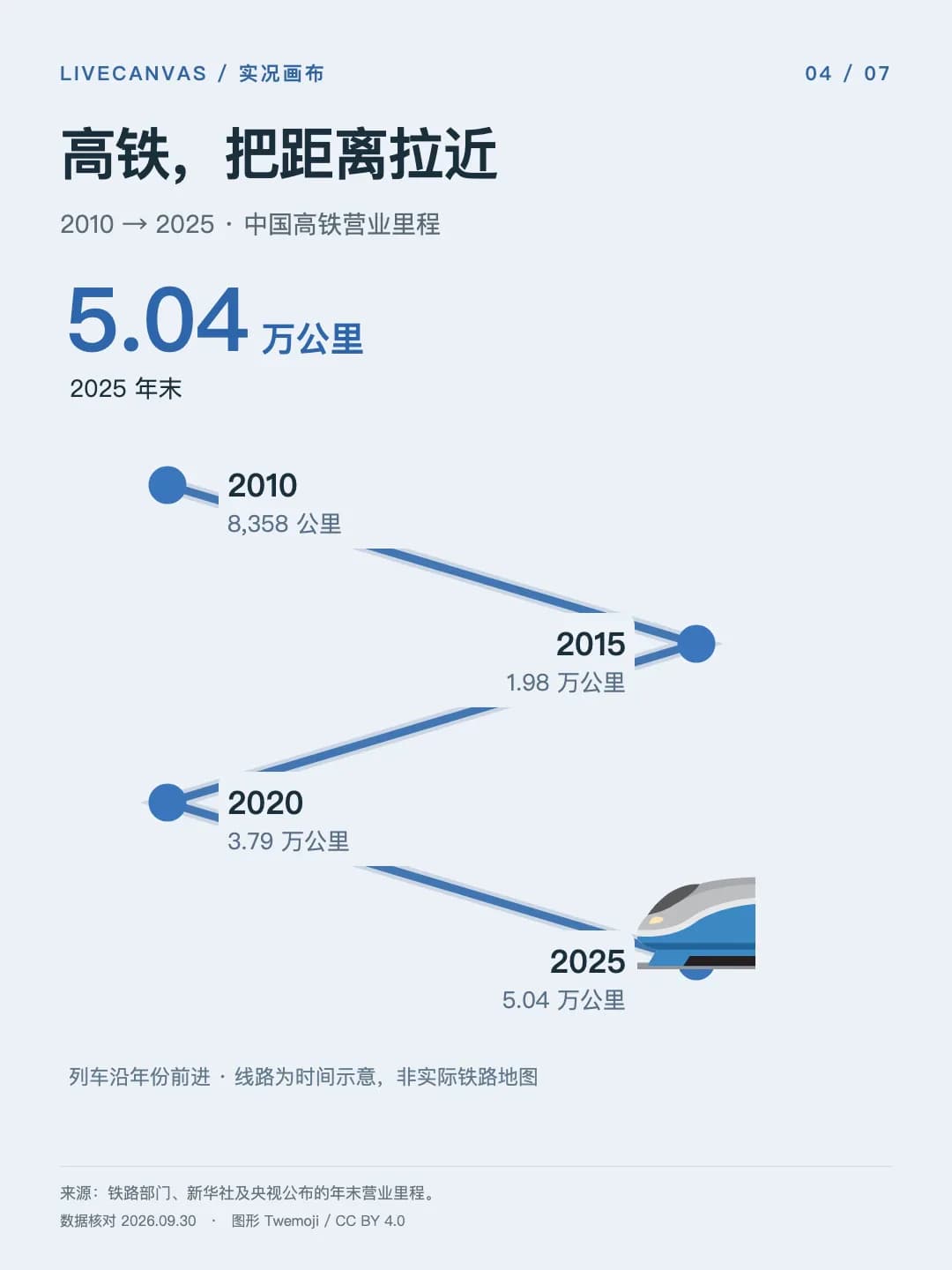
Pair a cover and short video on macOS, package the result as `.pvt`, and retain an MP4 preview with an explicit compatibility record.
Assessment
LiveCanvas documents a reviewable path from source verification through visual design, deterministic rendering, and file validation. Its guidance is unusually explicit about cover and video consistency, asset provenance, missing data, and the limits of Live Photo validation, while 15 demos make the intended output easy to inspect. The cost is a substantial local toolchain, a macOS requirement for `.pvt`, and inconsistent support across receiving apps. The public history is still short at eight commits with no formal Release, and this catalog review did not install or rerun the project.
Why it may be useful
- Source verification and delivery records have concrete file and process conventions
- Motion is designed to explain the subject and can combine scenes, timelines, images, and charts
- The cover and video come from one composition for visual and timing consistency
- Metadata, local loading, package integrity, and phone playback are validated separately
- The bilingual README includes 15 inspectable GIF and MP4 examples with some `.pvt` downloads
What to know first
- The full workflow depends on Node.js, Python, FFmpeg, fonts, and Remotion
- `.pvt` pairing and local PhotoKit loading require macOS and Xcode Command Line Tools
- Demo facts and model results are snapshots and were not independently rechecked here
- Media licensing is layered and third-party brands, data, and assets need individual review
- The repository has a short history with no GitHub Release, SECURITY.md, or long-term compatibility record
README
LiveCanvas
Overview
LiveCanvas is an open-source Skill for Codex, Claude Code, and other AI coding assistants. It researches and checks source material, builds a Remotion animation with a designed cover, scenes, images, emoji, timelines, or charts, and can package Apple Live Photo resources on a supported macOS environment. Turn a sentence into a Live Photo with a designed cover and animation for Codex, Claude Code, and other AI coding assistants.
Getting started
- Install the complete `livecanvas/` directory through Skills CLI. Start a new session and verify the Skill with a small non-sensitive topic before adding FFmpeg, fonts, and Remotion dependencies for a real render.
- Research comes before visual design. Time series need raw evidence, sources, and definitions, while non-time-series claims still need per-claim sourcing.
- Visuals can combine product imagery, scenes, emoji, timelines, process demonstrations, and charts. Motion should explain the subject, and charts are optional.
- In a new session, ask LiveCanvas to plan a Chinese motion card for a low-risk topic. Confirm that it defines the source scope, cover hierarchy, storyboard, assets, and environment before rendering. If you continue, inspect the cover, MP4, source record, and editable project. Mark the Live Photo package as locally validated only after pairing, PhotoKit loading, and `.pvt` hash checks pass on macOS. Phone preview still requires a separate test.
Configuration
npx skills add pengchujin/livecanvas --skill livecanvas -g