
Knowledge Work Plugins
Knowledge Work Plugins is Anthropic's public marketplace of job-oriented Claude extensions. Choose an office or sales workflow in Cowork, start with information you supply, and decide separately whether to connect company systems.
Project overview
Knowledge Work Plugins packages role-specific workflows and tool connections. Start with one plugin and a limited task. We reviewed the marketplace manifest, Sales README and call-prep Skill; this guide describes documented behavior rather than a hands-on test.
Core capabilities
Choose role-specific workflows
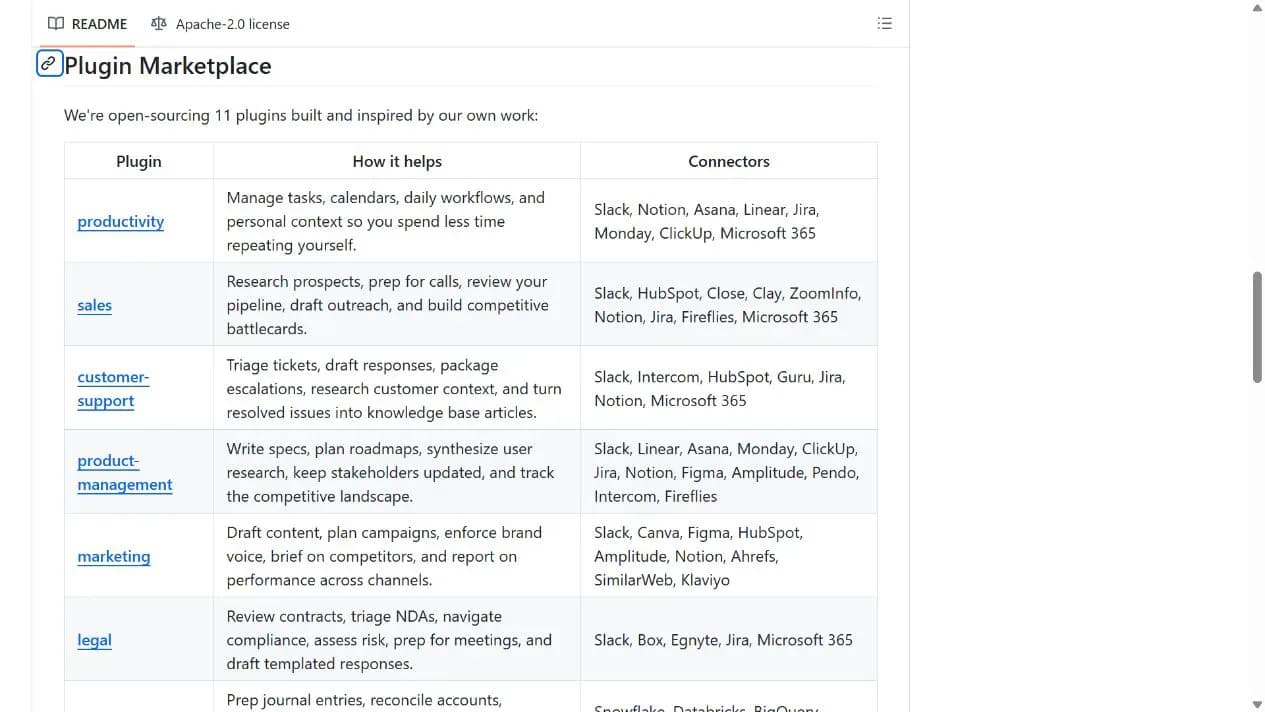
The manifest includes productivity, sales, marketing and customer-support plugins. This entry covers the marketplace as a whole rather than counting its components as separate additions.
Prepare meeting agendas and questions
The Sales call-prep Skill accepts company, meeting type and supplied background, then uses web research to prepare a brief. CRM access is optional for this starting workflow.
Connect business tools selectively
Connector configuration covers services such as Slack, HubSpot and Notion. Authorization expands the accessible data, and some follow-up workflows can modify records.
Installation and usage
Choose a role plugin in Cowork. This walkthrough uses Sales call preparation without connecting a CRM or mailbox first.
Let an AI Agent install it
Send this prompt to Codex, Claude Code, or another AI agent that can work with your local environment.
Help me set up Knowledge Work Plugins from https://github.com/anthropics/knowledge-work-plugins. Read README, .claude-plugin/marketplace.json, sales/README.md and sales/skills/call-prep/SKILL.md. Prefer the Cowork interface for installing Sales; run the root README marketplace and installation commands only if I choose Claude Code. Do not connect CRM or email initially. Verify an agenda, questions and sources using a public company and non-sensitive context I provide. Ask before credentials, additional permissions, sending messages, changing business records or overwriting files.- Claude Cowork with plugin access, or an existing Claude Code installation
- A public company name, meeting type and background you are authorized to process
Project URL: https://github.com/anthropics/knowledge-work-plugins
Copy the URL and follow the steps below to complete setup.- 1Install one plugin
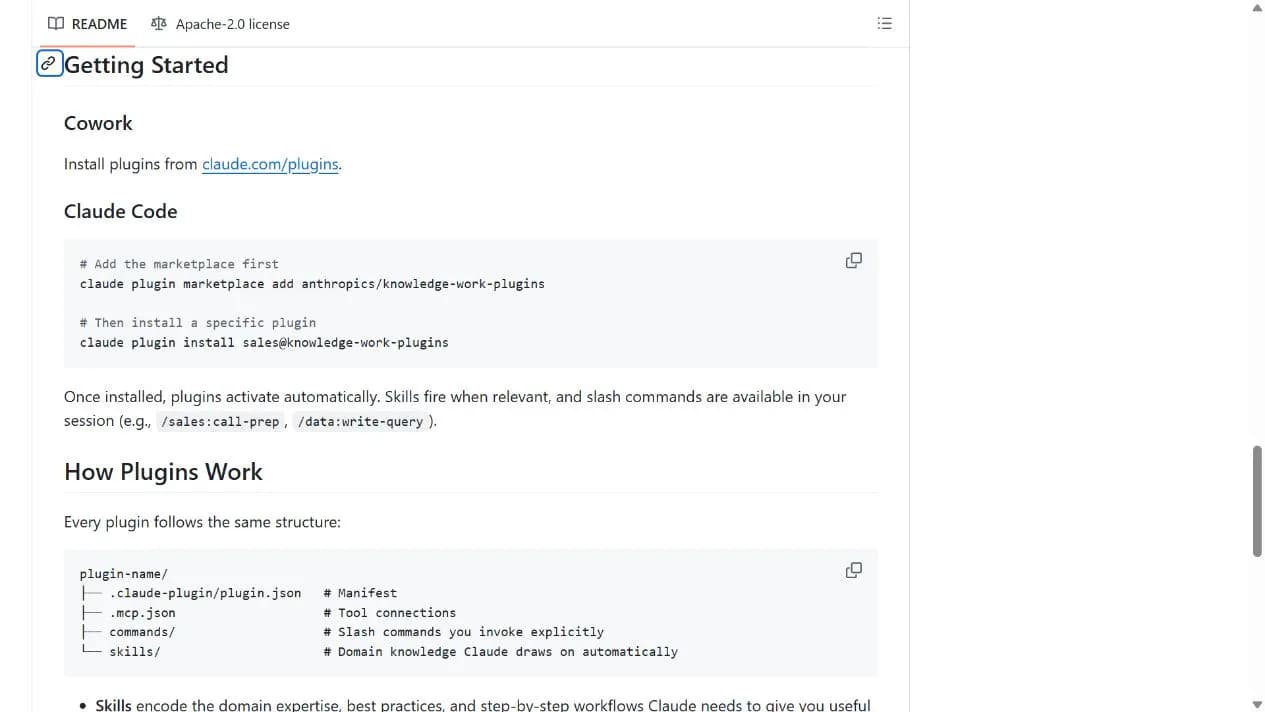
Use the Cowork plugin directory linked from the README to choose Sales. Claude Code users can use the two root-README commands in the acquisition panel to add the marketplace and install sales.
- 2Prepare from public material
Without email or CRM access, request an introductory-meeting agenda for a public company. State the meeting type and objective and supply only authorized context.
- 3Verify before adding connections
Check company facts, sources and relevance. If internal context is genuinely needed, inspect connector permissions and approve account authorization separately.
Ask the installed Sales plugin to prepare an introductory meeting with a public company. Check for an agenda, discovery questions and sources, then verify the facts. Without CRM authorization, it must not claim to have read internal customer records.
- Host access, model usage and third-party services may cost money; open-source plugins do not make every connector free.
- Some older README commands differ from current Skill paths; use the current manifest and natural-language Skill entry.
- Enable only necessary connectors and have qualified people review professional-domain output.
Use cases
Meeting preparation
Turn existing context into an agenda and useful questions before a business conversation.
Office assistance by role
Choose content, support or task workflows as needed, assessing data access and risks for each role.
Assessment
The manifest and Sales Skill provide inspectable workflows and a starting path without business-system access. Host requirements and data authorization are the main practical boundaries. Some README examples lag the current file structure, so verify the current Skill entry.
Why it may be useful
- Cowork graphical installation path
- Selective role-based installation
- Sales meeting preparation can start with supplied context and web search
What to know first
- Depends on Claude host features and account access
- Older documentation commands do not fully match current Skill paths
- Professional-domain plugins do not replace qualified judgment
README
Knowledge Work Plugins
Overview
Knowledge Work Plugins is Anthropic's public marketplace of job-oriented Claude extensions. Choose an office or sales workflow in Cowork, start with information you supply, and decide separately whether to connect company systems.
Getting started
- Choose a role plugin in Cowork. This walkthrough uses Sales call preparation without connecting a CRM or mailbox first.
- The repository organizes plugins by job function using Markdown and JSON files.
- The root README lists introductory examples; marketplace.json is the current inventory.
- Ask the installed Sales plugin to prepare an introductory meeting with a public company. Check for an agenda, discovery questions and sources, then verify the facts. Without CRM authorization, it must not claim to have read internal customer records.
Configuration
Project URL: https://github.com/anthropics/knowledge-work-plugins
Copy the URL and follow the steps below to complete setup.