
dsh-context
Inspect context occupancy and composition, request trends, full model-visible content, file activity, and agent relationships inside the DeepSeek Harness Web UI.
Project overview
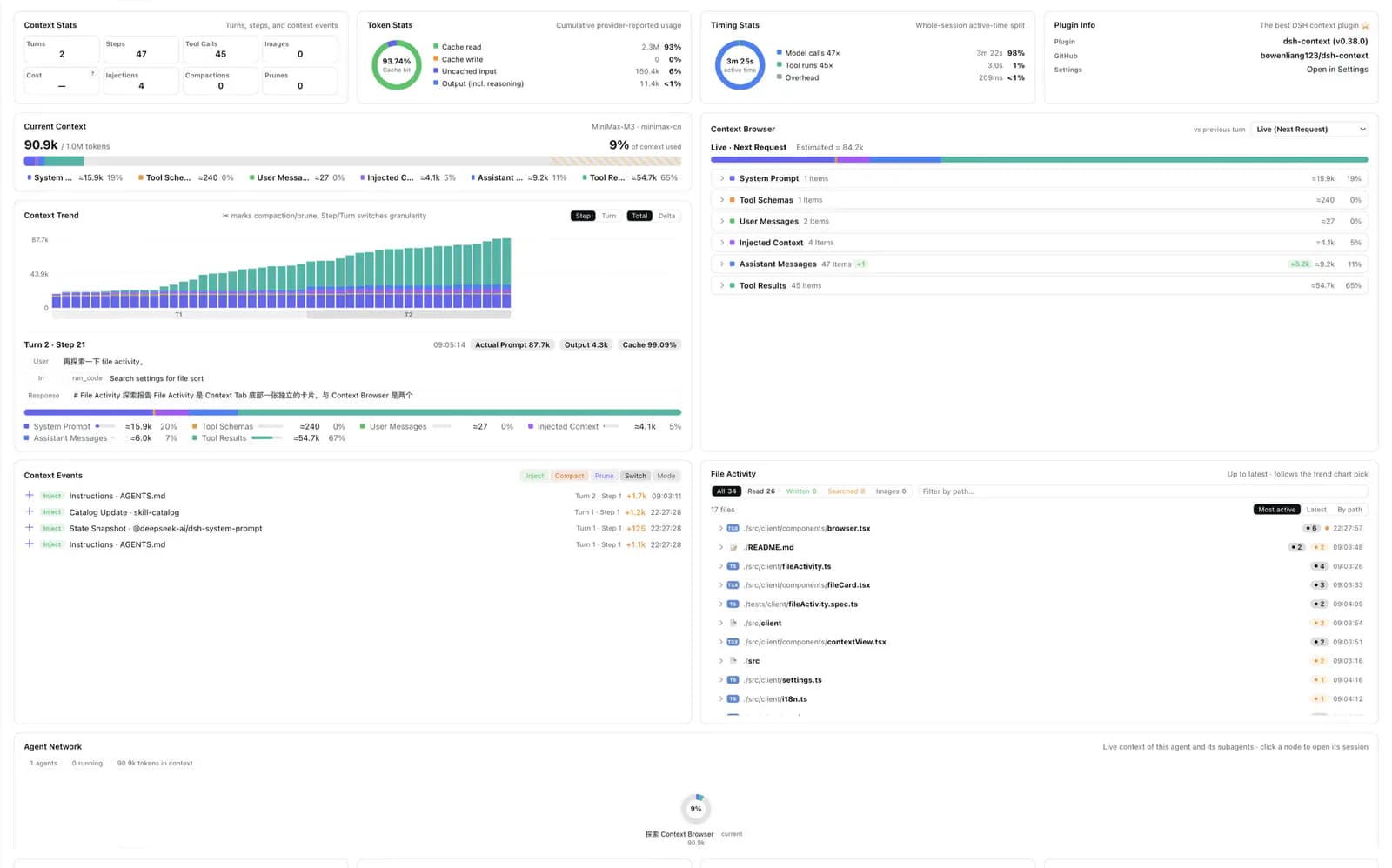
dsh-context is a context-inspection plugin for the DeepSeek Harness Web UI. It brings the current request's token occupancy and composition, per-step or per-turn trends, model-visible system prompts and tool schemas, file activity, and agent relationships into one view. Its most useful role is diagnostic: identifying what keeps growing in a long session, what changed around compaction, and how a tool or agent contributes to the model's context.
Core capabilities
Context occupancy and composition
Uses the same contextPressure and contextBreakdown projections as DSH's official token meter to show the current request's content categories and occupancy.
Trend and event diagnostics
Shows total and delta context history by step or complete turn, alongside context events that help locate compaction, tool-call, or large-result changes.
Full context browser
Displays system prompts, tool schemas, user and assistant messages, reasoning, tool arguments, and results. Content outside the current window is fetched through compatibility adapters for newer and older DSH history APIs.
File activity and agent network
Aggregates file reads, writes, searches, images, and line changes from session events, then builds an agent relationship view using best-effort tool-source attribution.
Installation and usage
Confirm the minimum DSH version, add the package to the web profile, start `dsh web`, and open the Context tab or `/context`. Verify projections, on-demand history, and settings with a test session that contains no sensitive data.
Let an AI Agent install it
Send this prompt to Codex, Claude Code, or another AI agent that can work with your local environment.
Help me review and install dsh-context from https://github.com/bowenliang123/dsh-context. First read the README, LICENSE, package.json, release notes, and `src/client/latestVersion.ts`, `src/client/historyPage.ts`, and `src/host/index.ts`. Confirm that DeepSeek Harness is at least 0.1.1-rc.2 or 0.1.2-alpha.2 and that the target is the web profile. Use the repository's current command `dsh plugin --profile web add dsh-context` without overwriting other profiles or plugin settings. Before running it, explain the npm download, web-profile update, session-history access, full-context display, and npm/npmmirror version-check boundaries. Then start `dsh web` and test the Context tab, `/context`, trend view, and older-content expansion only with a non-sensitive session. Stop and ask before requesting credentials, expanding permissions, resolving version conflicts by replacement, or exposing the Web UI publicly.- DeepSeek Harness 0.1.1-rc.2+ or 0.1.2-alpha.2+
- A working `dsh` CLI with permission to update the web profile
- Network access to download dsh-context and its dependencies from npm
- A reviewed Web UI access boundary suitable for displaying full session content
dsh plugin --profile web add dsh-context- 1Check the DSH version and Web UI boundary
Confirm DSH 0.1.1-rc.2+ or 0.1.2-alpha.2+. Make sure only trusted users can access the Web UI because the plugin can display complete session content.
- 2Install into the web profile
Run `dsh plugin --profile web add dsh-context`. It downloads the package from npm and updates the web profile; inspect the current version and configuration first if the package is already present.
- 3Start DSH and open Context
Run `dsh web`, select the Context tab, or enter `/context` in chat. Display preferences are available under Settings → Plugin configuration.
- 4Verify with a low-sensitivity session
Use a short test session to check occupancy, composition, and trends, then expand an older message or tool result. Treat category numbers as estimates and use provider-reported actuals for metering.
Run `dsh web`, open the Context tab or enter `/context`, and use a short non-sensitive session to confirm occupancy, composition, and trends. Expand a system prompt or tool result to exercise history loading, then change a display preference and refresh.
- Update with `dsh plugin --profile web update dsh-context@latest`
- The plugin has no custom RPC; its host side uses DSH session projections
- Default retention bounds include 1,500 request steps, 300 complete turns, and 400 events, and can be configured
- The latest-version check prefers registry.npmjs.org, falls back to registry.npmmirror.com, and caches for one hour
Use cases
Find sources of context growth
Compare totals and deltas by step or turn to see whether growth comes from system prompts, tool schemas, messages, reasoning, or tool results.
Inspect changes around compaction
Combine the trend, context events, and browser content to see what was retained, replaced, or moved out of the active window around automatic compaction.
Review tool and agent impact
Use File Activity and Agent Network to inspect which tools touched files and how agents relate, while treating source attribution as best-effort.
Assessment
dsh-context turns existing DSH context projections, session history, and tool activity into a coherent diagnostic Web UI. Setup is direct, and the repository includes two DSH release baselines, extensive tests, and a very recent release. The main tradeoff is sensitivity: system prompts, reasoning, and tool results are gathered into one inspectable surface, while some categories and tool attributions remain estimates or best-effort. This assessment is based on public documentation, source, and GitHub metadata rather than a local functional test.
Why it may be useful
- Combines current occupancy, historical trends, full content, file activity, and agent relationships in one interface
- Documents installation, updates, entry points, settings, and compatible DSH versions
- Runs type checks, tests, and builds against two DSH baselines in the release workflow
- v0.40.1 was published the day before review, and the public repository is not archived
What to know first
- The full-context view can expose sensitive system prompts, reasoning, and tool results
- Category estimates do not replace provider actuals, and tool attribution can be unknown or inaccurate
- There is no SECURITY.md documenting a vulnerability-reporting process
- The plugin was not installed or run in a target DSH environment during this review
README
dsh-context
Overview
Inspect context occupancy and composition, request trends, full model-visible content, file activity, and agent relationships inside the DeepSeek Harness Web UI. A DeepSeek Harness web context dashboard and /context command for composition, trends, content browsing, file activity, and agent relationships.
Getting started
- Confirm the minimum DSH version, add the package to the web profile, start `dsh web`, and open the Context tab or `/context`. Verify projections, on-demand history, and settings with a test session that contains no sensitive data.
- After installation, open the dashboard from the Context tab or the `/context` command. Display preferences live under the plugin configuration settings, and no manual frontend build is required.
- Context Stats, Token Stats, and Timing Stats show occupancy, official token-meter projections, latency, and request cadence. Context Trend switches between step and full-turn views and between totals and deltas.
- Run `dsh web`, open the Context tab or enter `/context`, and use a short non-sensitive session to confirm occupancy, composition, and trends. Expand a system prompt or tool result to exercise history loading, then change a display preference and refresh.
Configuration
dsh plugin --profile web add dsh-context