
agent-device
Callstack's cross-platform app automation toolkit drives mobile, TV, web, and desktop apps through a stdio MCP server, CLI, and typed TypeScript API while collecting screenshots, logs, network, and performance evidence.
Project overview
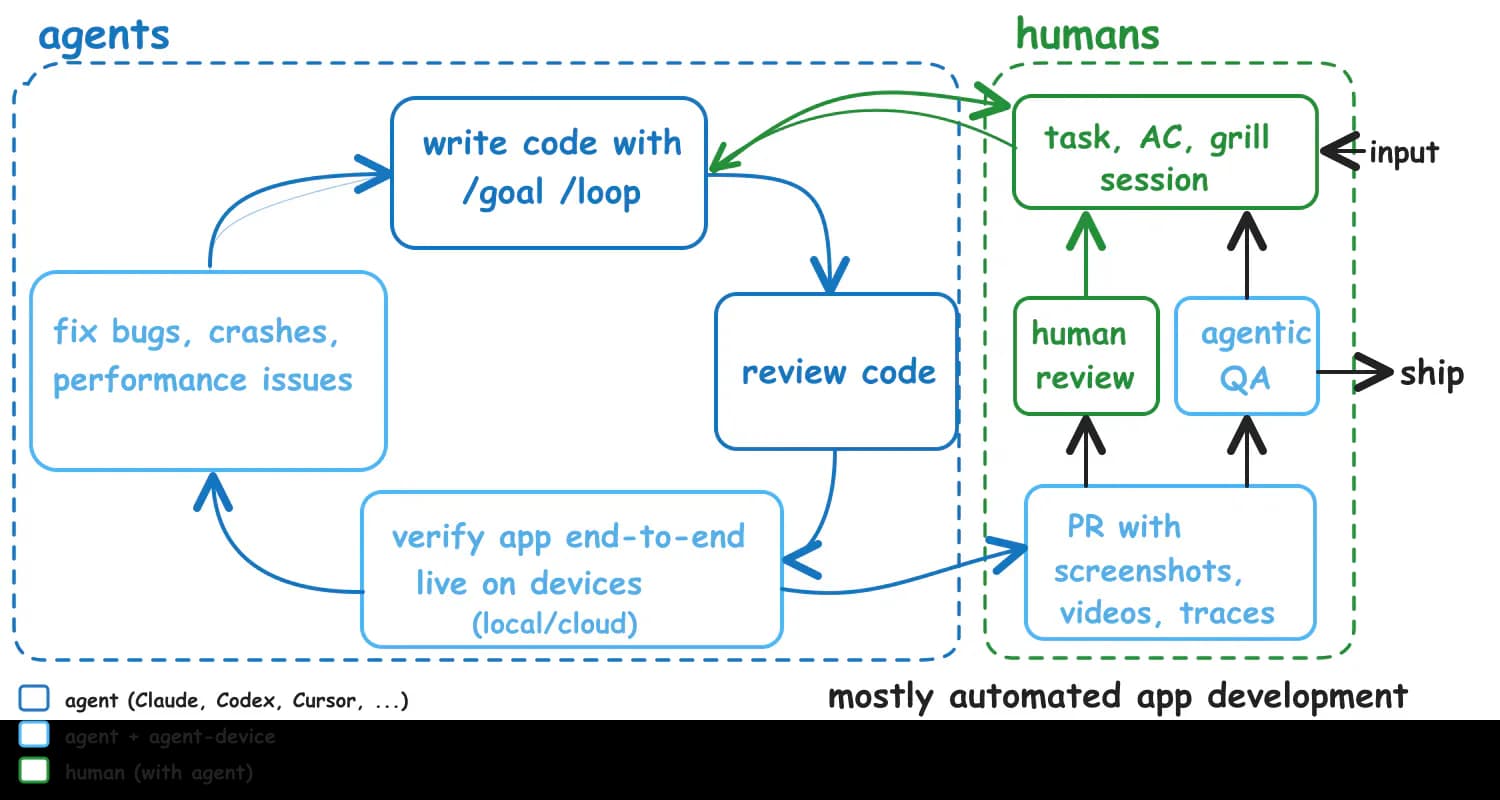
agent-device is Callstack's cross-platform app automation toolkit for coding agents. It combines accessibility snapshots, stable element references, device actions, and evidence capture behind a CLI, stdio MCP server, and typed TypeScript API. An agent can write code, open the app, verify the interaction, and bring screenshots, logs, network, or performance evidence back into the repair loop. It covers mobile, TV, web, and desktop targets, but actual depth depends on the platform and local toolchain. Treat device control, operating-system permissions, remote tokens, and artifact retention as explicit security boundaries.
Core capabilities
Accessibility snapshots and stable references
snapshot -i returns interactive nodes with @refs. Agents can act by reference, id, label, or role, then use diffs and waits to verify interface changes.
Cross-platform app control
One command model covers app launch, clicks, typing, scrolling, back navigation, orientation, installation, and state queries. The selected device reports its exact command set through capabilities.
Debugging and evidence capture
Capture screenshots, screen recordings, application logs, network activity, memory and frame performance, CPU profiles, and traces for functional or regression verification.
Structured MCP tools
agent-device mcp provides structured tools over stdin and stdout using the CLI execution path. It exposes no generic shell, and operator-owned paths and credentials are not model-writable tool inputs.
Replay and test output
Save common flows as .ad scripts, produce machine-readable results, and export Maestro YAML to connect with an existing end-to-end test stack.
Setup and connection
Have a human install the package, run doctor, and complete SDK, device-trust, and operating-system permission setup before handing a pinned, reviewed version to an agent. Start with the CLI; add the local stdio MCP server when structured tools are useful.
Let an AI Agent install it
Send this prompt to Codex, Claude Code, or another AI agent that can work with your local environment.
Help me install and minimally verify agent-device from https://github.com/callstack/agent-device. First read the README plus the installation, agent-setup, and security-trust documents, then confirm Node.js 22.12+ and the target-platform toolchain. Prefer the exact version I specify; if I do not specify one, show me the difference between the latest formal release and the current npm/manifest version before asking. After installation, run agent-device doctor. Do not grant macOS Accessibility or Screen Recording permissions yourself, trust a physical device, enable Developer Mode, configure signing, start a remote proxy, connect a device cloud, or use a production app. Perform only an open, snapshot -i, one low-risk interaction, screenshot, and close on an isolated test simulator. Keep tokens, network content, and sensitive artifacts out of version control. Ask before installing SDKs, changing system settings, connecting a physical device, or uploading to an external service.- Node.js 22.12 or newer with npm
- Xcode for iOS, Android SDK and ADB for Android, or the documented toolchain for another target
- A human has completed physical-device pairing, Developer Mode, signing, or ADB trust
- A human has granted any required macOS Accessibility and Screen Recording permissions
- A specific reviewed version has been selected and pinned for agent use
npm install -g agent-device@latest
agent-device doctor- 1Install and diagnose the environment
Install a reviewed agent-device version, run agent-device doctor, and resolve any missing SDK or command-line tool for the target platform.
- 2Open an isolated test app
Run agent-device open on a simulator or dedicated test device and specify the platform or device explicitly to avoid selecting a production phone.
- 3Interact through snapshot references
Run snapshot -i for current @refs, prefer refs or semantic selectors for press, click, fill, or scroll, and use --settle or wait to verify the result.
- 4Capture minimal evidence
Write a screenshot and only the necessary logs or test output to a controlled directory. Review it for accounts, tokens, customer data, and private UI before sharing or committing.
- 5Close and clean up the session
Run agent-device close and confirm device claims and temporary sessions are released. Remote workflows should also disconnect the cloud device, tunnel, and proxy.
Run `agent-device doctor` and confirm the target-platform checks pass. On a test simulator, run `agent-device open <test-app> --platform <platform>`, obtain interactive refs with `snapshot -i`, perform one read-only navigation or low-risk click, save a screenshot, and run `agent-device close`. The base setup is usable when the expected UI state is returned and the screenshot appears at the chosen path.
- The repository recommends a global, project-local, or pinned installation for agents instead of an unreviewed mutable latest invocation.
- The first use of some platform helpers can trigger builds, signing, or system permission prompts that a human should handle.
- Reconnect or restart the client after adding the MCP configuration.
- Run capabilities before writing a cross-platform workflow so the selected target defines the supported command set.
Use cases
Application acceptance loop for coding agents
After changing an app, an agent opens a test build, completes a critical interaction, captures evidence, and feeds defects back into code repair.
Cross-platform smoke tests
Reuse the same workflow skeleton for iOS, Android, or another target while branching on the command set returned by capabilities.
Reproducible regression evidence
Save a stable path as an .ad script, emit JSON or JUnit reports, and export Maestro YAML when an existing mobile test runner needs the flow.
Remote device lab
Let CI agents use centralized devices through a protected proxy or device cloud while separately governing tokens, leases, artifacts, and network scope.
Assessment
agent-device brings the app actions, state checks, and debugging evidence that coding agents need into one versioned interface. It also takes parallel device claims, structured errors, and operator-owned configuration seriously. That makes it a strong fit for teams with established mobile or multi-platform engineering infrastructure. The tradeoff is real native-toolchain, system-permission, and platform-variation cost, while remote proxies and device clouds substantially expand the trust boundary. The 0.21 line is moving quickly, so pinned versions and isolated test devices are safer than following latest blindly.
Why it may be useful
- CLI, stdio MCP, and TypeScript API share one execution path
- Accessibility snapshots, stable refs, and diff output fit agent feedback loops
- Evidence spans screenshots, recordings, logs, network, performance, and traces
- Worktree sessions, device claims, and leases reduce parallel contention
- Security documentation clearly covers loopback binding, tokens, artifacts, and proxy risks
- The MIT license is clear, with active commits and recent formal releases
What to know first
- Platform depth varies, so portable workflows still need capability detection and branching
- Node.js plus several native SDKs make installation and CI image maintenance substantial
- System permissions and physical-device trust cannot safely be delegated entirely to an agent
- Network and log evidence can capture sensitive data and requires separate governance
- A remote proxy token grants effective device control, so exposure has serious consequences
- Manifest version 0.21.1 and the latest GitHub release v0.21.0 are temporarily out of sync
README
agent-device
Overview
Callstack's cross-platform app automation toolkit drives mobile, TV, web, and desktop apps through a stdio MCP server, CLI, and typed TypeScript API while collecting screenshots, logs, network, and performance evidence. Mobile app automation and verification for AI coding agents. CLI, MCP server, and typed Node.js API for iOS, Android, HarmonyOS, TV, web, macOS, and Linux.
Getting started
- Have a human install the package, run doctor, and complete SDK, device-trust, and operating-system permission setup before handing a pinned, reviewed version to an agent. Start with the CLI; add the local stdio MCP server when structured tools are useful.
- agent-device places app navigation, snapshots, interaction, installation, replay, and evidence capture behind one agent-oriented command surface, with stdio MCP and a TypeScript API using the same execution path.
- The recommended loop is to open an app, read an interactive snapshot with @refs, act by ref or selector, wait for explicit state, capture evidence, and close the session.
- Run `agent-device doctor` and confirm the target-platform checks pass. On a test simulator, run `agent-device open <test-app> --platform <platform>`, obtain interactive refs with `snapshot -i`, perform one read-only navigation or low-risk click, save a screenshot, and run `agent-device close`. The base setup is usable when the expected UI state is returned and the screenshot appears at the chosen path.
Configuration
npm install -g agent-device@latest
agent-device doctor