
Fabric
A collection of reusable Markdown Prompt Patterns, strategies, and a Go CLI for building inspectable, customizable AI workflows.
Project overview
Fabric is an open-source prompt workflow toolkit built around reusable Patterns. Each Pattern is an inspectable Markdown system prompt, while the current Go CLI supplies input handling, provider connections, streaming, strategies, and output controls. The result is more operational than a static prompt list: users can read or edit the prompts directly, then apply them consistently to text, webpages, or YouTube material. The repository also includes a REST API and web interface, but its clearest value for this catalog is the maintained Pattern collection and the CLI that runs it.
Core capabilities
Readable, reusable Patterns
Patterns live as Markdown system prompts under data/patterns. They can be inspected, adapted, versioned, or used outside Fabric instead of being hidden inside an application.
Multiple input sources
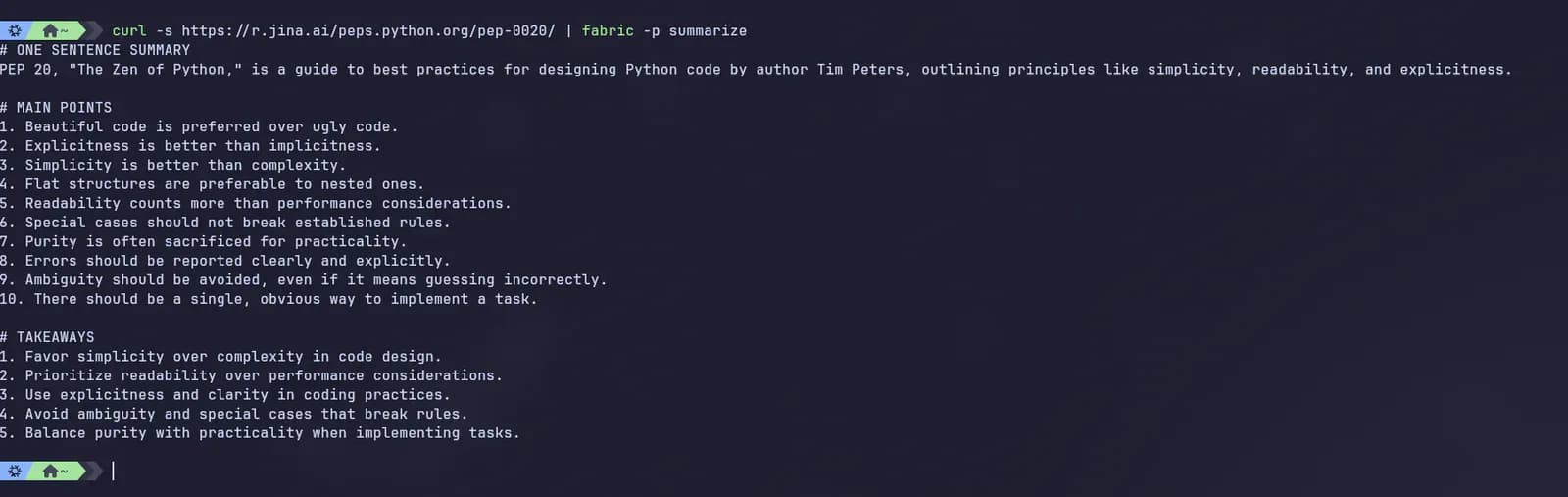
The README documents standard input, files, webpages, and YouTube URLs, allowing the same Pattern to be reused across common research and writing inputs.
Execution and output controls
The CLI exposes streaming, JSON, model selection, output-file, copy-to-clipboard, session, and dry-run options. Dry-run is useful for inspecting the assembled request before a model call.
Strategies and local customization
Strategy JSON files define reasoning workflows, while a custom Patterns directory lets users keep private additions separate from repository updates.
Access and usage
Install the current Go-based Fabric CLI from the project's documented path, run interactive provider setup, and verify the configuration with version, Pattern-list, and dry-run commands before sending real content.
Let an AI Agent install it
Send this prompt to Codex, Claude Code, or another AI agent that can work with your local environment.
Help me install and configure Fabric from https://github.com/danielmiessler/Fabric. Read the current README, installer documentation, LICENSE, and security policy first. Confirm my operating system, CPU architecture, installation directory, available package tools, and whether I want a cloud provider or local Ollama/LM Studio. Show the exact documented command before running it. Keep API keys and OAuth tokens out of the repository, shell history, logs, and chat; use Fabric's documented config location and verify restrictive file permissions. After setup, run fabric --version, fabric --listpatterns, and echo "test input" | fabric --dry-run -p summarize. Do not send real or sensitive content to a model without asking me first, and report every file or configuration value changed without revealing secrets.- On macOS or Linux, curl or wget, tar, and write access to the selected installation directory
- On Windows, PowerShell and write access to the selected installation directory
- Credentials for a chosen cloud model provider, or an available local Ollama or LM Studio endpoint
- A review of what content the selected provider will receive and retain
curl -fsSL https://raw.githubusercontent.com/danielmiessler/fabric/main/scripts/installer/install.sh | bash- 1Choose an installation path
For macOS or Linux, the project recommends curl -fsSL https://raw.githubusercontent.com/danielmiessler/fabric/main/scripts/installer/install.sh | bash. Windows users can use the documented PowerShell installer or Winget; users with Go can run go install github.com/danielmiessler/fabric/cmd/fabric@latest. Review a downloaded installer before execution when local policy requires it.
- 2Configure one model provider
Run fabric --setup and select a provider. Use a scoped key where the provider supports one, or configure Ollama or LM Studio for local inference. Do not place credentials in the repository or command examples.
- 3Verify the CLI without a model call
Run fabric --version and fabric --listpatterns, then echo "test input" | fabric --dry-run -p summarize. Confirm that the intended Pattern and input appear before making a live request.
- 4Run a low-risk first Pattern
After reviewing the selected provider's data policy, send non-sensitive text with a documented command such as pbpaste | fabric --pattern summarize. Inspect the output rather than treating it as verified fact.
- 5Create private Patterns safely
Use Fabric's custom Patterns directory for local or team-specific prompts so repository updates do not overwrite them. Review prompt inputs for secrets and prompt-injection content before automating the workflow.
Run fabric --version, then fabric --listpatterns. Before the first provider request, inspect a minimal assembled prompt with: echo "test input" | fabric --dry-run -p summarize. A dry run validates CLI discovery and Pattern loading but does not verify a model connection.
- The Unix installer downloads a release archive and modifies the user installation path; inspect it before piping it to a shell if required by local policy
- Homebrew installs the binary as fabric-ai unless the documented alias is created
- Fabric stores provider secrets in ~/.config/fabric/.env and documents mode 0600 on Unix-like systems
- Use the current Go documentation because some linked videos demonstrate the retired Python version
Use cases
Turn long material into a repeatable brief
Pipe an article or clipboard selection into the summarize Pattern to produce a consistent structure, then verify important claims against the source.
Extract insights from a video
Use the documented YouTube input option with extract_wisdom when the source is permitted, while checking transcript quality and provider data handling.
Standardize team analysis prompts
Keep reviewed custom Patterns in version control and invoke them through one CLI interface across repeatable research, writing, or security-review tasks.
Assessment
Fabric stands out because its prompt collection is inspectable, broad, and connected to an actively maintained execution layer instead of being only a list of snippets. The MIT license, explicit installer documentation, local-model options, dry-run mode, and visible repository structure make adoption easier to evaluate. Its main trade-off is operational: most users still connect a model provider, so prompts and source content cross that provider's data boundary, while custom Patterns and untrusted input need normal prompt-injection and accuracy review. This assessment is based on public sources and does not claim installation or model-call testing.
Why it may be useful
- Patterns are readable Markdown files rather than opaque built-in templates
- The collection and CLI are both actively maintained under an MIT license
- Dry-run, local-model support, and custom Pattern directories provide useful control
What to know first
- Provider cost, availability, output quality, and retention remain external dependencies
- Community Patterns require human review for accuracy, safety, and task fit
- Older Python-era videos can conflict with the current Go workflow
README
Fabric
Overview
A collection of reusable Markdown Prompt Patterns, strategies, and a Go CLI for building inspectable, customizable AI workflows. An open-source framework for augmenting humans with a modular, crowdsourced set of AI prompts that can be used anywhere.
Getting started
- Install the current Go-based Fabric CLI from the project's documented path, run interactive provider setup, and verify the configuration with version, Pattern-list, and dry-run commands before sending real content.
- Fabric organizes AI instructions as named Patterns stored in the repository. They are Markdown system prompts, so a user can inspect and copy them into another AI application or invoke them through Fabric's CLI.
- The checked repository snapshot contains 255 directories under data/patterns. The collection covers activities such as summarization, claim analysis, wisdom extraction, writing, security analysis, and technical review. Strategies under data/strategies add multi-step reasoning flows such as chain-of-thought and tree-of-thought variants.
- Run fabric --version, then fabric --listpatterns. Before the first provider request, inspect a minimal assembled prompt with: echo "test input" | fabric --dry-run -p summarize. A dry run validates CLI discovery and Pattern loading but does not verify a model connection.
Configuration
curl -fsSL https://raw.githubusercontent.com/danielmiessler/fabric/main/scripts/installer/install.sh | bash