
Next AI Draw.io MCP Server
Next AI Draw.io MCP Server lets Codex, Claude Code, Cursor, VS Code, and other agents create and edit draw.io diagrams on a local browser canvas with selection, screenshots, versions, pages, and export tools.
Project overview
Next AI Draw.io MCP Server is the local MCP component inside the Next AI Draw.io repository. An agent talks to it over stdio and opens an editable draw.io canvas in a regular browser. The user and agent can take turns changing the same diagram, while tools read the current selection, capture rendered screenshots, restore versions, manage pages, and export files. Its central value is not a one-off image: it connects project context, generated draw.io XML, and manual canvas edits in a continuing workflow. This listing reviewed public documentation, npm metadata, and source structure without installing or running the server.
Core capabilities
Shared editable canvas
Agent changes appear on a real draw.io canvas that the user can edit manually. Later calls can read the current diagram and selection instead of replacing it with a static image.
Screenshot checks and shape libraries
The agent can request a rendered screenshot to inspect overlap and retrieve styles from libraries such as AWS, Azure, GCP, Kubernetes, and Cisco.
Versions, pages, and restore
The preview shows the last 20 versions for comparison or restore, and tools list, add, rename, and delete diagram pages.
Load and multi-format export
The server loads existing draw.io files and exports .drawio, PNG, SVG, or .drawio.svg, with an optional transparent background for images.
Setup and connection
After confirming Node.js and the configuration scope, register the local stdio server with the documented npx command. Restart the client and use a small test diagram to check the tools, regular-browser preview, persistence directory, and export path before relaxing approval settings.
Let an AI Agent install it
Send this prompt to Codex, Claude Code, or another AI agent that can work with your local environment.
Install Next AI Draw.io MCP Server from packages/mcp-server in https://github.com/DayuanJiang/next-ai-draw-io . First read the component README.md, package.json, LICENSE, and the Configuration, Troubleshooting, and How it works sections. Check that Node.js is at least 18, identify the current MCP client, confirm user or project scope, and preserve existing server entries. Use the documented `@next-ai-drawio/mcp-server@latest` stdio configuration with the name drawio. Before installing, explain that it opens a local browser preview and stores diagrams and recent versions in `~/.next-ai-drawio/` by default; ask whether to change `DRAWIO_DATA_DIR` or set it to off. Do not relax Codex tool approvals without confirmation. After restarting, create only a small test diagram in a regular browser and export only to a path I explicitly approve.- Node.js 18 or later with npx available.
- An MCP client that can run local stdio servers.
- Permission for the first run to fetch `@next-ai-drawio/mcp-server` from npm.
- A chosen user or project scope, persistence directory, and export path.
codex mcp add drawio -- npx @next-ai-drawio/mcp-server@latest- 1Check Node.js and configuration scope
Confirm Node.js 18+ and npx, identify the MCP client, and choose user or project configuration.
- 2Add the local stdio server
For Codex CLI run `codex mcp add drawio -- npx @next-ai-drawio/mcp-server@latest`; use the documented command or JSON for other clients.
- 3Restart and open the regular-browser preview
After the tools appear, ask the agent to call start_session and open its localhost URL outside embedded browsers that cannot display it.
- 4Verify collaborative editing
Create a small diagram, move or select a shape manually, and ask the agent to read the current diagram or selection.
- 5Inspect persistence and export boundaries
Review `~/.next-ai-drawio/` or the configured data directory, then export a .drawio or image file only to an approved path.
Restart the client and confirm that the drawio tools appear. Ask the agent to call start_session, open the returned local URL in a regular browser, and create a three-node flowchart. Move one node manually, then request get_diagram or get_selection, and finally export to an explicit temporary path. Check the preview, manual-edit readback, and output file. This listing did not perform these steps.
- The documented Codex CLI command is `codex mcp add drawio -- npx @next-ai-drawio/mcp-server@latest`.
- The Claude Code user-scope command is `claude mcp add --scope user drawio -- npx @next-ai-drawio/mcp-server@latest`.
- `DRAWIO_DATA_DIR=off` disables diagram auto-save; recheck instructions.md behavior against the README and installed version.
- VS Code Simple Browser and Cursor's embedded browser cannot embed the preview, so use a regular browser.
Use cases
Draw an architecture from a codebase
The agent reads project structure and key modules with its own file tools, then draws the architecture on an editable draw.io canvas through MCP.
Collaboratively revise a process diagram
The user moves nodes, changes styles, or selects a region, and the agent reads the current canvas and selection before continuing.
Inspect a complex layout with screenshots
The agent captures the rendered page, identifies overlaps or routing problems, and applies atomic edits.
Maintain a multi-page design document
Keep overview, data-flow, and deployment views on separate pages, compare or restore versions, and export a standard draw.io file.
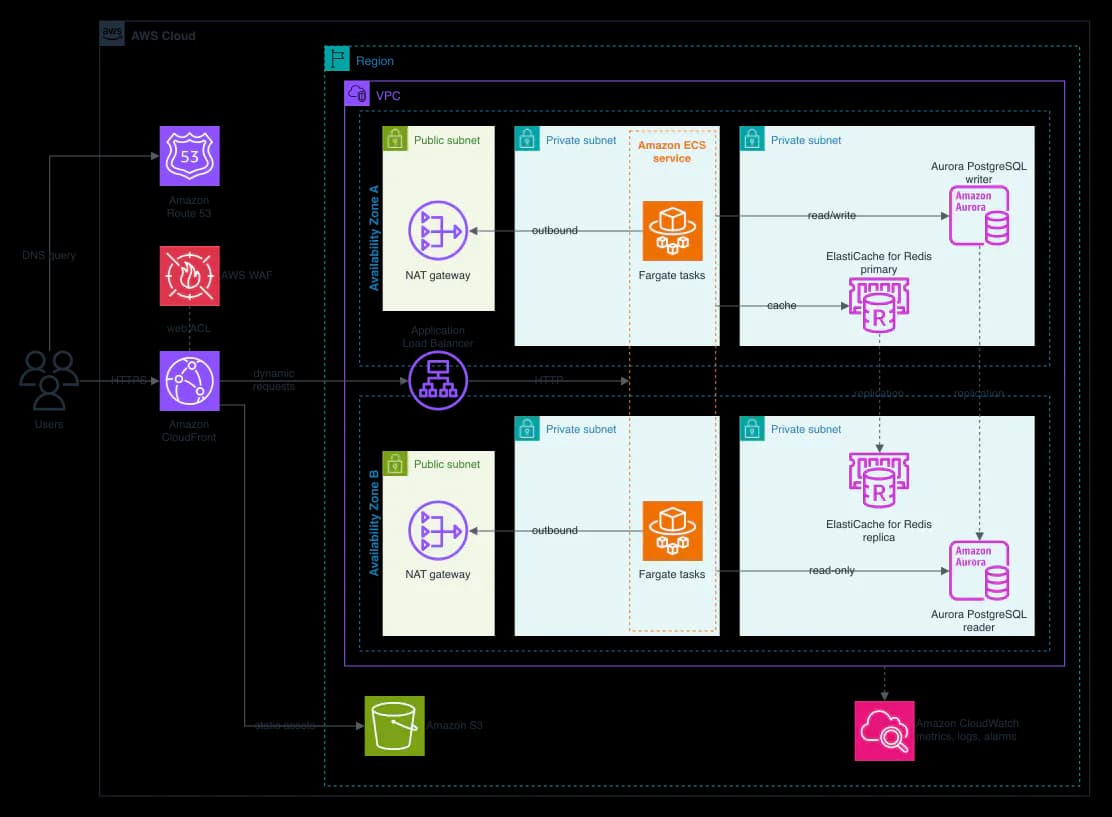
Assessment
Based on the public repository, this server stands out by letting an agent and user take turns on the same real draw.io canvas while exposing selection, screenshots, versions, and pages as tools. Installation evidence, Node.js requirements, stdio configuration, loopback binding, persistence, and export limits are documented, and the MCP package has recent releases and dependency updates. The repository has no dedicated security policy, this review did not install it, browser-tab rendering affects preview and image exports, and external draw.io instances and remote images have explicit feature gaps.
Why it may be useful
- Documented configurations for Codex, Claude Code, VS Code, Cursor, and generic stdio clients
- Tool coverage includes readback, selection, screenshots, versions, pages, and multiple export formats
- Loopback binding, API token, persistence directory, and persistence-off setting are publicly described
- Apache-2.0 license, npm workflow, unit tests, and browser end-to-end tests are reviewable
What to know first
- Installation, runtime behavior, and client compatibility were not tested for this listing
- There is no dedicated SECURITY.md or documented specialist vulnerability-reporting process
- The preview cannot run inside common editor embedded browsers, and exports may be affected by background-tab throttling
- External draw.io hosting loses some collaboration features, and remote images may be absent from exports
README
Next AI Draw.io MCP Server
Overview
Next AI Draw.io MCP Server lets Codex, Claude Code, Cursor, VS Code, and other agents create and edit draw.io diagrams on a local browser canvas with selection, screenshots, versions, pages, and export tools. Draw and edit draw.io diagrams by chatting with an AI, available as a web app, desktop app, and MCP server for Claude Code, Cursor, Codex, and VS Code.
Getting started
- After confirming Node.js and the configuration scope, register the local stdio server with the documented npx command. Restart the client and use a small test diagram to check the tools, regular-browser preview, persistence directory, and export path before relaxing approval settings.
- The server communicates with the agent over stdio and serves its bundled draw.io preview on 127.0.0.1.
- Tools create and edit mxCell XML, read the current diagram and selection, inspect screenshots, manage pages, and restore versions.
- Restart the client and confirm that the drawio tools appear. Ask the agent to call start_session, open the returned local URL in a regular browser, and create a three-node flowchart. Move one node manually, then request get_diagram or get_selection, and finally export to an explicit temporary path. Check the preview, manual-edit readback, and output file. This listing did not perform these steps.
Configuration
codex mcp add drawio -- npx @next-ai-drawio/mcp-server@latest