
Ponytail
Ponytail gives Codex, Claude Code, OpenCode, and other coding agents a minimal-implementation ruleset, six companion Skills, and lifecycle hooks. It prioritizes existing code, standard libraries, and native platform features without removing security, validation, error handling, or accessibility safeguards.
Project overview
Ponytail puts a 'lazy but not careless' senior-developer decision ladder into coding agents. It first asks whether a requirement needs to exist, then checks the codebase for an existing solution, followed by the standard library, native platform features, and installed dependencies before writing the smallest new implementation. The repository includes adapters for Codex, Claude Code, OpenCode, Gemini CLI, and other hosts, plus six Skills for the main mode, diff review, repository audit, debt collection, benchmark reporting, and help. Its rules explicitly require understanding the real flow and preserving security, data protection, error handling, validation, and accessibility.
Core capabilities
Smallest-correct-solution ladder
After understanding the problem and tracing the real flow, the agent chooses the first sufficient option among not building, reuse, the standard library, native features, existing dependencies, and minimal new code.
Multiple intensity levels
lite names a simpler option, full enforces the default ladder, ultra challenges nonessential requirements more aggressively, and off disables the rules. An environment variable or local config can set the default.
Review and audit Skills
ponytail-review targets the current diff and ponytail-audit targets the repository. debt, gain, and help Skills cover deferred items, benchmark reporting, and command guidance.
Cross-host adapters
Hosts with plugin support reuse the Skills and hooks, while instruction-only hosts receive AGENTS.md or matching rules files.
Installation and usage
For Codex, add the project's GitHub repository as a plugin marketplace and install ponytail@ponytail. Review and trust the two local lifecycle scripts, restart the desktop app or begin a new CLI session, and verify mode and review commands.
Let an AI Agent install it
Send this prompt to Codex, Claude Code, or another AI agent that can work with your local environment.
Install Ponytail from https://github.com/DietrichGebert/ponytail. First read the Codex section of README.md, .codex-plugin/plugin.json, and hooks/claude-codex-hooks.json. Confirm that this Codex build supports plugin commands and that Node.js is available on the non-interactive shell PATH. Run the documented commands exactly: codex plugin marketplace add DietrichGebert/ponytail, then codex plugin add ponytail@ponytail. Open /hooks and explain each local script, its file access, and its effect before asking me to trust it. Restart the Codex desktop app or begin a new CLI session, then run @ponytail-help and a read-only @ponytail-review as minimal verification. Ask before requesting credentials, adding permissions, overwriting configuration, editing settings.json, or taking any risky action.- A Codex CLI or desktop build with plugin commands
- Node.js on the non-interactive shell PATH; otherwise Skills work but automatic hook activation stays silent
- A code repository with a small diff for minimal verification
- Approval to change local Codex plugin configuration and run repository-local Node.js hooks
codex plugin marketplace add DietrichGebert/ponytail
codex plugin add ponytail@ponytail- 1Review plugin and hook boundaries
Read README.md, .codex-plugin/plugin.json, and hooks/claude-codex-hooks.json. Confirm that the package exposes six Skills and runs local Node.js scripts on session, subagent, and prompt events.
- 2Add the marketplace and install
Run codex plugin marketplace add DietrichGebert/ponytail followed by codex plugin add ponytail@ponytail. Keep the documented marketplace and plugin identifiers unchanged.
- 3Inspect and enable hooks
Start codex, open /hooks, and inspect each repository-local script. Trust the hooks only after accepting their local mode and configuration file access. Restart the desktop app after installation.
- 4Verify mode and review commands
Begin a new task, invoke @ponytail-help to confirm Skill discovery, then run @ponytail-review on a small diff. It should identify removable over-engineering without making changes or skipping safeguards.
Start codex, open /hooks, and confirm the Ponytail hooks have been reviewed and enabled. In a new task, invoke @ponytail-help or @ponytail-review. Seeing the command guide or an over-engineering review of the current diff completes the minimal check.
- Restart the Codex desktop app after installation; start a new session in the CLI.
- The default is full. Switch with /ponytail lite, /ponytail full, /ponytail ultra, or /ponytail off.
- To remove external state, run node scripts/uninstall.js from the plugin directory before codex plugin remove ponytail.
- An Anthropic API Key in .env.example is only relevant to reproducing the promptfoo benchmark, not ordinary plugin rules and local hooks.
Use cases
Constrain a small feature
Have the agent check existing helpers, standard libraries, or native browser controls before adding a dependency or wrapper for a single feature.
Review the current diff
Use ponytail-review to identify unnecessary interfaces, factories, configuration, boilerplate, or duplicate implementations in the active change.
Audit repository-wide over-engineering
Use ponytail-audit to find abstractions that can be removed or merged while keeping security, data protection, and accessibility as non-negotiable boundaries.
Share coding rules across agents
Choose plugin, Skill, or AGENTS.md adapters based on each host so multiple coding agents follow the same minimal-implementation rules.
Assessment
Based on the README, primary Skill, portability guide, hooks, and public tests, Ponytail's value is a reusable implementation decision order rather than merely shorter answers. It explicitly preserves safety and problem comprehension, and the repository includes host adapters, uninstall guidance, and reproducible benchmark materials. The performance figures remain author-provided, and this review did not install the plugin into Codex, so teams should inspect the hooks and validate results on their own tasks and quality metrics.
Why it may be useful
- Clearly separates efficiency from carelessness and preserves safety, data protection, validation, and accessibility
- Ships plugins, Skills, rule files, and documented adapters for multiple hosts
- Documents installation, mode switching, uninstall, and external state cleanup
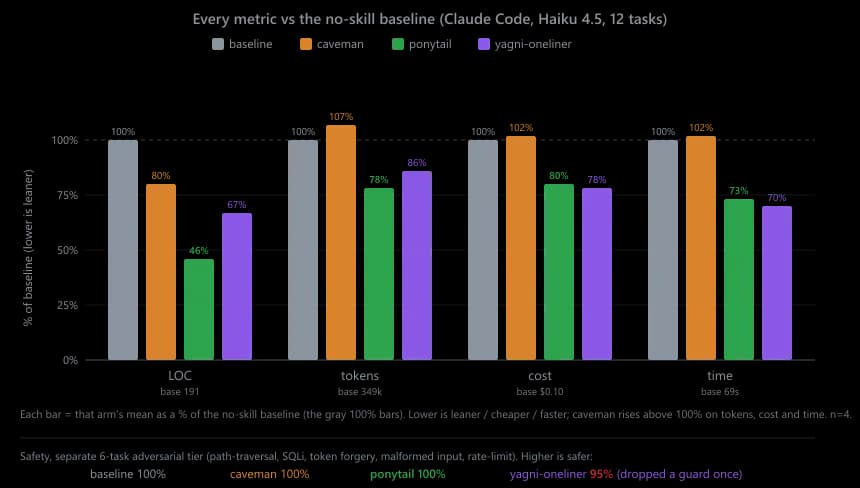
- Publishes benchmark tasks, comparison arms, metrics, and limitations
What to know first
- Author-provided benchmarks do not guarantee identical gains on other models, repositories, or complex tasks
- Automatic activation depends on local Node.js hooks and user trust
- Two strict one-second Python/pandas timeout checks failed in the current Windows test run
- ultra mode may be a poor fit when a complete, non-negotiable specification must be delivered exactly
README
Ponytail
Overview
Ponytail gives Codex, Claude Code, OpenCode, and other coding agents a minimal-implementation ruleset, six companion Skills, and lifecycle hooks. It prioritizes existing code, standard libraries, and native platform features without removing security, validation, error handling, or accessibility safeguards. Makes your AI agent think like the laziest senior dev in the room. The best code is the code you never wrote.
Getting started
- For Codex, add the project's GitHub repository as a plugin marketplace and install ponytail@ponytail. Review and trust the two local lifecycle scripts, restart the desktop app or begin a new CLI session, and verify mode and review commands.
- The core ladder starts with YAGNI, then checks existing code, the standard library, native platform features, installed dependencies, and one-line solutions before adding minimal new code.
- The default mode is full, with lite, ultra, and off alternatives. Companion commands cover diff review, repository audit, debt collection, benchmark results, and help.
- Start codex, open /hooks, and confirm the Ponytail hooks have been reviewed and enabled. In a new task, invoke @ponytail-help or @ponytail-review. Seeing the command guide or an over-engineering review of the current diff completes the minimal check.
Configuration
codex plugin marketplace add DietrichGebert/ponytail
codex plugin add ponytail@ponytail