
Exa MCP Server
Exa MCP Server adds web search and public-page fetching to AI assistants. Its hosted endpoint can be connected through compatible remote-MCP clients without running a server. Anonymous use is rate-limited, while higher limits and research tools have separate authentication and cost boundaries.
Project overview
When an assistant needs current sources or the original page behind a claim, Exa MCP Server supplies search results and page content that can support a source-linked answer. MCP is the interface connecting the assistant to these external tools. Maintained by Exa, this project suits public-information research, but it is neither an offline tool nor a guarantee that an answer is correct.
Core capabilities
Find pages with source links
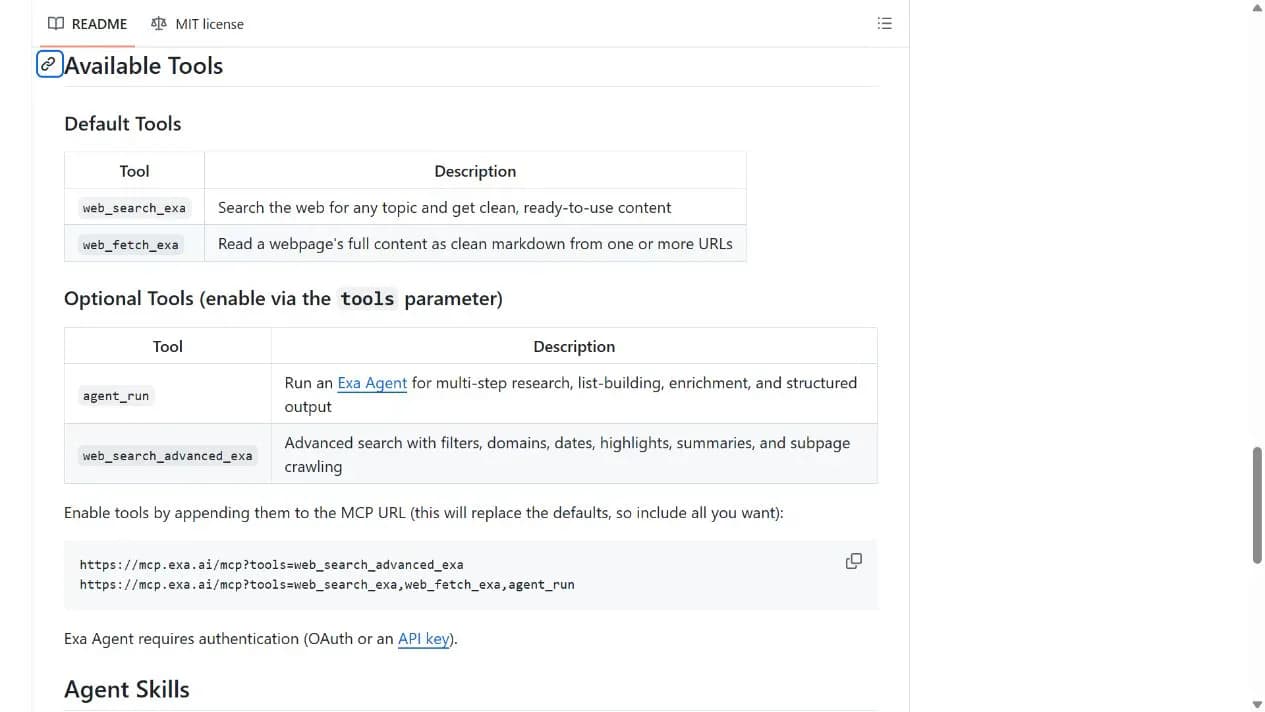
web_search_exa finds web material. Ask the assistant to retain source links so you can check the original text and publication date.
Fetch a known public page
web_fetch_exa retrieves content from a known URL for follow-up reading. It does not imply permission to bypass logins or paywalls.
Enable advanced research separately
agent_run and web_search_advanced_exa are optional. A tools parameter replaces the default tool set, and the research agent requires authentication rather than anonymous access.
Setup and connection
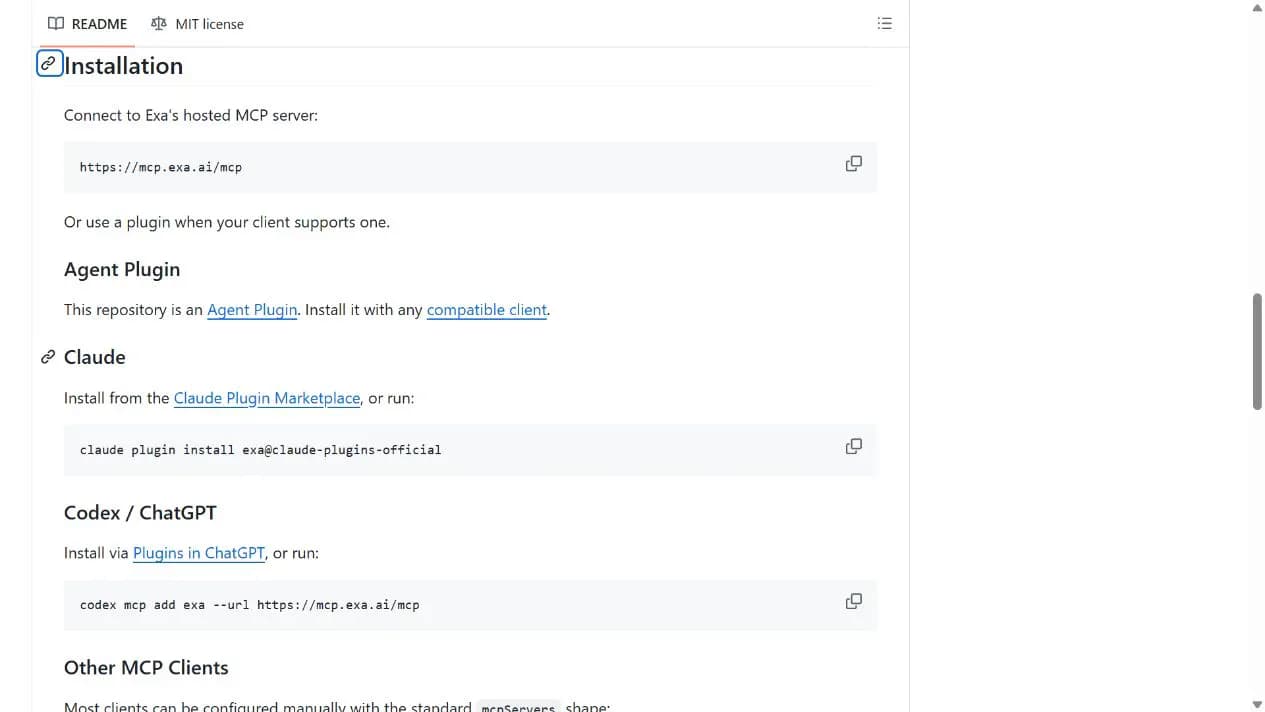
Connect the official hosted endpoint in a compatible client you already use. Verify basic search with non-sensitive public material before deciding whether to authenticate or enable advanced tools.
Let an AI Agent install it
Send this prompt to Codex, Claude Code, or another AI agent that can work with your local environment.
Help me connect https://mcp.exa.ai/mcp using the official README and only the default search and fetch tools. Explain client permissions and possible charges first. Do not request or expose my secret keys. Verify the tool list and source links using a public topic, without enabling the research agent or accessing private material.- An account and client supporting remote MCP
- Permission for the client to contact Exa over the network
- Awareness that the AI client and Exa service can have separate charges
{
  "mcpServers": {
    "exa": {
      "type": "streamable-http",
      "url": "https://mcp.exa.ai/mcp?client=agent-plugin",
      "headers": {
        "x-exa-source": "agent-plugin"
      }
    }
  }
}- 1Add the hosted endpoint
Add https://mcp.exa.ai/mcp in a compatible client's MCP or connector settings. The README also supplies client-specific entry points. Codex CLI users can optionally use the official command provided here.
- 2Check the default tools
Confirm that web_search_exa and web_fetch_exa are available. Anonymous connections are rate-limited; follow official authentication or limit guidance rather than trying to bypass it.
- 3Verify a public search
Ask for source-linked results on a public topic and fetch one original page. Compare its title, date and key claims manually before authorizing higher usage or extra tools.
Check that web_search_exa and web_fetch_exa appear in the tool list. Ask for at least two sources on a public topic, then fetch one result and compare its title and content with the page in your browser. Tool discovery confirms a connection, not result quality.
- Client setup screens, plan requirements and authentication support can differ; consult the current client documentation.
- Prefer the official OAuth flow when authentication is needed. Do not put API keys in public chats, repositories or screenshots.
- The MIT license covers repository code, not unlimited free hosted calls or model usage.
Use cases
Find primary material
Search for official pages and documentation about a public topic, retaining links for manual review.
Prepare reading notes
Fetch an authorized public URL and summarize it with the original link while respecting copyright and access restrictions.
Assessment
Exa combines search and page reading within an existing assistant, with a hosted route that avoids coding and server administration. Client support, anonymous limits and ongoing charges are the main practical considerations. This assessment is based on repository materials, not a live search or installation test.
Why it may be useful
- No local server required for the basic hosted route
- Clear separation between search and page-fetch tools
- Documented authentication and optional advanced capabilities
What to know first
- Anonymous usage is limited; no fixed quota or price was independently confirmed
- Compatibility reflects project documentation and may depend on client plans or interface changes
- Pages and model summaries can be wrong, incomplete or outdated
- Optional local development has additional requirements such as Node.js and is outside this guide
README
Exa MCP Server
Overview
Exa MCP Server adds web search and public-page fetching to AI assistants. Its hosted endpoint can be connected through compatible remote-MCP clients without running a server. Anonymous use is rate-limited, while higher limits and research tools have separate authentication and cost boundaries.
Getting started
- Connect the official hosted endpoint in a compatible client you already use. Verify basic search with non-sensitive public material before deciding whether to authenticate or enable advanced tools.
- The basic route uses an official hosted MCP endpoint.
- web_search_exa and web_fetch_exa are the default tools.
- Check that web_search_exa and web_fetch_exa appear in the tool list. Ask for at least two sources on a public topic, then fetch one result and compare its title and content with the page in your browser. Tool discovery confirms a connection, not result quality.
Configuration
{
  "mcpServers": {
    "exa": {
      "type": "streamable-http",
      "url": "https://mcp.exa.ai/mcp?client=agent-plugin",
      "headers": {
        "x-exa-source": "agent-plugin"
      }
    }
  }
}