
Awesome GitHub Copilot
A GitHub-hosted community collection of installable Copilot plugins plus agents, skills, instructions, hooks, workflows, and copy-ready guidance.
Project overview
Awesome GitHub Copilot is a community customization repository maintained under the GitHub organization. It brings Copilot agents, instructions, skills, hooks, workflows, and plugins into one searchable collection for people who already use GitHub Copilot and do not want to author every workflow from scratch. Its main value is discovery plus a short installation path. Because contributions come from different developers, each plugin still needs its own permission and dependency review.
Core capabilities
Unified customization catalog
Organizes agents, instructions, skills, plugins, and cookbook recipes with website search and filtering.
Copilot plugin marketplace
Documents direct plugin installation and a fallback registration step for older or custom environments.
Learning Hub
Provides guides for agents, skills, instructions, hooks, MCP servers, agentic workflows, and the Copilot coding agent.
Installation and usage
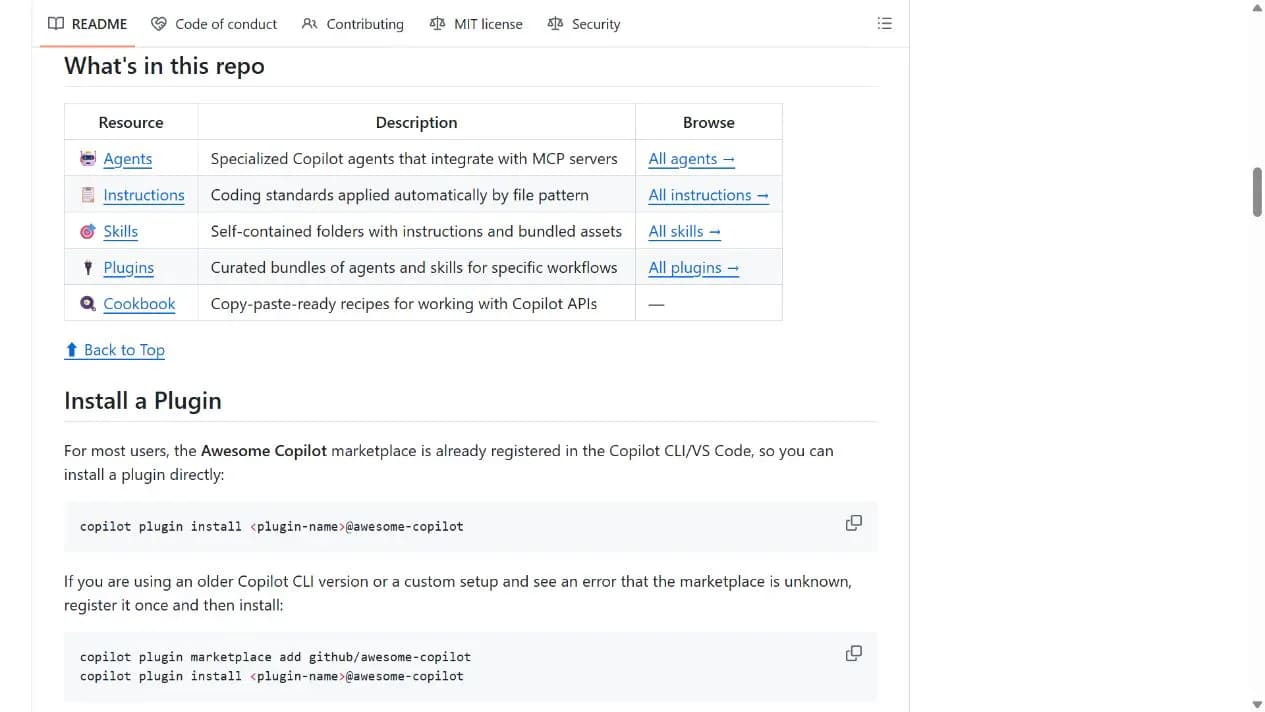
Choose one plugin from the catalog and record its exact name. If Copilot CLI/VS Code already recognizes the marketplace, install it directly. Register github/awesome-copilot only when Copilot reports an unknown marketplace.
Let an AI Agent install it
Send this prompt to Codex, Claude Code, or another AI agent that can work with your local environment.
Help me install one plugin from Awesome GitHub Copilot at https://github.com/github/awesome-copilot. Read the README Install a Plugin section and the target plugins/<plugin-name> directory. Confirm the exact plugin name and summarize its agents, skills, hooks, MCP connections, and external services. Use copilot plugin install <plugin-name>@awesome-copilot when the marketplace is already available; only run copilot plugin marketplace add github/awesome-copilot if Copilot reports an unknown marketplace. Verify that the plugin is visible and run its smallest documented trigger. Ask before requesting login credentials, extra file/network/command permissions, or overwriting configuration.- A GitHub Copilot CLI or VS Code version with plugin support
- The exact <plugin-name> from the repository catalog
- A review of that plugin's agents, skills, hooks, MCP settings, and external services
Project URL: https://github.com/github/awesome-copilot
Copy the URL and follow the steps below to complete setup.- 1Choose and inspect a plugin
Pick a plugin from plugins/ or the catalog website, record its exact name, and review its agents, skills, hooks, MCP settings, and external services.
- 2Run the documented install command
Run copilot plugin install <plugin-name>@awesome-copilot. Register github/awesome-copilot first only if Copilot reports an unknown marketplace.
- 3Verify that Copilot loaded it
Confirm the plugin appears in Copilot's plugin manager and run the smallest documented task, pausing before credentials or sensitive permissions are needed.
The install command should complete without error. Reopen Copilot's plugin management surface, confirm that the plugin is listed, then run the smallest trigger described by that plugin and confirm its agent or skill appears.
- Do not execute the literal <plugin-name> placeholder
- Permissions and dependencies vary across community plugins
- The root MIT License does not replace terms for external services or dependencies
Use cases
Install a workflow bundle by task
Choose a plugin for planning, testing, documentation, frontend work, or code review instead of authoring the workflow from scratch.
Learn Copilot customization
Use the Learning Hub and repository examples to understand instructions, skills, hooks, MCP, and agentic workflows.
Reuse team conventions
Review and adapt instructions or skills for a team after confirming file patterns and permission scope.
Assessment
Based on the public README, repository structure, install commands, and maintenance activity, the collection is easy to browse and has a short integration path. The trade-off is uneven community content: repository maintenance and licensing do not replace a per-plugin review. This assessment is based on public materials, not an installation test.
Why it may be useful
- Maintained under the GitHub organization with clear catalog and install entry points
- Covers agents, skills, instructions, plugins, and learning material
- Documents both direct installation and an older-environment fallback
- Clear MIT license and recent repository activity
What to know first
- Community contributions have different quality, permissions, and dependencies
- Users must choose a specific plugin; the repository is not one monolithic capability
- The plugin command is unavailable without a compatible Copilot host
README
Awesome GitHub Copilot
Overview
A GitHub-hosted community collection of installable Copilot plugins plus agents, skills, instructions, hooks, workflows, and copy-ready guidance. Community-contributed instructions, agents, skills, and configurations to help you make the most of GitHub Copilot.
Getting started
- Choose one plugin from the catalog and record its exact name. If Copilot CLI/VS Code already recognizes the marketplace, install it directly. Register github/awesome-copilot only when Copilot reports an unknown marketplace.
- The README describes a community-created Copilot customization collection with website search, filters, and a Learning Hub.
- Its main sections cover agents, instructions, skills, plugins, and a cookbook; plugins are bundles of agents and skills for specific workflows.
- The install command should complete without error. Reopen Copilot's plugin management surface, confirm that the plugin is listed, then run the smallest trigger described by that plugin and confirm its agent or skill appears.
Configuration
Project URL: https://github.com/github/awesome-copilot
Copy the URL and follow the steps below to complete setup.