
MCP Toolbox for Databases
Google's open-source database MCP server and custom-tool framework connects many databases to MCP clients while letting operators constrain agent actions through prebuilt or parameterized tools.
Project overview
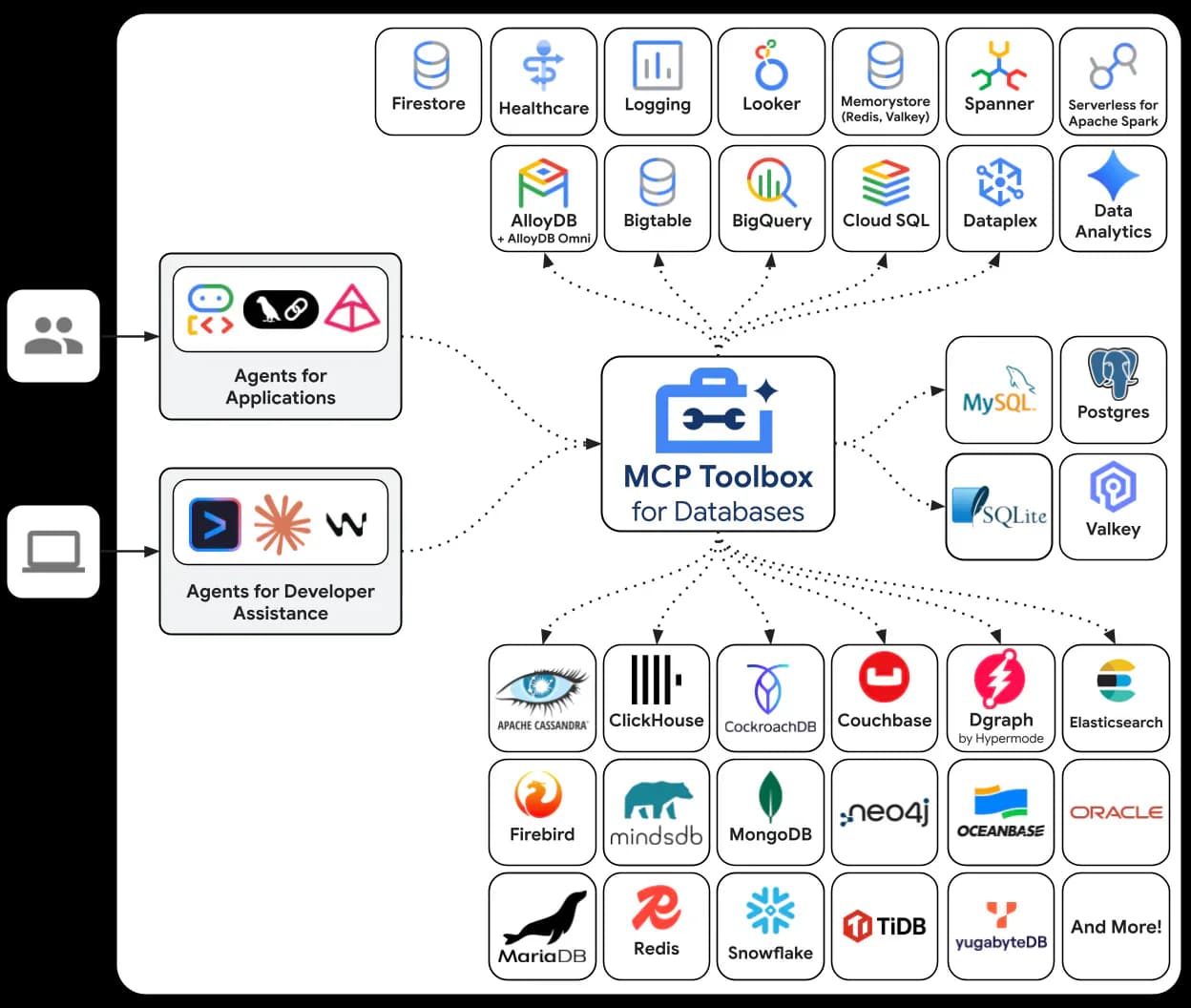
MCP Toolbox for Databases is Google's open-source server and framework for connecting database systems to agents through the Model Context Protocol. It offers a fast path through prebuilt configurations and a more controlled path through custom tools whose SQL, parameters, authentication, and toolsets are defined by the operator. The distinction matters: the repository explicitly treats arbitrary-SQL prebuilt tools as a developer-in-the-loop convenience, not a safe production authorization model.
Core capabilities
Prebuilt database MCP tools
Load a bundled configuration for a supported database, or narrow it to a named toolset. The PostgreSQL bundle includes schema-inspection and SQL-execution tools, with connection values taken from environment variables.
Custom parameterized tools
Define the allowed SQL statement and parameters in tools.yaml so an agent fills constrained inputs instead of supplying an arbitrary query. This is the repository's recommended direction for application runtimes.
MCP and tool-level authorization
Auth services can validate individual tool calls, populate authenticated parameters, or protect the entire MCP endpoint. Generic OIDC supports token validation and granular required scopes when MCP authorization is enabled.
Multiple transports and deployment paths
The server can run over stdio for a local client or expose a Streamable HTTP endpoint for a self-hosted deployment. The repository documents binaries, npx, Homebrew, Docker, Cloud Run, and Kubernetes paths.
Operational observability
Toolbox writes logs to standard output or error and can export metrics and traces to an OpenTelemetry-compatible backend when explicitly configured.
Setup and connection
Start locally with one prebuilt database and a dedicated read-only identity, keep all secrets outside the MCP configuration, then verify discovery and one harmless query before considering custom tools or network deployment.
Let an AI Agent install it
Send this prompt to Codex, Claude Code, or another AI agent that can work with your local environment.
Help me install and configure MCP Toolbox for Databases from https://github.com/googleapis/mcp-toolbox. Read the current README, prebuilt-config documentation, license, and security guidance first. Confirm my MCP host, operating system, target database, transport, and secret-management method. Start with the repository's documented npx stdio setup for one database unless I choose another supported method. Create or identify a dedicated least-privilege, preferably read-only database identity; never print, log, hardcode, or commit its password or tokens. Show the exact client configuration path and proposed changes before editing it. After setup, restart the client, inspect the available tools, and perform only one harmless read against non-sensitive data. Report the commands, files changed, tool list, permissions used, and verification result. Stop and ask before enabling arbitrary SQL for untrusted users, network exposure, write access, telemetry export, or broader scopes.- Node.js and npx, or another installation method documented by the repository
- An MCP client with stdio server support
- A reachable supported database
- A dedicated database user restricted to the required schemas and operations
- A secret-handling method for connection values
{"mcpServers":{"toolbox-postgres":{"command":"npx","args":["-y","@toolbox-sdk/server","--prebuilt=postgres","--stdio"],"env":{"POSTGRES_HOST":"127.0.0.1","POSTGRES_PORT":"5432","POSTGRES_DATABASE":"YOUR_DATABASE","POSTGRES_USER":"YOUR_READONLY_USER","POSTGRES_PASSWORD":"SET_IN_A_SECRET_STORE"}}}}- 1Choose a narrow connection boundary
Select one supported database and decide whether a prebuilt configuration is appropriate for trusted development. Create a dedicated database identity with only the required schemas and operations; use SELECT-only access for exploration where possible.
- 2Provide credentials outside configuration files
Set the database values through environment injection or a secret manager. For PostgreSQL, the bundled prebuilt file expects POSTGRES_HOST, POSTGRES_PORT, POSTGRES_DATABASE, POSTGRES_USER, POSTGRES_PASSWORD, and an optional POSTGRES_QUERY_PARAMS value.
- 3Register the stdio server
Add an MCP server entry that runs: npx -y @toolbox-sdk/server --prebuilt=postgres --stdio Keep the real secret outside any shared or committed client configuration. A narrower PostgreSQL toolset can be selected with --prebuilt=postgres/<toolset>.
- 4Verify discovery and database enforcement
Restart the MCP client, confirm the server and expected tools are visible, then list one known table or run one harmless SELECT against non-sensitive data. Verify that the database itself denies writes and out-of-scope data.
- 5Harden before application use
Replace arbitrary-SQL tools with custom parameterized tools for fixed workflows. Add authenticated parameters or MCP authorization where needed; add TLS and host/origin restrictions before network exposure, and review telemetry before exporting it.
Restart the MCP client and confirm that the Toolbox server is connected. Inspect the advertised tools, then use the dedicated read-only identity to list an expected table or run one harmless SELECT against non-sensitive data. Confirm that write operations and out-of-scope schemas are denied before widening usage.
- The sample environment values are placeholders; use a secret manager or local environment injection for real credentials.
- Prefer a filtered prebuilt toolset or custom parameterized tools over the full arbitrary-SQL bundle.
- If Streamable HTTP is exposed beyond localhost, configure MCP authorization, allowed hosts/origins, and TLS according to the deployment documentation.
- Telemetry export is optional and may send operational metadata to the configured backend.
Use cases
Database-aware development assistance
Let a trusted developer inspect schemas and read selected data from an IDE while database-native permissions keep the exploratory boundary narrow.
Constrained application actions
Expose a fixed, parameterized query such as looking up an order owned by the authenticated user, rather than giving the model an arbitrary SQL endpoint.
Shared self-hosted database tool service
Run one Toolbox server for approved clients, with toolsets, OIDC scopes, TLS, and observability configured for the deployment environment.
Assessment
MCP Toolbox stands out because it combines a broad database catalog with an explicit path from developer convenience to constrained production tools. The documentation, release cadence, security policy, tests, and Apache-2.0 license provide strong public evidence. The main risk is equally clear: its fastest prebuilt path can expose arbitrary SQL, so database-native least privilege and custom parameterized tools are essential rather than optional polish. This assessment does not claim installation or functional testing.
Why it may be useful
- Official repository with detailed installation, configuration, deployment, security, and upgrade documentation
- Broad database coverage with both local stdio and self-hosted HTTP paths
- Custom tools, authenticated parameters, OIDC scopes, and observability support a gradual hardening path
- Recent releases and commits show ongoing maintenance
What to know first
- The default prebuilt experience includes high-authority arbitrary-SQL tools
- Operating a networked database-facing MCP service introduces authentication, TLS, secret, and telemetry responsibilities
- The number of integrations increases the amount of database-specific documentation that operators must review
README
MCP Toolbox for Databases
Overview
Google's open-source database MCP server and custom-tool framework connects many databases to MCP clients while letting operators constrain agent actions through prebuilt or parameterized tools. An open-source MCP server and custom-tool framework for connecting AI agents and developer assistants to many Google Cloud and third-party databases.
Getting started
- Start locally with one prebuilt database and a dedicated read-only identity, keep all secrets outside the MCP configuration, then verify discovery and one harmless query before considering custom tools or network deployment.
- The repository presents two paths. Prebuilt configurations expose common database tools quickly, while custom tools let operators define sources, SQL statements, parameters, toolsets, prompts, and authorization behavior in tools.yaml.
- The documented prebuilt catalog spans Google Cloud services and third-party databases such as PostgreSQL, MySQL, MariaDB, SQL Server, Oracle, MongoDB, Redis, Elasticsearch, ClickHouse, Neo4j, Snowflake, and others. A database or a narrower toolset can be selected with --prebuilt=<database> or --prebuilt=<database>/<toolset>.
- Restart the MCP client and confirm that the Toolbox server is connected. Inspect the advertised tools, then use the dedicated read-only identity to list an expected table or run one harmless SELECT against non-sensitive data. Confirm that write operations and out-of-scope schemas are denied before widening usage.
Configuration
{"mcpServers":{"toolbox-postgres":{"command":"npx","args":["-y","@toolbox-sdk/server","--prebuilt=postgres","--stdio"],"env":{"POSTGRES_HOST":"127.0.0.1","POSTGRES_PORT":"5432","POSTGRES_DATABASE":"YOUR_DATABASE","POSTGRES_USER":"YOUR_READONLY_USER","POSTGRES_PASSWORD":"SET_IN_A_SECRET_STORE"}}}}