
Hugging Face Skills
Hugging Face Skills is the official Agent Skills repository for using hf-cli and task-specific skills to search models, manage datasets and Spaces, evaluate models, and plan training workflows.
Project overview
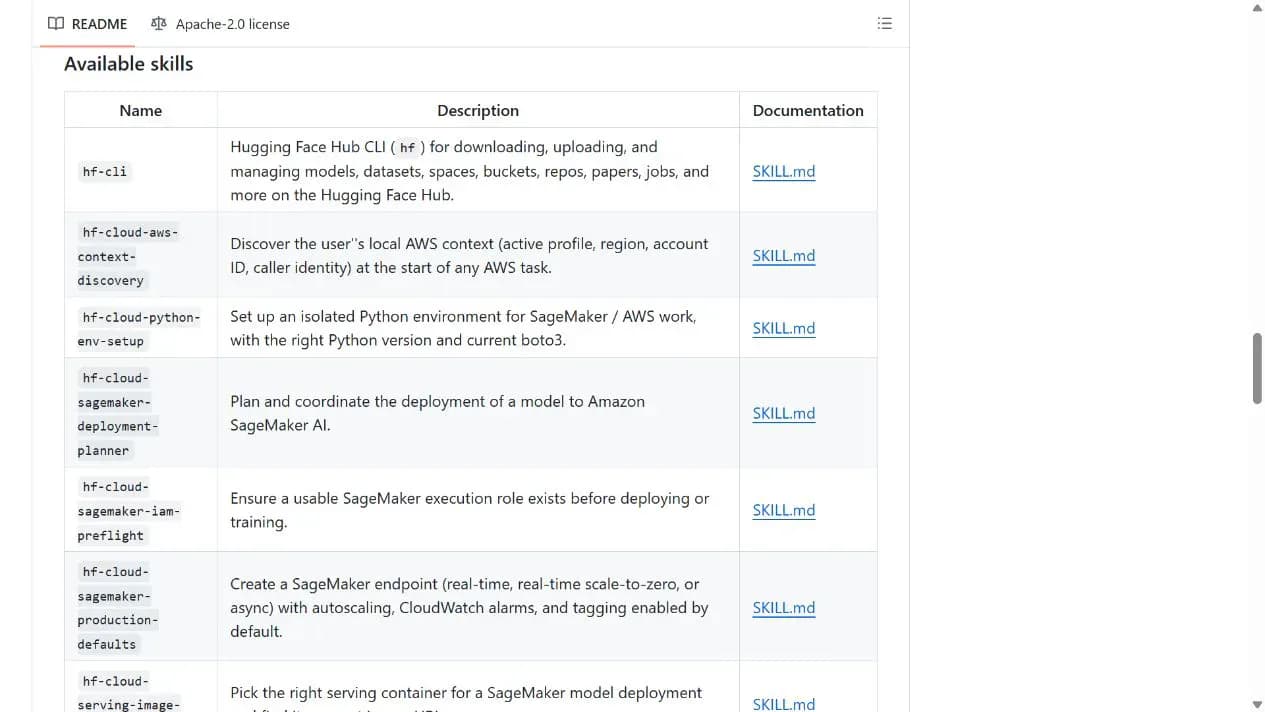
Hugging Face Skills packages Hub CLI, model discovery, datasets, Spaces, papers, evaluation, and training workflows as agent-loadable skills. General users can start with `hf-cli` or model discovery, while training and cloud deployment skills are better suited to users with AI/ML environments and cost awareness.
Core capabilities
Use the Hugging Face Hub CLI
Teaches agents current `hf` commands for models, datasets, Spaces, buckets, repositories, and jobs.
Find models and papers
Helps filter models and compare public benchmark information for a task.
Manage datasets and Spaces
Uses Dataset Viewer API and Hub workflows for metadata, rows, filters, and statistics.
Model evaluation and training workflows
Provides focused skills for local models, fine-tuning, evaluation, Spaces, and cloud deployment.
Installation and usage
Start with `hf-cli`, then add only the task-specific skills you need. Confirm credentials and cost before uploads, jobs, GPU use, or cloud resources.
Let an AI Agent install it
Send this prompt to Codex, Claude Code, or another AI agent that can work with your local environment.
Help me install Hugging Face Skills from https://github.com/huggingface/skills. Read README.md, LICENSE, and `skills/hf-cli/SKILL.md`, then identify the current host. For Claude Code, use `/plugin marketplace add huggingface/skills` and `/plugin install hf-cli@huggingface/skills`; for Codex, copy or symlink only the skills I explicitly choose into the appropriate `.agents/skills` directory. Do not install the entire catalog by default. Ask before Hugging Face login, tokens, uploads, jobs, GPU or cloud resources, extra software downloads, global-directory writes, or file replacement. Verify first with a read-only search for a public model or dataset.- An Agent Skills-compatible host
- Claude Code marketplace or a Codex setup that can manage `.agents/skills`
- A Hugging Face account and credentials for Hub writes
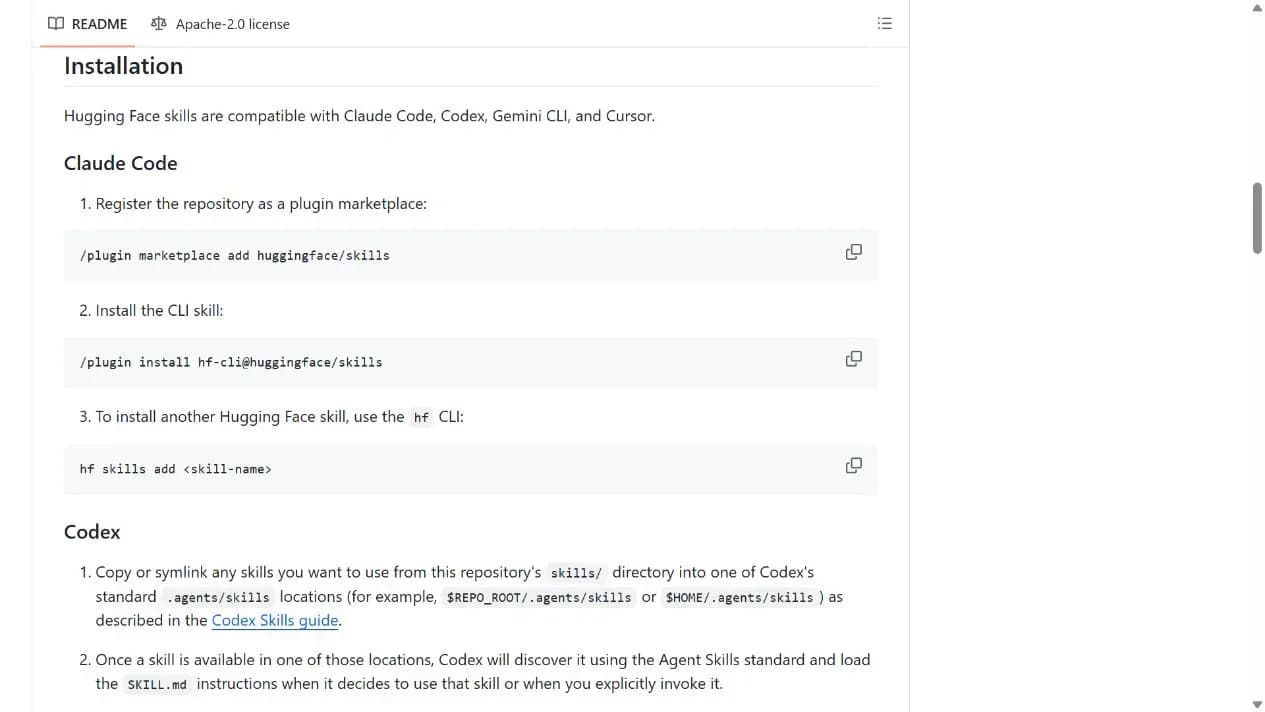
/plugin marketplace add huggingface/skills
/plugin install hf-cli@huggingface/skills- 1Start with hf-cli
Install the core hf-cli skill before enabling task-specific workflows.
- 2Run a read-only check
Ask the agent to search for one public model or dataset and verify the returned name and URL.
- 3Add skills on demand
Use `hf skills add <skill-name>` only when you need datasets, Spaces, papers, evaluation, or training.
After installing `hf-cli`, ask the agent to run a read-only search for one public model or dataset and return its name and repository URL. Do not upload files, create jobs, or start paid resources during the first check.
- Keep the first verification read-only
- Review resource cost before training or cloud deployment
Use cases
Model and dataset discovery
Ask an agent to search public models, datasets, and papers for a task.
Hub resource management
Manage models, datasets, Spaces, and repositories after confirming account permissions.
Training and evaluation planning
Use focused skills to estimate resources, run evaluations, or organize fine-tuning steps.
Assessment
Official ownership, a clear hf-cli bootstrap path, and broad Hub coverage make this repository useful. Discovery and resource management are the most approachable areas; training, evaluation, and cloud deployment still require technical context, credentials, and cost judgment. This assessment is based on the README, skill catalog, and license without connecting to the Hub.
Why it may be useful
- Maintained by Hugging Face
- Progressive path from hf-cli to focused skills
- Covers models, datasets, Spaces, papers, and training
What to know first
- Complex AI/ML workflows have a higher barrier
- Some features require accounts, GPUs, or cost
- No installation or functional test was performed
README
Hugging Face Skills
Overview
Hugging Face Skills is the official Agent Skills repository for using hf-cli and task-specific skills to search models, manage datasets and Spaces, evaluate models, and plan training workflows. Give your agents the power of the Hugging Face ecosystem
Getting started
- Start with `hf-cli`, then add only the task-specific skills you need. Confirm credentials and cost before uploads, jobs, GPU use, or cloud resources.
- The repository follows the Agent Skills standard and recommends `hf-cli` as the starting point for core Hub operations.
- Claude Code installs `hf-cli` through the marketplace, while other skills can be added with `hf skills add <skill-name>`.
- After installing `hf-cli`, ask the agent to run a read-only search for one public model or dataset and return its name and repository URL. Do not upload files, create jobs, or start paid resources during the first check.
Configuration
/plugin marketplace add huggingface/skills
/plugin install hf-cli@huggingface/skills