
Obsidian Skills
Obsidian Skills teaches AI assistants the file formats used for notes, wikilinks and visual canvases. Existing Obsidian users can start with file-based skills through manual copying, without programming. Command-line control and web extraction are separate optional capabilities.
Project overview
This is a set of instructions for an AI assistant, not a new note-taking app or an independent chat plugin installed inside Obsidian. Place the skills in a compatible assistant's directory and authorize only a test vault to work with Markdown, Bases and JSON Canvas rules. A useful first task is creating notes with properties, wikilinks and callouts.
Core capabilities
Create and edit structured notes
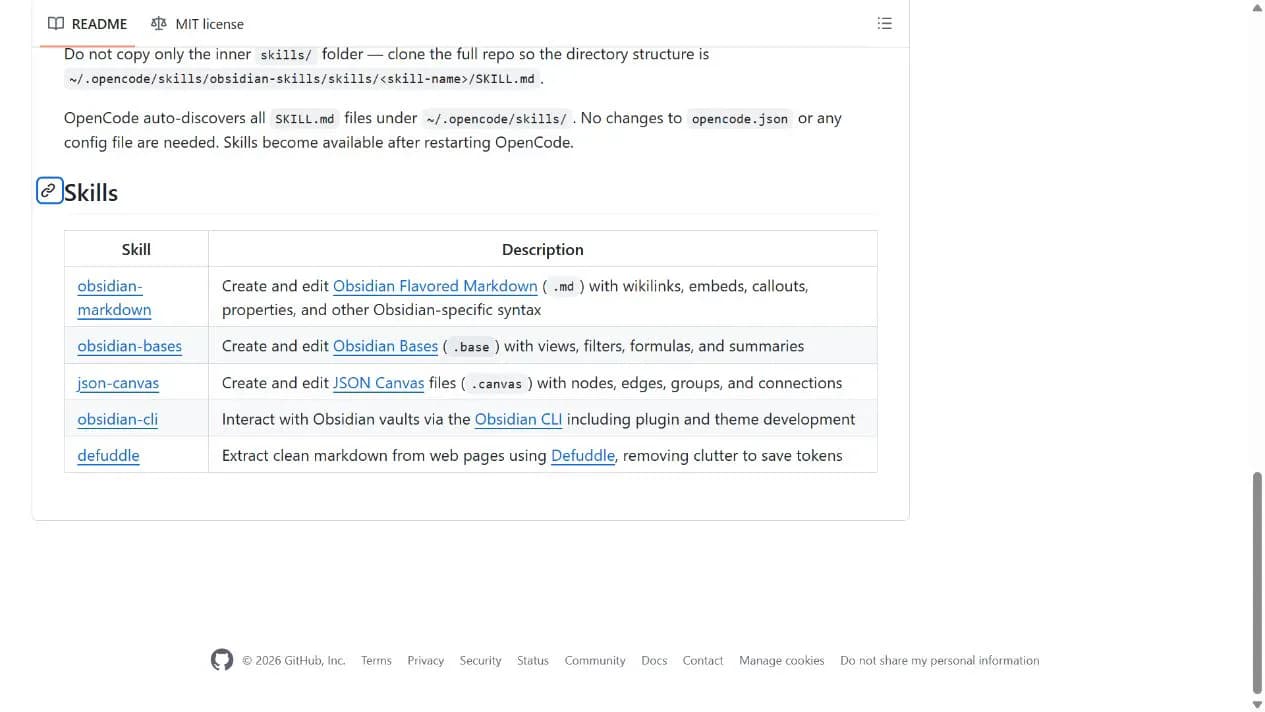
obsidian-markdown supplies rules for properties, wikilinks, embeds and callouts so the assistant can produce Obsidian-compatible notes.
Build node-based canvas files
json-canvas describes nodes, edges and groups for visual planning. Node IDs and edge references still require validation.
Define Bases views
obsidian-bases targets views, filters, formulas and summaries in .base files; it does not automatically repair all existing note data.
Use optional CLI and web extraction
obsidian-cli and defuddle cover command-line interaction and web-to-Markdown extraction. They require separate tools and permissions and are not prerequisites for basic file editing.
Installation and usage
Start with a test vault and the basic Markdown skill. Downloading and manually copying the documented files does not require API setup, a private server or Obsidian CLI.
Let an AI Agent install it
Send this prompt to Codex, Claude Code, or another AI agent that can work with your local environment.
Read the kepano/obsidian-skills README and choose the installation method for my current assistant. Show the target skills directory before writing, without overwriting existing names. Authorize only my specified test vault, load obsidian-markdown first and create two linked test notes for review. Do not bulk-edit my primary vault, run CLI extensions or extract web pages.- Obsidian installed with a non-sensitive test vault
- A compatible assistant that can load Agent Skills and edit authorized files
- Understanding of the assistant's model charges and data handling
- A backup and the smallest necessary test-folder permissions
Project URL: https://github.com/kepano/obsidian-skills
Copy the URL and follow the steps below to complete setup.- 1Download and choose your client
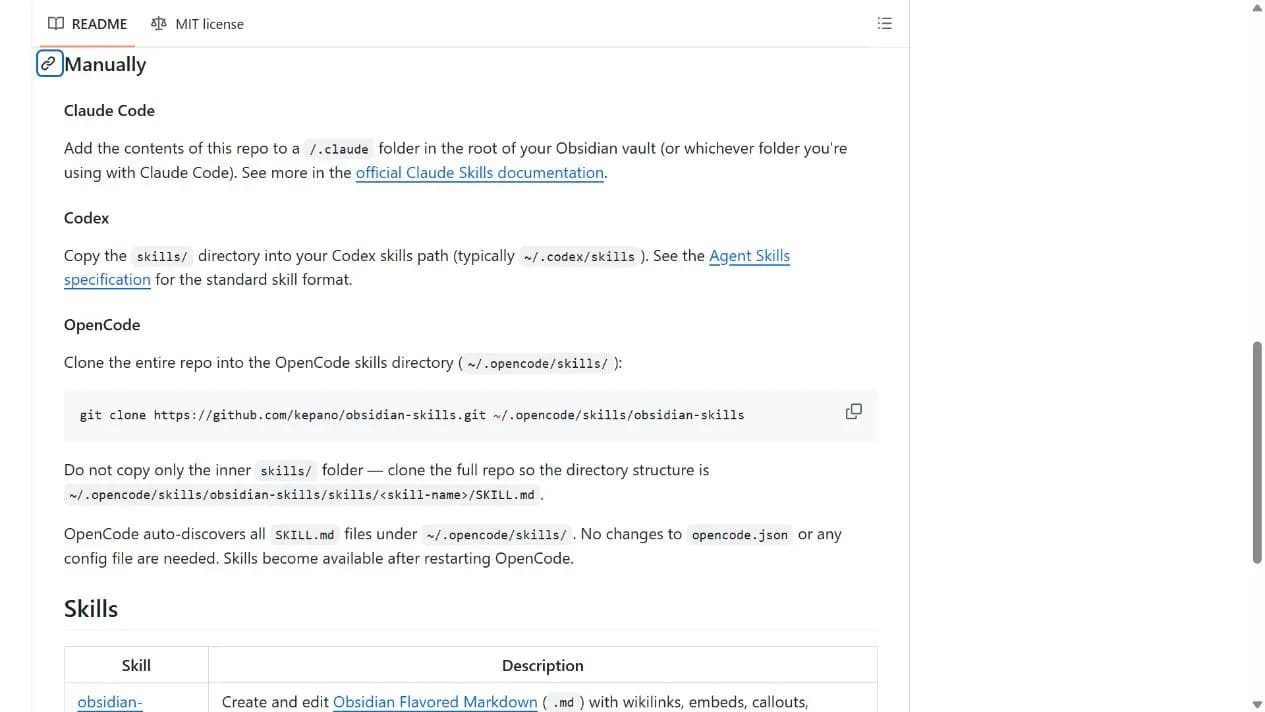
Download and extract the official repository ZIP. Identify whether you use Claude Code, Codex or OpenCode and read the matching README section rather than borrowing another client's directory layout.
- 2Place the skills manually
For Codex, place the individual skills from skills in the configured skills path without an extra nested skills level. Claude Code uses the repository contents in a .claude folder at the vault root. OpenCode requires the complete repository structure and a restart, not just the inner skills folder. Stop and inspect any existing name conflicts.
- 3Check a small test vault
Grant access only to the test folder and ask obsidian-markdown to create two linked notes. Review properties, wikilinks and callouts in Obsidian before using real notes. CLI installation is an optional shortcut rather than a basic requirement.
Ask the assistant to create only two notes in the test vault, including a wikilink to the other note, a tags property and a callout. In Obsidian reading view, check that the link opens and properties and callouts render correctly. For an optional .canvas file, check valid JSON and edge references to existing nodes.
- These are skills for an AI assistant, not an independent chat plugin from Obsidian's community-plugin manager.
- Use the configured Codex skills path; the README's typical location is only a reference.
- The repository skills use MIT licensing. Model platforms, optional Obsidian services and external tools have separate terms and charges.
Use cases
Link reading notes
Turn authorized public reading material into notes with topic properties and links, then verify factual claims manually.
Map a project visually
Create a small JSON Canvas draft with nodes and edges, open it in Obsidian and adjust its layout and relationships.
Assessment
The collection gives an assistant concrete rules for common note formats and is understandable to established Obsidian users. Practical value depends on correct skill loading and controlled file permissions. Repository and format documentation were reviewed, but no installation or note-editing test was performed.
Why it may be useful
- No programming or server required for the basic note workflow
- Centralized guidance for several open file formats
- Documented manual installation differences across clients
What to know first
- Requires a compatible AI assistant and is not a standalone app
- Generated links, formulas and canvas structures can still be incorrect
- CLI and web-extraction features have additional dependencies
- The latest observed default-branch commit was 2026-06-08; star counts are not a guarantee of ongoing updates
README
Obsidian Skills
Overview
Obsidian Skills teaches AI assistants the file formats used for notes, wikilinks and visual canvases. Existing Obsidian users can start with file-based skills through manual copying, without programming. Command-line control and web extraction are separate optional capabilities.
Getting started
- Start with a test vault and the basic Markdown skill. Downloading and manually copying the documented files does not require API setup, a private server or Obsidian CLI.
- The repository follows Agent Skills and lists Claude Code, Codex and OpenCode.
- Installation options include a marketplace, Skills CLI and client-specific manual copying.
- Ask the assistant to create only two notes in the test vault, including a wikilink to the other note, a tags property and a callout. In Obsidian reading view, check that the link opens and properties and callouts render correctly. For an optional .canvas file, check valid JSON and edge references to existing nodes.
Configuration
Project URL: https://github.com/kepano/obsidian-skills
Copy the URL and follow the steps below to complete setup.