
Matt Pocock Skills
A collection of 25 installable Agent Skills maintained by Matt Pocock for real software engineering, including discovery, specification, TDD, debugging, code review, domain modeling, tickets, and handoffs.
Project overview
Matt Pocock Skills packages the engineering habits behind discovery, specifications, TDD, debugging, architecture, code review, tickets, and handoffs into 25 active Agent Skills. The collection favors small, composable instructions that can be adapted to an existing project instead of taking ownership of the entire development process. Claude Code receives the set as a managed plugin, while Codex and other agents can install editable copies through the skills CLI.

Core capabilities
Discovery and specification
grill-with-docs, to-spec, and to-tickets help resolve ambiguity, capture shared project language, and turn the current conversation into specifications or dependency-aware tickets.
TDD and debugging
The TDD Skill uses one red-green vertical slice at a time and asks the user to agree on public testing seams. diagnosing-bugs provides a gated loop for reproduction, instrumentation, repair, and regression checks.
Codebase design and review
codebase-design builds a shared vocabulary for deep modules, while code-review compares a fixed diff against repository standards and the originating specification as separate review axes.
Tickets, handoffs, and project context
The collection can record issue-tracker rules, domain documentation, triage labels, and compact session handoffs so another agent can continue from existing artifacts.
Installation and usage
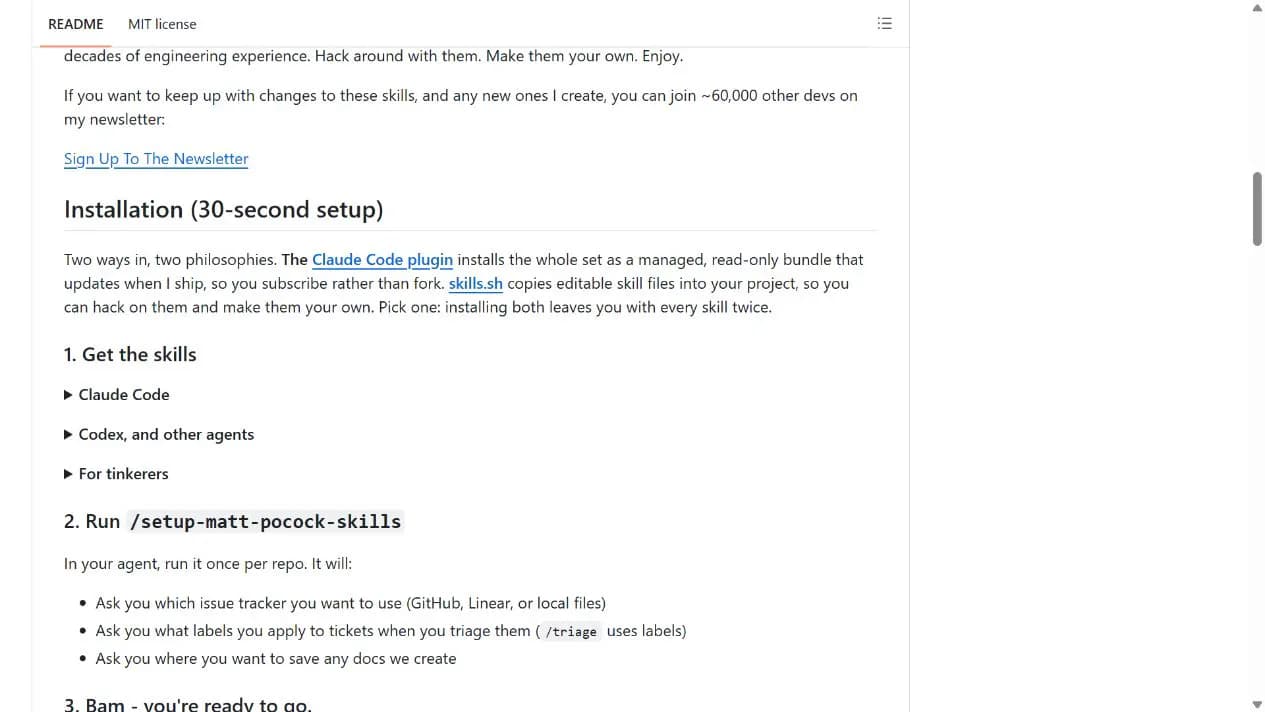
For Codex or another Skills-compatible agent, use the skills CLI, select the Skills you need, and include setup-matt-pocock-skills. Run the setup once in each repository before relying on the engineering workflows.
Let an AI Agent install it
Send this prompt to Codex, Claude Code, or another AI agent that can work with your local environment.
Help me install and configure Matt Pocock Skills from https://github.com/mattpocock/skills. Read the current README, .claude-plugin/plugin.json, and skills/engineering/setup-matt-pocock-skills/SKILL.md first. Identify my agent host. For Codex or another Skills-compatible agent, use npx skills@latest add mattpocock/skills and include setup-matt-pocock-skills in the selection. For Claude Code, use claude plugins install mattpocock-skills. Use only one installation route so the Skills are not duplicated. Then run the setup once in this repository, show me the proposed issue-tracker, label, AGENTS.md or CLAUDE.md, and docs/agents changes before writing them, and verify the resulting files. Ask before requesting credentials, broader permissions, overwriting files, or changing an existing workflow.- Node.js and npx are available for the skills CLI route
- The target agent can write Skills into the selected project
- You can choose an issue tracker and approve changes to AGENTS.md or CLAUDE.md and docs/agents files
npx skills@latest add mattpocock/skills- 1Choose one installation route
Use the managed Claude Code plugin when you want automatic updates, or use the skills CLI for Codex and editable project files. Do not install both copies.
- 2Install the selected Skills
For Codex or another supported agent, run the command below. In the selection screen, include setup-matt-pocock-skills and the workflows you need. npx skills@latest add mattpocock/skills
- 3Configure the repository
Run setup-matt-pocock-skills once. Review its findings, choose the issue tracker, confirm triage labels when relevant, and approve the proposed Agent skills block and docs/agents files before they are written.
- 4Verify the generated project guidance
Confirm that the selected Skills are available, docs/agents contains the agreed tracker and domain rules, and only the existing AGENTS.md or CLAUDE.md contains a single Agent skills block.
Run setup-matt-pocock-skills in the target repository. A successful setup presents its findings before writing, records the chosen issue tracker under docs/agents, adds or updates one Agent skills block in the existing AGENTS.md or CLAUDE.md, and reports which Skills will use those files.
- Choose either the Claude Code plugin or the skills CLI copy, not both
- The skills CLI copy is editable and updates only when you run npx skills update
- The setup Skill is prompt-driven and must present proposed edits before writing
Use cases
Clarifying a change before implementation
Use grill-with-docs to resolve ambiguous requirements while recording the project's terminology and decisions, then turn the result into a specification or tickets.
Implementing with short feedback loops
Use the TDD and debugging Skills to agree on public seams, work one vertical slice at a time, and keep reproduction and regression evidence close to the fix.
Reviewing work against standards and intent
Use code-review with a fixed comparison point to inspect repository standards and specification fidelity as separate questions.
Continuing work across agent sessions
Use issue-tracker guidance, domain documents, and handoff files so the next session can reuse existing decisions instead of rebuilding the entire context.
Assessment
This assessment is based on the repository README, plugin manifest, selected Skill sources, license, release notes, and maintenance metadata. The collection stands out for turning familiar engineering practices into small Skills that can be combined and edited. It also keeps important control points visible, including agreement on test seams and confirmation before setup writes project guidance. The trade-off is that the set can touch code, documentation, commands, and issue trackers, so users still need to select Skills deliberately and review their permissions. No hands-on installation or workflow test is claimed here.
Why it may be useful
- Covers discovery, implementation, testing, review, and handoff without forcing one monolithic process
- Provides distinct installation routes for managed Claude Code updates and editable agent files
- Documents the initial project configuration and asks for confirmation before writing
What to know first
- Installing both routes creates duplicate Skills
- Codex currently relies on the skills CLI rather than a native plugin
- Individual Skills can require broad project, command, or issue-tracker access
README
Matt Pocock Skills
Overview
A collection of 25 installable Agent Skills maintained by Matt Pocock for real software engineering, including discovery, specification, TDD, debugging, code review, domain modeling, tickets, and handoffs. Skills for Real Engineers. Straight from my .agents directory.
Getting started
- For Codex or another Skills-compatible agent, use the skills CLI, select the Skills you need, and include setup-matt-pocock-skills. Run the setup once in each repository before relying on the engineering workflows.
- The repository describes these as Skills for real engineers. The active plugin manifest contains 18 engineering Skills and seven productivity Skills, covering planning, implementation, feedback loops, review, issue tracking, documentation, and session continuity.
- The README documents two installation philosophies. The Claude Code plugin is a managed, read-only bundle that receives updates, while the skills CLI copies editable Skill files into the project. Installing both routes creates duplicate entries, so the user should choose one.
- Run setup-matt-pocock-skills in the target repository. A successful setup presents its findings before writing, records the chosen issue tracker under docs/agents, adds or updates one Agent skills block in the existing AGENTS.md or CLAUDE.md, and reports which Skills will use those files.
Configuration
npx skills@latest add mattpocock/skills