
Azure DevOps MCP Server
Azure DevOps MCP Server lets MCP-capable agents read and operate on Azure DevOps projects, work items, repositories, pipelines, test plans, wikis, and Advanced Security data.
Project overview
Azure DevOps MCP Server is Microsoft's official connector for exposing Azure DevOps Services projects, work items, Git repositories, pipelines, test plans, wikis, and security alerts to MCP-capable agents. New users can connect to Microsoft's hosted Remote MCP, while a local npm server remains available for stdio clients and alternative authentication methods. This is not a read-only search connector: several enabled domains contain state-changing tools, so deployment should begin with a narrow project scope, selected domains, and least-privilege identity.
Core capabilities
Project, team, and identity context
List projects, teams, members, identities, iterations, and team capacity to establish organizational context.
Work-item read and write
Query, create, and update work items, comments, links, and attachments; these actions can change shared project state.
Repositories and pull requests
Search code and commits, read repositories and PRs, and create branches, PRs, comments, and discussion replies.
Pipelines, tests, wikis, and security
Read or run pipelines, retrieve logs and artifacts, maintain test plans and wikis, and query Advanced Security alerts.
Setup and connection
Evaluate hosted Remote MCP first. Use the local npm package when the client only supports stdio or requires Azure CLI or non-interactive authentication. Choose one organization and a least-privilege identity, then use -d to load only required domains. The first check should only list projects or read a test work item, never create, update, or run anything.
Let an AI Agent install it
Send this prompt to Codex, Claude Code, or another AI agent that can work with your local environment.
Help me safely connect Azure DevOps MCP Server from https://github.com/microsoft/azure-devops-mcp. First read README.md, docs/GETTINGSTARTED.md, docs/TOOLSET.md, LICENSE.md, SECURITY.md, and the latest v2.9.0 release. Confirm that the target is Azure DevOps Services, the account is backed by Entra ID, and explain whether Remote MCP or local Node.js 20+ stdio is appropriate. Do not overwrite existing MCP configuration or put tokens or PATs in chat, logs, a tracked config file, or shell history. Load only domains required for the task and start with a least-privilege identity and test project. Stop for confirmation before interactive sign-in, using Azure CLI credentials, reading an environment token or PAT, choosing a tenant, broadening project permissions, enabling write tools, or changing work items, PRs, pipelines, test plans, or wikis. Verify only by listing projects and reading one non-sensitive test work item, then report added configuration and results.- An Azure DevOps Services organization and accessible test project
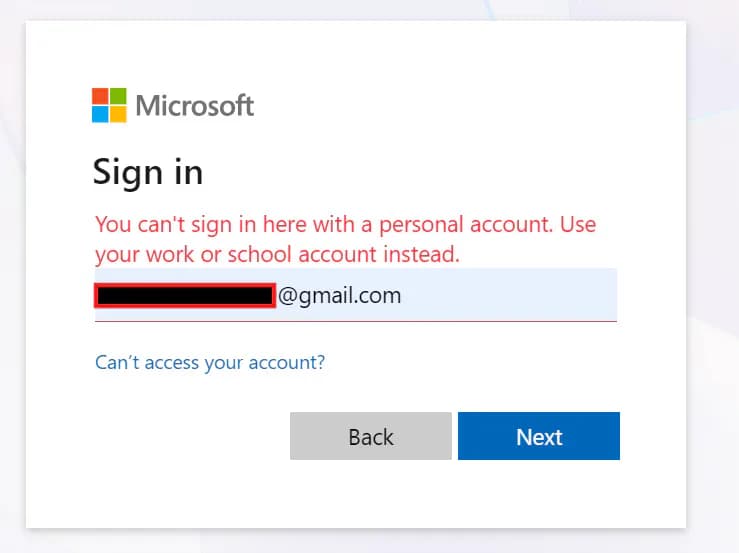
- An Entra ID work or school account; personal Microsoft accounts are unsupported
- Node.js 20 or later for local mode
- An MCP client supporting Streamable HTTP or stdio
{
  "servers": {
    "ado-remote-mcp": {
      "url": "https://mcp.dev.azure.com/{organization}",
      "type": "http"
    }
  },
  "inputs": []
}- 1Define the organization, project, and read-only goal
Choose one Azure DevOps Services organization and a non-sensitive test project. List exactly what the agent needs to read and leave create, update, and run actions unapproved by default.
- 2Choose Remote MCP or local stdio
Use the README-recommended Remote MCP when Streamable HTTP and interactive sign-in are available. Choose the Node.js 20+ npm package for a local process or Azure CLI and environment-token authentication.
- 3Narrow domains and identity permissions
For local startup, use -d to load only required domains and ensure the identity can access only the intended organization and projects. Core is always loaded; omitting -d loads all regular domains.
- 4Complete a minimal read-only check
List projects, then read one test work item or repository metadata. Confirm organization, project, and returned content before reviewing write tools individually.
After restarting the client and signing in, confirm the server handshake and tool list. Use the core domain to list projects, then read one work item from a non-sensitive test project. Verify the organization, project, identity, and returned scope. Do not use work-item creation, PR updates, or pipeline runs for the first check.
- The current README recommends Remote MCP. The FAQ statement that Remote was unavailable is stale, so follow the README and v2.9.0 release.
- Headless environments should use Azure CLI or environment-token authentication rather than interactive sign-in.
- PAT mode reads PERSONAL_ACCESS_TOKEN; do not commit a PAT to MCP configuration or source control.
- Use --tenant to select a tenant explicitly for multi-tenant accounts.
Use cases
Work-item retrieval and triage
Let an agent summarize work items, iterations, and capacity from queries, while retaining human approval for creation or updates.
Code-review context
Read repositories, commits, pull requests, and discussions to supply Azure DevOps context during review.
Pipeline and test troubleshooting
Inspect build status, logs, artifacts, and test plans, with separate confirmation before running or changing pipelines.
Assessment
Azure DevOps MCP Server stands out for official maintenance, broad Azure DevOps coverage, and both hosted and local connection paths. Its README, getting-started guide, and tool catalog document setup, authentication, client compatibility, and read/write capabilities in useful detail. Recent commits continue strengthening external-content safety and PAT request boundaries. The main costs are a wide permission surface, potentially breaking tool consolidation, and uneven update timing between local and Remote documentation. This assessment is based on public GitHub evidence without installation or a live organization connection.
Why it may be useful
- Microsoft-owned repository with an MIT license and a clear security-reporting channel
- Covers project management, code, CI/CD, testing, wikis, and security data in Azure DevOps
- Hosted Remote MCP and local stdio coexist, with documented clients and authentication methods
- Security-related content handling, PAT, and dependency-policy work continued in September 2026
What to know first
- Many tool domains contain write operations and require identity permissions, domain filtering, and human confirmation
- Azure DevOps Server and personal Microsoft accounts are unsupported
- The local implementation is moving toward Remote MCP and tool names or parameters may keep changing
- server.json version and package identifiers lag package.json and the README
- Installation, authentication, and functions were not tested against a live Azure DevOps organization
README
Azure DevOps MCP Server
Overview
Azure DevOps MCP Server lets MCP-capable agents read and operate on Azure DevOps projects, work items, repositories, pipelines, test plans, wikis, and Advanced Security data. The MCP Server for Azure DevOps, bringing the power of Azure DevOps directly to your agents.
Getting started
- Evaluate hosted Remote MCP first. Use the local npm package when the client only supports stdio or requires Azure CLI or non-interactive authentication. Choose one organization and a least-privilege identity, then use -d to load only required domains. The first check should only list projects or read a test work item, never create, update, or run anything.
- The README recommends hosted Remote MCP for new users because it requires no installation and receives new features first; the local server remains supported.
- The local path runs @azure-devops/mcp through npx, requires Node.js 20+, and defaults to interactive Microsoft sign-in.
- After restarting the client and signing in, confirm the server handshake and tool list. Use the core domain to list projects, then read one work item from a non-sensitive test project. Verify the organization, project, identity, and returned scope. Do not use work-item creation, PR updates, or pipeline runs for the first check.
Configuration
{
  "servers": {
    "ado-remote-mcp": {
      "url": "https://mcp.dev.azure.com/{organization}",
      "type": "http"
    }
  },
  "inputs": []
}