
Prompty
Microsoft's open .prompty format and multi-language runtimes keep prompts, model configuration, sample inputs, and evaluation material in version-controlled Markdown files.
Project overview
Prompty is Microsoft's open prompt file format and runtime project. A .prompty file can hold model configuration, sample input, template variables, and role-based message content together, making it suitable for Git review alongside application code. Teams can use it to maintain prompts as loadable, renderable, traceable, and comparable engineering assets. This listing is based on the public specification, source tree, MIT license, and recent commits, with an isolated Python check of minimal file loading and prepare.
Core capabilities
Version-controlled prompt assets
Configuration, examples, and message content live in one text file for diff review, reuse, and release alongside application code.
Role messages and template rendering
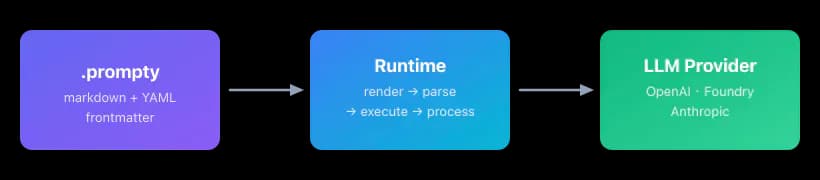
The body supports multiple message roles, and runtimes can render input into messages with Jinja2 or Mustache.
Multiple model providers
Official runtimes include OpenAI, Microsoft Foundry, and Anthropic adapters, with credentials and target endpoints supplied by the host environment.
Host-managed agent capabilities
Version 2 can describe tools, memory, and runtime controls while function binding, authorization, credentials, and persistence stay with the host.
Local tracing and editor workflow
The VS Code extension and runtimes can create .tracy traces for inspecting prepared messages, calls, and results.
Access and usage
Choose a runtime, template engine, and model provider first, then install only the corresponding extras. The first check can load the repository's minimal fixture without configuring external credentials or sending a model request.
Let an AI Agent install it
Send this prompt to Codex, Claude Code, or another AI agent that can work with your local environment.
Help me evaluate and install Microsoft Prompty with least privilege. Project URL https://github.com/microsoft/prompty

Read README, LICENSE, SECURITY, the selected runtime package manifest, spec, and schema. State the runtime, template engine, model provider, install command, endpoint, environment variables, file-reference roots, and .tracy location. Do not read existing credentials, connect to a real model, expand trusted endpoints or allowed directories, or bind tools with side effects. Install an exact version in an isolated environment and verify local load plus prepare with the repository's minimal.prompty fixture. Report installed components, actual output, data flow, cleanup command, limitations, and unverified steps, then stop before any external call.- Python 3.11 or newer, or Node.js 18 or newer
- A selected model provider and an understood data-processing boundary
- A least-privilege provider credential if a model call is required
- Code review for every third-party .prompty file as untrusted input
uv pip install "prompty[jinja2,openai]==2.1.0"- 1Choose the runtime and provider
Select Python, TypeScript, or another runtime based on the application, and install only the required template engine and provider adapter.
- 2Create a minimal .prompty file
Declare model configuration and sample input in YAML front matter, write system and user messages in Markdown, and place the file under code review.
- 3Run local prepare first
Load and render without calling a model, then inspect variables, role order, file references, and final message text.
- 4Connect a restricted test endpoint
Use test credentials and non-sensitive input, confirm that the endpoint is trusted, and inspect request content, cost, and error behavior.
- 5Review traces and tool permissions
Check .tracy for data that should not persist, bind only authorized functions, and add host-level confirmation and logging around every side effect.
Load minimal.prompty and call prepare first, confirming that it produces the expected system message. Only then connect a test model with non-sensitive input and inspect the endpoint, rendered request, trace content, and cost. A successful local load does not verify a model, tools, or every runtime.
- Python extras include jinja2, mustache, openai, foundry, anthropic, and otel choices
- TypeScript installs the core and provider packages separately
- Each language runtime releases independently, so production deployments should pin and verify them separately
- Only the host can expand trusted endpoints, allowed roots, and tool functions
Use cases
Review prompts with code
Commit model parameters, message templates, and sample inputs so prompt changes appear in the same review flow as application changes.
Reuse prompt structure across languages
Read similar .prompty assets from different services while pinning each runtime and testing provider-specific differences.
Prototype agent tool orchestration
Declare tool interfaces in the file, bind restricted host functions, and test multi-turn calls and stopping behavior with synthetic data.
Prepare prompt debugging and evaluation
Use sample input and local traces to compare rendering and isolate differences caused by variables, roles, model settings, or tool output.
Assessment
Prompty turns prompts from temporary chat text into structured project files that can be reviewed and tested. Its format, schema, multi-language runtimes, and VS Code tooling are kept in one public repository, with install paths and security boundaries visible in source. It does not solve provider compliance, tool authorization, or output quality for a team. Runtimes release independently, and trace files can retain business text. This review verified Python 2.1.0 installation, minimal file loading, and prepare without extending that narrow result into an end-to-end claim.
Why it may be useful
- The readable format works well with Git diff review and code-adjacent maintenance
- Specification, schemas, runtimes, editor extension, and tests live in an official public repository
- Ambient-credential endpoints and file references have explicit host-controlled boundaries
- MIT licensing, private vulnerability reporting, and recent release work are publicly verifiable
What to know first
- Capabilities differ across runtimes, template engines, and providers
- External model use still carries cost, network dependency, and compliance responsibility
- Key-name redaction in local traces does not replace sensitive-data governance
- Placeholder content in SUPPORT.md is not a service-level commitment
README
Prompty
Overview
Microsoft's open .prompty format and multi-language runtimes keep prompts, model configuration, sample inputs, and evaluation material in version-controlled Markdown files. An open format and multi-language runtime project for authoring, running, and tracing LLM prompts with Markdown and YAML front matter.
Getting started
- Choose a runtime, template engine, and model provider first, then install only the corresponding extras. The first check can load the repository's minimal fixture without configuring external credentials or sending a model request.
- The README defines .prompty as a Markdown file. YAML front matter stores model, connection, and sample-input configuration, while the body uses system, user, assistant, and other role markers.
- The Python quick start installs prompty plus selected template and provider extras. The TypeScript quick start installs @prompty/core and provider packages. A VS Code extension supports authoring, preview, execution, and tracing.
- Load minimal.prompty and call prepare first, confirming that it produces the expected system message. Only then connect a test model with non-sensitive input and inspect the endpoint, rendered request, trace content, and cost. A successful local load does not verify a model, tools, or every runtime.
Configuration
uv pip install "prompty[jinja2,openai]==2.1.0"