
MCP Inspector
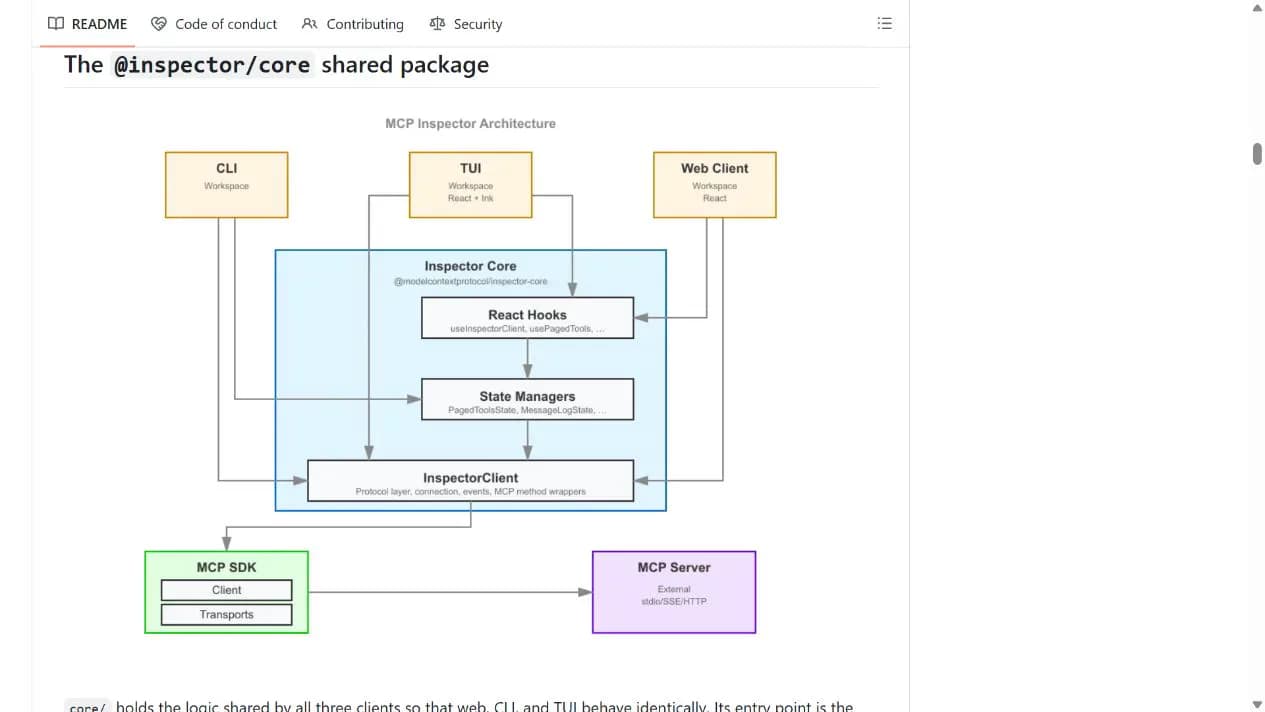
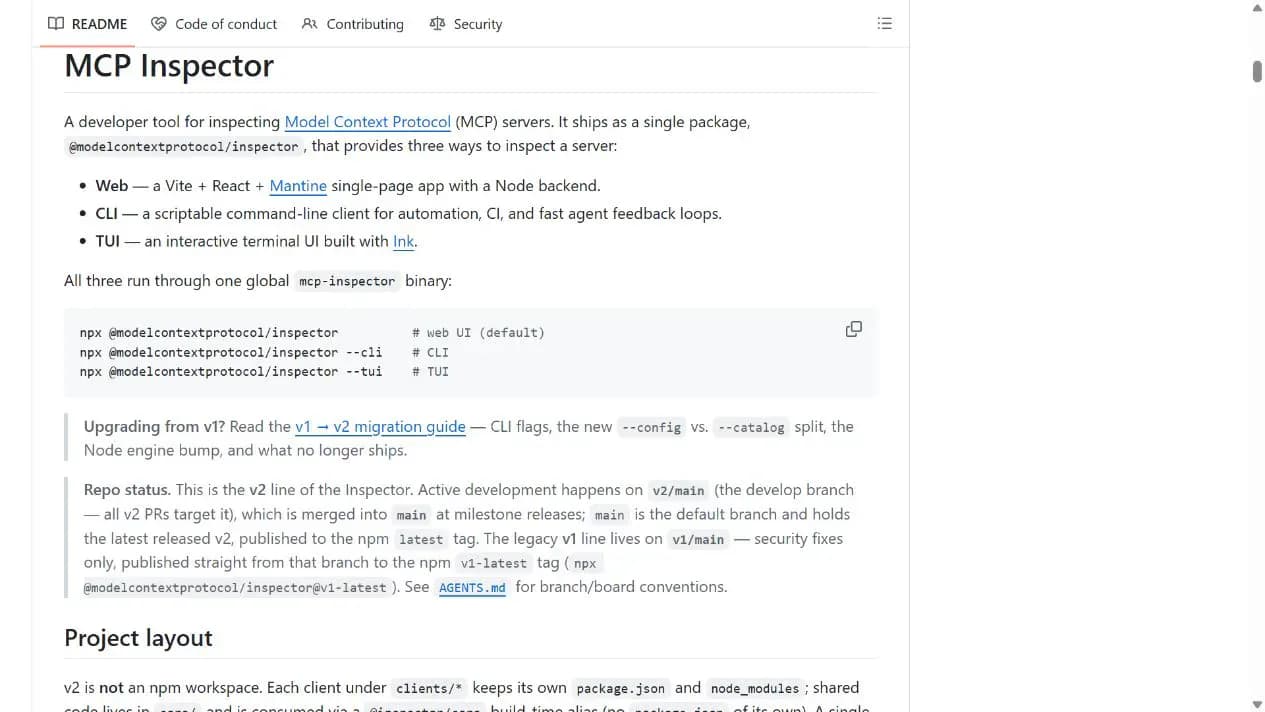
MCP Inspector is the official Model Context Protocol debugging tool. Its Web, CLI, and TUI clients connect to MCP servers and inspect tools, resources, prompts, transports, authentication, and MCP Apps.
Project overview
MCP Inspector is the official tool for checking whether an MCP server works correctly. Its web, CLI, and TUI clients show tools, resources, prompts, connection state, protocol data, OAuth flows, and MCP Apps. For users setting up an MCP server, it answers practical questions such as whether the server connected, which tools were listed, and what a call returned.
Core capabilities
Visually inspect MCP servers
The web UI connects to servers and displays tools, resources, prompts, and protocol state.
List and invoke tools
CLI supports automation and CI, while TUI provides terminal interaction.
Inspect resources and prompts
Tests local STDIO plus Streamable HTTP and SSE connections.
Debug transports, OAuth, and MCP Apps
Includes test paths for MCP Apps, OAuth, pagination, structured output, tasks, and logs.
Setup and connection
After checking Node.js, start the default web UI on loopback, connect one trusted MCP server, and complete a minimal tools-list check. Do not disable authentication or expose the listener for convenience.
Let an AI Agent install it
Send this prompt to Codex, Claude Code, or another AI agent that can work with your local environment.
Help me start MCP Inspector from https://github.com/modelcontextprotocol/inspector. Read README.md, docs/mcp-server-configuration.md, LICENSE, and the latest release notes, then confirm Node.js >=22.19.0. Run `npx @modelcontextprotocol/inspector` for the default web UI, keep it on loopback, and connect only the trusted MCP server I specify. Do not disable the API token, set `DANGEROUSLY_OMIT_AUTH`, or bind all interfaces. Ask before downloading extra software, executing unknown server commands, reading credentials or OAuth tokens, requesting extra permissions, exposing the network listener, or replacing files. List tools first, then invoke one side-effect-free read-only tool.- Node.js 22.19.0 or newer
- One trusted MCP server configuration to verify
- Browser access to the local loopback address
npx @modelcontextprotocol/inspector- 1Check the environment and start
Confirm the Node.js version and run `npx @modelcontextprotocol/inspector`.
- 2Connect a trusted server
Choose the correct transport and enter one reviewed MCP server command or URL.
- 3List and test tools
List tools first, then invoke one side-effect-free read-only tool and inspect the response.
Run `npx @modelcontextprotocol/inspector`, connect one trusted MCP server, and confirm that tools can be listed. Invoke one side-effect-free read-only tool and verify the expected response.
- Keep loopback binding and default authentication
- Connect only trusted server configurations
Use cases
Installation acceptance
Confirm a new MCP server connects and lists tools.
Protocol debugging
Inspect tools, resources, prompts, logs, and structured output.
MCP Apps and OAuth review
Verify UI resources, authorization flows, and transports.
Assessment
Official ownership, three clients, and broad protocol coverage make MCP Inspector a useful acceptance and debugging tool. Its main risks come from a web backend that can spawn processes, store state, and handle credentials, so loopback binding, authentication, and trusted configurations are essential. This assessment is based on the README, architecture diagram, configuration docs, release, and license without launching it.
Why it may be useful
- Official Model Context Protocol tool
- Web, CLI, and TUI cover different workflows
- README gives concrete network and authentication warnings
What to know first
- Requires a recent Node.js version
- Not suitable for unprotected network exposure
- No live server was launched or connected
README
MCP Inspector
Overview
MCP Inspector is the official Model Context Protocol debugging tool. Its Web, CLI, and TUI clients connect to MCP servers and inspect tools, resources, prompts, transports, authentication, and MCP Apps. Visual testing tool for MCP servers
Getting started
- After checking Node.js, start the default web UI on loopback, connect one trusted MCP server, and complete a minimal tools-list check. Do not disable authentication or expose the listener for convenience.
- Inspector 2.x ships Web, CLI, and TUI through one `@modelcontextprotocol/inspector` package.
- Common commands are `npx @modelcontextprotocol/inspector`, `--cli`, and `--tui`.
- Run `npx @modelcontextprotocol/inspector`, connect one trusted MCP server, and confirm that tools can be listed. Invoke one side-effect-free read-only tool and verify the expected response.
Configuration
npx @modelcontextprotocol/inspector