
DSH-better-sidebar
Add file editing and previews, real terminals, Git changes and side conversations to DeepSeek Harness Web, with right and bottom panels, floating windows and third-party extensions.
Project overview
DSH-better-sidebar places files, code editing, commands and change inspection beside the main DSH conversation. It supplies a ready-made workbench and exposes registerTab and registerFileViewer to other plugins. Right, bottom and floating panels can be arranged per task and persisted per session. Because it includes real shells and file writes, it is more than a visual theme.
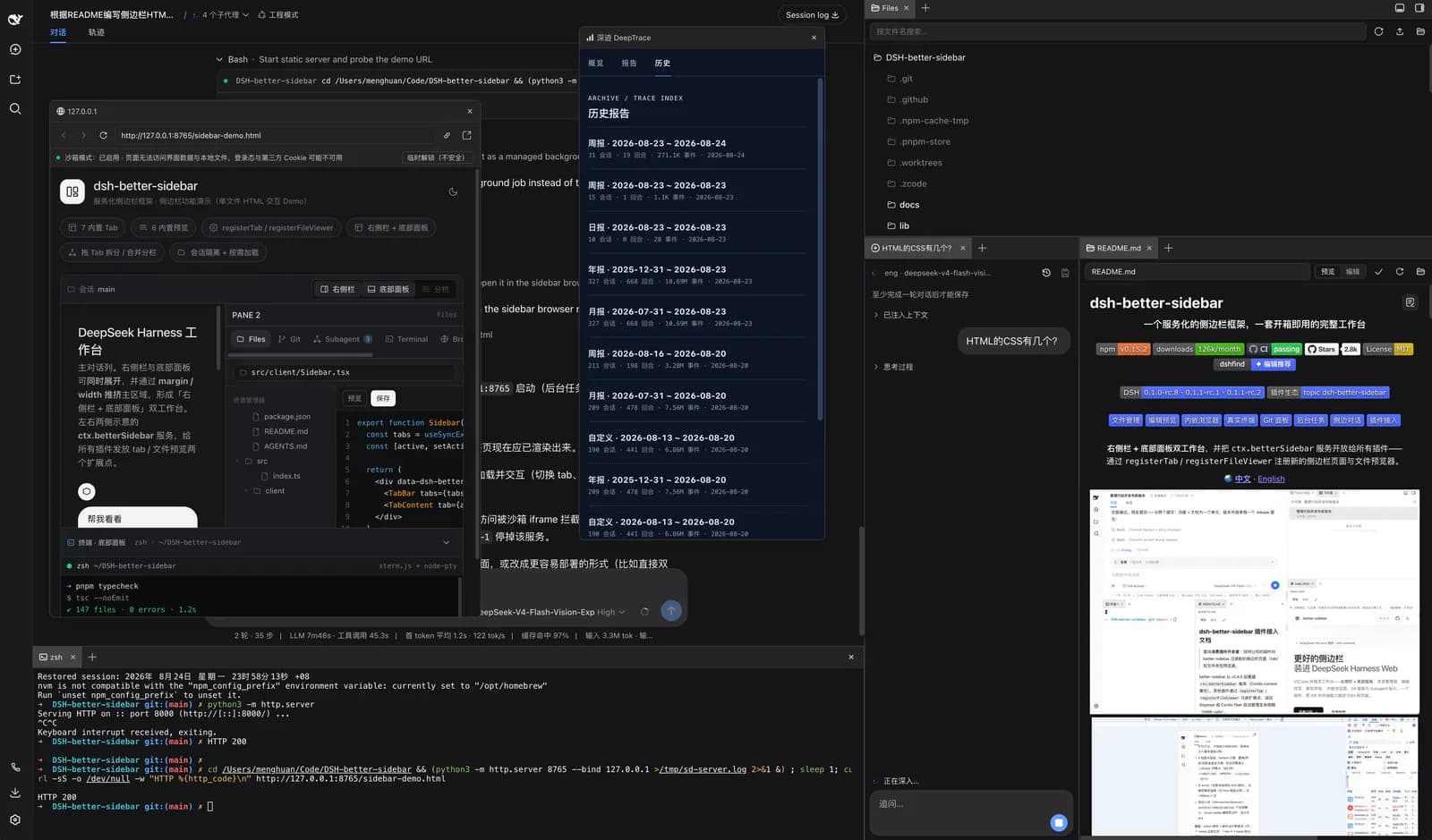
Core capabilities
File editing and previews
A lazy file tree and CodeMirror editor support images, Markdown, Mermaid, HTML and PDF. Office formats require separate ecosystem viewers.
Real terminals and Git
xterm.js with node-pty runs a real shell. Git views cover diffs, history, staging, commits and restoration, but not built-in push/pull/fetch.
Panels and side conversations
Tabs can split, move across panels or float. Beta side conversations inherit main-session context, run independently and can be saved as new sessions.
Public extension interfaces
Third-party pages and file viewers register through ctx.betterSidebar, the same service used by built-in features.
Installation and usage
Match Host and plugin versions first, install into the web profile and review any blocked node-pty build scripts before approval. Hard-refresh the browser afterward.
Let an AI Agent install it
Send this prompt to Codex, Claude Code, or another AI agent that can work with your local environment.
Install DSH-better-sidebar from https://github.com/omdsh-dev/DSH-better-sidebar . Read README, package.json and LICENSE; check DSH, Node.js and pnpm. Version 0.18.0 requires DSH 0.1.2-rc.1+. On an older documented Host, explain pinning 0.17.1 versus upgrading; do not upgrade DSH without asking. On a compatible Host run `dsh plugin --profile web add dsh-better-sidebar@latest`. If node-pty builds are blocked, list pending scripts first: the documented `pnpm approve-builds --all` approves all pending builds and requires my confirmation. Hard-refresh and verify the file tree, README preview and a blank terminal. Ask before credentials, additional permissions, overwriting files, removing old mounts or Git writes. Do not automatically disable the browser sandbox or enable model terminal tools. Report changes and actual results.- Working DSH Web; version 0.18.0 requires DSH 0.1.2-rc.1+
- Node.js ≥20 and pnpm ≥10, also satisfying any higher Host requirements
- node-pty for terminals; a system compiler toolchain may be needed if no prebuilt binary is available
dsh plugin --profile web add dsh-better-sidebar@latest- 1Match versions and profile
Check working `dsh web`, Node.js ≥20 and pnpm ≥10. Current latest 0.18.0 targets DSH 0.1.2-rc.1+; decide whether to pin 0.17.1 or upgrade an older Host.
- 2Install the matching package
For a compatible newer Host, run `dsh plugin --profile web add dsh-better-sidebar@latest`. Do not apply this latest command blindly to the older hosts identified in the README.
- 3Review blocked builds
If pnpm 11 blocks node-pty, review pending dependencies before approval. After confirmation, the README uses: ```sh cd ~/.dsh/profiles/web && pnpm approve-builds --all dsh plugin --profile web add dsh-better-sidebar@latest ``` This is Unix-like shell syntax. Native Windows can use the repository's install.ps1; paths and shell operators must match the actual environment.
- 4Refresh and inspect the workbench
Hard-refresh with Cmd/Ctrl+Shift+R, select a session and inspect the file tree and README preview. Open a blank terminal. Restart DSH after Host changes or terminal repairs; do not commit, restore files or run project scripts during this check.
Open a session and confirm the file tree and preview of a non-sensitive README. Open a blank terminal and confirm the shell starts without running modifying commands. Client-only updates need a hard refresh; Host changes or node-pty repairs also need a DSH restart.
- Older DSH hosts from 0.1.0-rc.8 through 0.1.1-rc.2 use dsh-better-sidebar@0.17.1; 0.1.2-alpha.x needs an upgrade or the documented alpha channel.
- The documented `pnpm approve-builds --all` approves every pending build; inspect the scope first.
- Do not mount the same sidebar through both registry and regular installation channels.
- HTML previews show saved content. Office previews are not built into the current core plugin.
Use cases
Inspect changes beside the conversation
Review files, diffs and terminal output beside the main session while iterating on code.
Add a specialized panel
Register a project-specific page or viewer in the existing workbench instead of building a separate sidebar layout.
Assessment
Based on the README, manifest, license and commits, this is useful when DSH is a daily development entry point. Its strengths are side-by-side files, commands and conversation, plus an extensible page service. Installation and permissions are more involved than a theme: match DSH versions, handle node-pty carefully and understand real-shell and sandbox options. We did not install it or test its terminal.
Why it may be useful
- Editing, previews, terminals and diffs in one workbench
- Third-party and built-in pages share an extension service
What to know first
- Version 0.18.0 is incompatible with older DSH hosts; match versions first
- Blocked node-pty build scripts or missing prebuilt binaries require terminal repair
- No built-in Git push/pull/fetch; Office viewers are separate plugins
- Narrow screens have no independent bottom panel; some sites forbid iframe embedding
README
DSH-better-sidebar
Overview
Add file editing and previews, real terminals, Git changes and side conversations to DeepSeek Harness Web, with right and bottom panels, floating windows and third-party extensions. Add file editing and previews, real terminals, Git changes and side conversations to DeepSeek Harness Web, with right and bottom panels, floating windows and third-party extensions.
Getting started
- Match Host and plugin versions first, install into the web profile and review any blocked node-pty build scripts before approval. Hard-refresh the browser afterward.
- The workbench includes files, terminals, Git changes, background tasks and side conversations, plus third-party tabs and viewers.
- Version 0.18.0 moves the baseline to DSH 0.1.2-rc.1+. Older hosts require a pinned plugin version or a Host upgrade.
- Open a session and confirm the file tree and preview of a non-sensitive README. Open a blank terminal and confirm the shell starts without running modifying commands. Client-only updates need a hard refresh; Host changes or node-pty repairs also need a DSH restart.
Configuration
dsh plugin --profile web add dsh-better-sidebar@latest