
dsh-genui
dsh-genui renders allowlisted interactive interfaces inside DeepSeek Harness replies, including charts, forms, quizzes, Mermaid diagrams, 3D scenes, session panels, and actions that return structured events to the model when needed.
Project overview
dsh-genui is built for people already using DSH Web. A model emits allowlisted dsh-ui JSON in its reply, and the plugin turns that description into a clickable interface. Charts, forms, quizzes, and a persistent session panel stay inside the conversation. Actions that need model involvement can return structured payloads to the current session. The plugin depends on DSH browser and session services, and installation must use the exact scoped package name.
Core capabilities
Inline interactive rendering
Converts dsh-ui fences into layouts, tables, forms, quizzes, charts, Mermaid diagrams, and 3D scenes, with completed components appearing during streamed replies.
Local state and session panels
Retains input values, answers, and submission state by session and content fingerprint, and provides a session panel that can update in place. Persistence is capped at 200 blocks.
Model action loop
Interactive components with an action can send structured events to the current session. State changes that can be completed locally do not call the model.
Validation and repair feedback
The plugin registers render_ui by default and always exposes validate_dsh_ui. It can send a limited number of same-turn correction messages when a final fence cannot render.
Standalone export
Exports a self-contained HTML artifact or GenUI JSON containing the normalized specification, safe interaction state, language, and theme.
Installation and usage
Add the exact scoped package to the DSH web profile, restart dsh web, and hard-refresh the browser. Running npm install alone does not register the plugin with DSH.
Let an AI Agent install it
Send this prompt to Codex, Claude Code, or another AI agent that can work with your local environment.
Help me install https://github.com/omdsh-dev/dsh-genui. First confirm that the DSH and Node.js versions match package.json and inspect the current web profile. Then run `dsh plugin --profile web add @changfenhuang/dsh-genui`. Keep the @changfenhuang scope and do not install the unrelated unscoped package. Restart `dsh web`, hard-refresh the browser, and verify it in a new session with the README's minimal prompt. Ask before handling credentials, granting extra permissions, downloading additional software, or overwriting configuration.- A working DeepSeek Harness within ^0.2.0-rc.1 or ^0.2.1-rc.1
- Node.js ^22.19.0 or 24 and later
- Access to restart DSH Web and inspect the browser console
dsh plugin --profile web add @changfenhuang/dsh-genui- 1Check host versions
Confirm that DSH, Node.js, and pnpm fall within the ranges declared in package.json.
- 2Install into the web profile
Run the dsh plugin command with the scoped package, restart DSH Web, and hard-refresh the page.
- 3Verify client activation
Check for the client active console message and use the README dashboard prompt to confirm that the fence becomes an interactive interface.
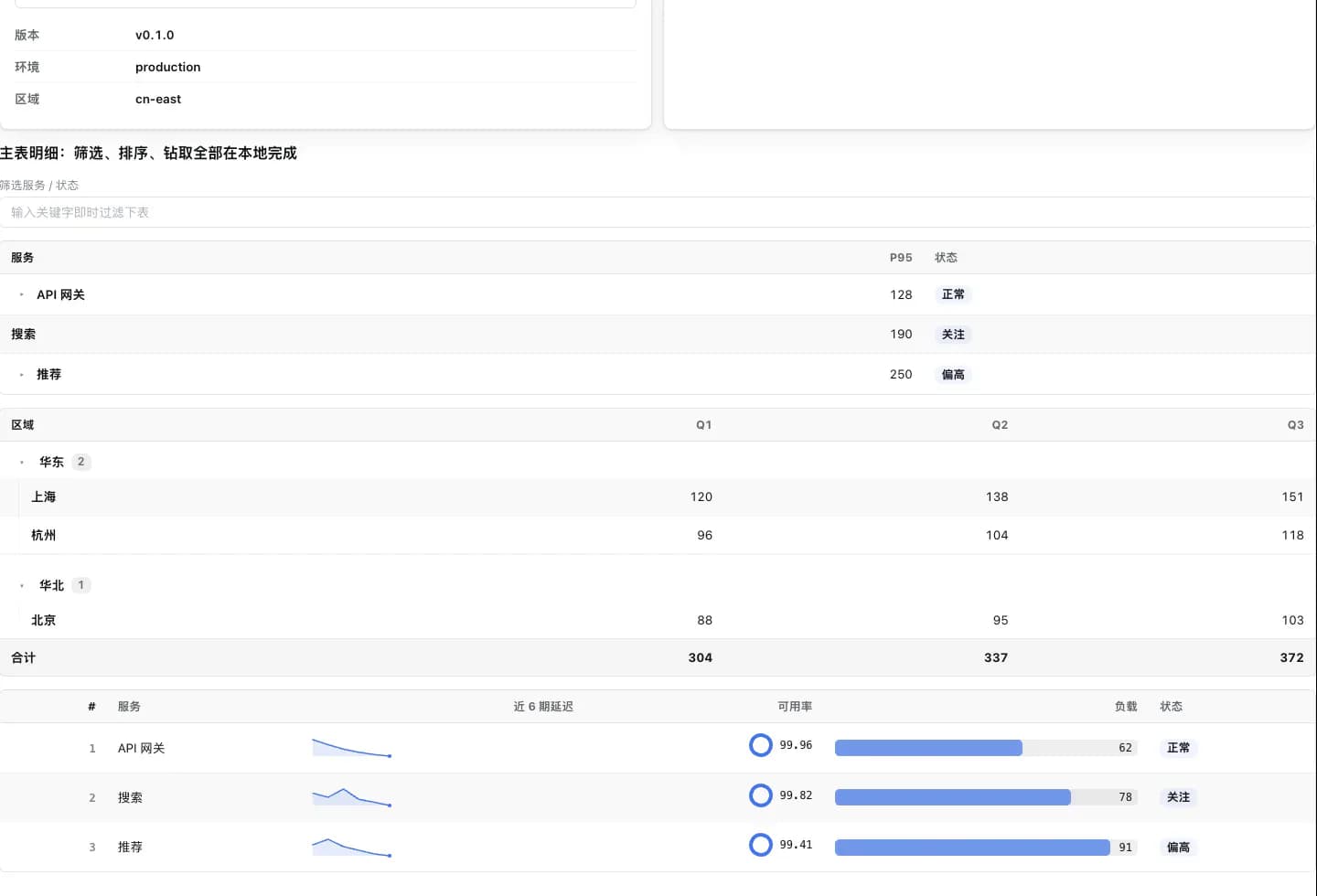
Start a new session and ask it to use dsh-ui to draw a metrics dashboard with a sortable service table. The reply should become an interface instead of a code block, and the console should include [genui] client active; fence-channel=dom.
- The exact package name is @changfenhuang/dsh-genui
- npm install alone does not register the DSH plugin
- Reload the plugin after changing render_ui or fence feedback settings
Use cases
Actionable data summaries
Put service status, metrics, or comparisons into sortable tables and charts instead of making readers scan a long text reply.
Forms inside a conversation
Collect choices and text input, then send a structured action only when the model must continue the task.
Practice and quizzes
Grade answers, show explanations, and retry locally in the browser, with an optional model-driven next step.
Assessment
The repository documents its component schema, host integration, retained state, and model action boundary in unusual detail. CI covers two DSH prerelease lines as well as tests, builds, and installation from a packed tarball. It is a strong fit for users willing to follow DSH's fast release cadence. Live output still depends on the prompt, model, and host version. This assessment is based on public evidence and did not include installation or a functional run.
Why it may be useful
- Clear installation, activation log, and minimal verification steps
- Allowlisted components and local-first interactions reduce arbitrary script risk
- CI covers compatibility, tests, builds, and packed installation
What to know first
- Depends on DSH prereleases and browser host structures
- Remote media and actions require a separate data-flow review
- No live installation or model interaction was performed for this publication
README
dsh-genui
Overview
dsh-genui renders allowlisted interactive interfaces inside DeepSeek Harness replies, including charts, forms, quizzes, Mermaid diagrams, 3D scenes, session panels, and actions that return structured events to the model when needed. GenUI for DeepSeek Harness: interactive UI components rendered inline in assistant replies via the dsh-ui fence.
Getting started
- Add the exact scoped package to the DSH web profile, restart dsh web, and hard-refresh the browser. Running npm install alone does not register the plugin with DSH.
- The plugin detects dsh-ui fences in assistant messages and mounts its own React interface inside the DSH conversation DOM.
- The component schema is allowlisted. Models cannot use it to insert arbitrary HTML or scripts, and plot expressions are parsed without eval.
- Start a new session and ask it to use dsh-ui to draw a metrics dashboard with a sortable service table. The reply should become an interface instead of a code block, and the console should include [genui] client active; fence-channel=dom.
Configuration
dsh plugin --profile web add @changfenhuang/dsh-genui