
Yingzao
Yingzao is an Agent Skill for Claude Code, Codex, and other hosts that support Skills and image-generation tools. It inspects real photos and factual boundaries, then combines a dominant reference, Chinese display-type design, and a sparse layout guide in one integrated image edit, with an optional 3×3 video storyboard after user approval.
Project overview
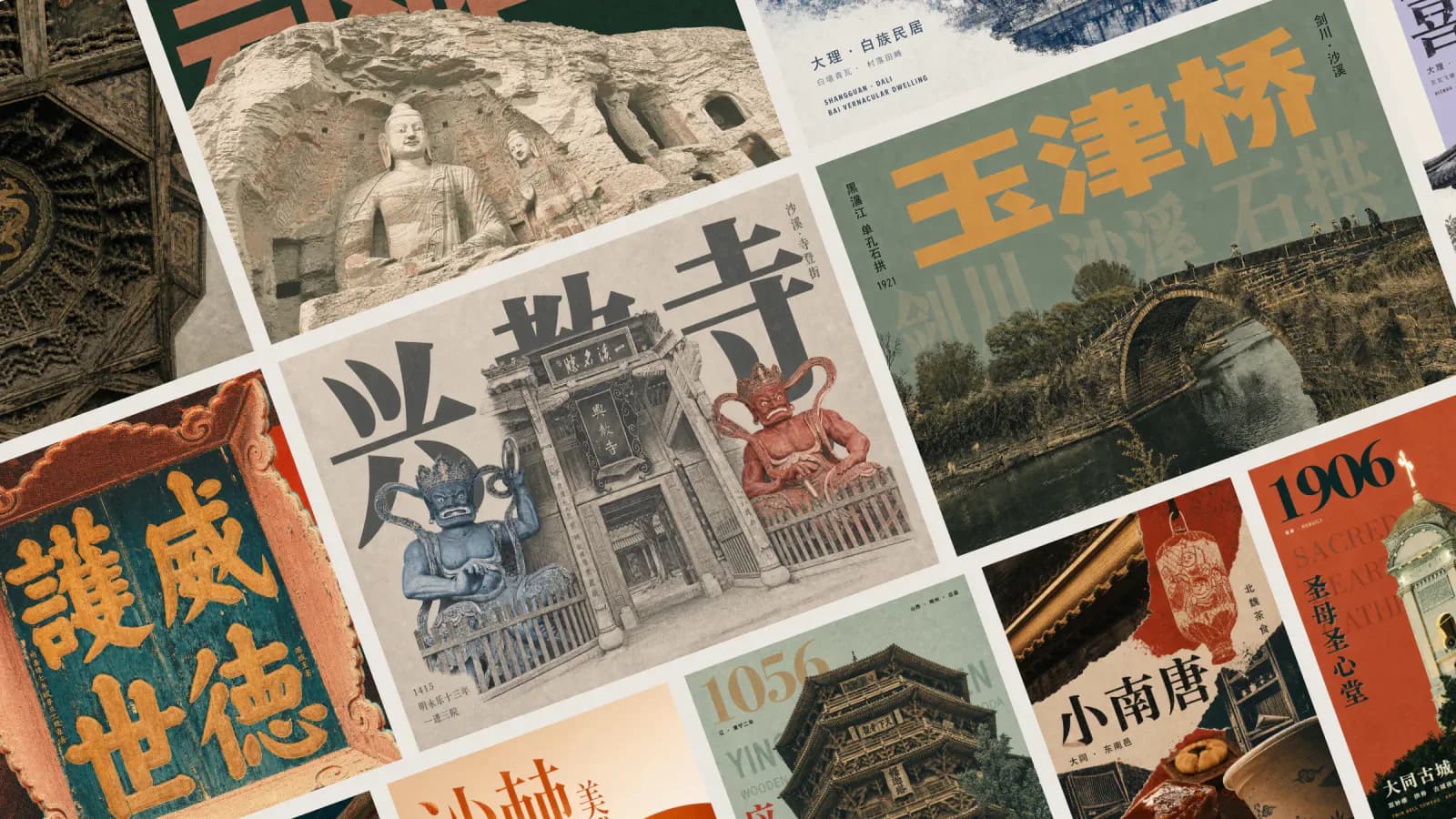
Yingzao translates real photos of Chinese architecture, historic neighborhoods, culturally rooted shops, craft objects, and local food into editorial posters. It is not a filter pack or a template that merely places type in empty space. The workflow preflights the photo and grades factual claims, freezes subject, background, typography, and interaction propositions, selects one compatible reference, creates a Chinese display-glyph brief and sparse layout guide, and then hands three visual inputs to an image model for one integrated edit. The repository also supplies deterministic gates, Python utilities, and an optional storyboard extension.
Core capabilities
Photo preflight and identity protection
Classifies frontal, upward, diagonal, framed, detail, or environmental shots, corrects at most one composition issue that materially affects the image, and protects roof slopes, eaves, plaques, silhouettes, and asymmetry.
Four-domain proposition and reference retrieval
Defines subject treatment, active background, type interaction with the real silhouette, and a non-default layout move before retrieving one compatible Recipe and reference image.
Chinese display glyphs and spatial relationships
Specifies a glyph lineage, visible features, per-character optical problems, contour actions, and immutable components, then marks shared axes, reading order, exclusions, and occlusion regions in a sparse guide.
Deterministic pre-generation gates
Checks photo fit, factual boundaries, reference compatibility, visible design domains, Recipe Token delivery, font cmap coverage, collisions, vertical reading order, and subject-over-type contracts before compiling one model handoff.
Integrated image editing and multi-photo fusion
Assigns semantic extraction, spatial reconstruction, relighting, background rebuilding, regional materials, and image-type occlusion to the image model. Multi-photo work rebuilds subjects under shared perspective, light, shadows, edges, and material language.
Readback, revisions, and storyboard extension
Reads the result once and records up to three obvious issues. Local problems edit the current image; structural problems return to the source photo. A 3×3 storyboard and video prompt are optional after approval.
Installation and usage
Use the Agent Skills CLI to install only the yingzao Skill from the repository, then prepare Python 3.10+ and the declared packages in the caller workspace. Run the dependency check and a no-model trigger test before deciding whether to provide a photo and start potentially paid generation.
Let an AI Agent install it
Send this prompt to Codex, Claude Code, or another AI agent that can work with your local environment.
Install the Yingzao Agent Skill from https://github.com/op7418/guizang-yingzao-skill. Read README.md, yingzao/SKILL.md, yingzao/requirements.txt, and yingzao/scripts/check_dependencies.py first. Confirm that the target agent supports Skills, local-image access, and an image-generation or editing tool. Run the documented command: npx skills add https://github.com/op7418/guizang-yingzao-skill --skill yingzao. Check for an existing yingzao Skill before installation and do not overwrite it without my approval. Run the dependency check in the caller project after installation. If modules are missing, explain the change and ask before creating a project-level .venv and installing requirements.txt; do not modify global Python. Finish with a trigger test that does not call an image model and confirms the input requirements, factual boundaries, and pre-generation steps. Ask before requesting additional permissions, researching online, uploading my photos, using API keys, making paid model calls, writing to a personal directory, or overwriting files.- Node.js and npx available in the terminal
- Claude Code, Codex, or another agent with Skills support, local-image access, and an image-generation or editing tool
- Python 3.10+
- Permission to create a project-level .venv and install Pillow, NumPy, opencv-python-headless, and fontTools
- A real architecture or place-based cultural photo with a known source and usage rights
- A review of the model provider, expected charges, upload behavior, and retention policy
npx skills add https://github.com/op7418/guizang-yingzao-skill --skill yingzao- 1Check the host, scope, and existing Skills
Confirm that the target agent supports Skills, local-image access, and image generation or editing. Check project and personal Skills directories for an existing yingzao folder and do not overwrite it without approval.
- 2Install the documented component
Run npx skills add https://github.com/op7418/guizang-yingzao-skill --skill yingzao. Confirm that SKILL.md, requirements.txt, references, scripts, tests, and assets were installed.
- 3Prepare a project-level Python environment
Run python3 yingzao/scripts/check_dependencies.py. If packages are missing, ask before creating a caller-workspace .venv and installing yingzao/requirements.txt; avoid changing global Python.
- 4Run a no-model trigger check
Provide a rights-cleared architecture photo and ask Yingzao to explain photo preflight, fact grading, the four-domain proposition, reference retrieval, and guide creation without calling an image model. Confirm output stays under output/yingzao/<run-id>/ in the caller workspace.
- 5Approve the model call and generation scope
Review the model, cost, upload and retention policy, poster count, dimensions, copy, and comparison choice. Submit the three fixed visual inputs only after prepare_generation.py returns READY and the user approves.
- 6Read back the result and revise from feedback
Open the poster and record the most visible problems in subject treatment, active background, glyphs, interaction, and reference mechanism without auto-regenerating. Edit local issues in place and redesign structural issues from the source photo.
Run python3 yingzao/scripts/check_dependencies.py and confirm that all four modules report OK. Then ask the agent: 'Use $yingzao to analyze this architecture photo, but do not call the image model yet; explain the required inputs and pre-generation steps.' The agent should recognize Yingzao, check photo and factual boundaries, and stop before generation.
- The documented command selects only the yingzao component; there is no need to clone the repository into a private agent directory.
- The repository documents python3. On Windows, confirm that python resolves to Python 3.10+ before adapting the command.
- When dependencies are missing, the checker stops and looks for a compatible caller-workspace .venv instead of silently modifying global Python.
- The repository has no LICENSE file. Ask the author about copying, modification, redistribution, and commercial-use rights.
- Before uploading a real photo or calling a model, review asset rights, privacy, provider policy, and cost.
Use cases
Historic-building travel covers
Preserve roofs, eaves, bracket sets, plaques, and asymmetrical silhouettes while adding Chinese display type, regional materials, and an active background in a 3:4 or other editorial format.
Cultural shops and local food
Combine night exteriors, interiors, objects, and food from one place into a scene with shared light, materials, and contact shadows instead of a simple grid.
Chinese display type interacting with a subject
Design width, weight, counters, rhythm, endings, and surface media around a real silhouette, using occlusion, shared edges, or negative-space interlock.
Poster-to-storyboard extension
After approving a poster, extend it into a 3×3 video storyboard and a model-ready video prompt without automatically generating a video.
Assessment
Based on the README, complete SKILL.md, reference system, Python gates, and official showcase, Yingzao's value is the explicit chain connecting photo facts, architectural identity, reference choice, Chinese glyph design, spatial interaction, and checks before an expensive model call. It is more than a style-word list. The dependency check and repository regression tests passed in a temporary environment, indicating maintained deterministic tooling. The final poster still depends on the host model and is not automatically regenerated, while the absence of a LICENSE file requires separate permission review before installation, redistribution, or commercial use. This review did not install the Skill or generate a poster.
Why it may be useful
- Grades facts as VERIFIED, OBSERVED, USER-CONFIRMED, or UNCONFIRMED
- Freezes a four-domain proposition before reference retrieval instead of stacking style words
- Provides explicit gates for Chinese glyphs, guide regions, occlusion, and Recipe Token delivery
- Dependency check passed; of 24 tests, 11 passed and 13 were skipped
- Reports visible issues without automatic retries, leaving cost and revision decisions to the user
- Requires approval before the optional video-storyboard extension
What to know first
- End-to-end poster quality, Chinese text accuracy, and model compatibility were not tested
- Requires an external image-generation or editing model and may involve charges and photo uploads
- Thirteen font-dependent tests were skipped because deterministic test fonts were unavailable
- Not intended for generic ecommerce ads, routine retouching, or fully deterministic type overlays
- No repository license is declared, so public access does not imply permission to copy, modify, redistribute, or use commercially
README
Yingzao
Overview
Yingzao is an Agent Skill for Claude Code, Codex, and other hosts that support Skills and image-generation tools. It inspects real photos and factual boundaries, then combines a dominant reference, Chinese display-type design, and a sparse layout guide in one integrated image edit, with an optional 3×3 video storyboard after user approval. Claude Code / Codex skill that transforms Chinese architecture, cultural places, and travel photos into art-directed editorial posters with GPT Image.
Getting started
- Use the Agent Skills CLI to install only the yingzao Skill from the repository, then prepare Python 3.10+ and the declared packages in the caller workspace. Run the dependency check and a no-model trigger test before deciding whether to provide a photo and start potentially paid generation.
- Install with npx skills add https://github.com/op7418/guizang-yingzao-skill --skill yingzao, then read SKILL.md and run the dependency check.
- Stylized work uses a corrected source photo, exactly one dominant reference, and a sparse neutral layout guide. prepare_generation.py must return READY before a model call.
- Run python3 yingzao/scripts/check_dependencies.py and confirm that all four modules report OK. Then ask the agent: 'Use $yingzao to analyze this architecture photo, but do not call the image model yet; explain the required inputs and pre-generation steps.' The agent should recognize Yingzao, check photo and factual boundaries, and stop before generation.
Configuration
npx skills add https://github.com/op7418/guizang-yingzao-skill --skill yingzao