
Serena
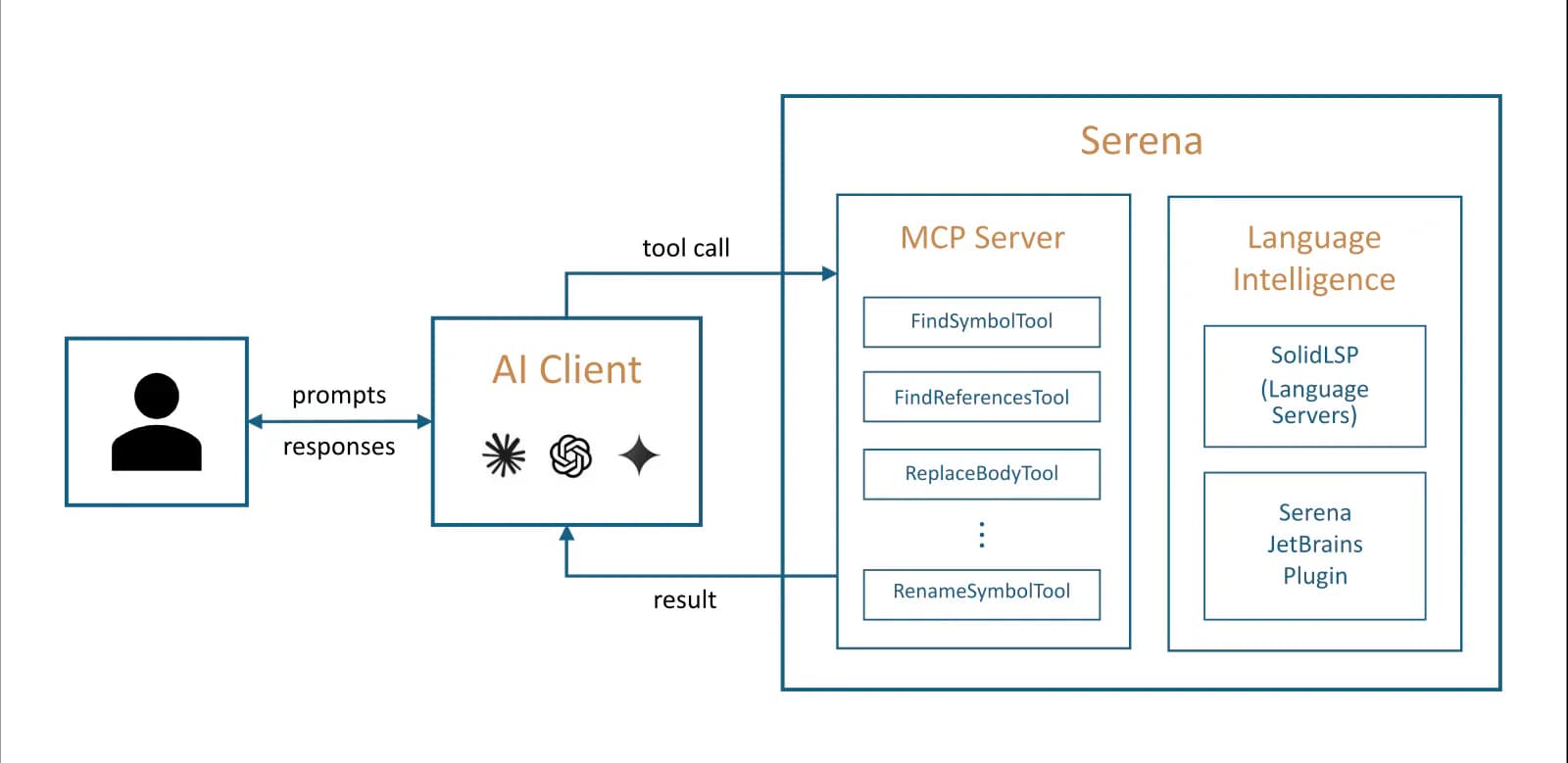
Serena is an open-source MCP toolkit for coding agents. It uses language servers or an optional JetBrains backend to provide symbol search, reference lookup, rename, and structured code editing, with official setup for Codex CLI and App.
Project overview
Serena brings IDE-like semantic code capabilities to Codex and other coding agents. Instead of relying only on text search, it uses language intelligence to understand symbols, definitions, and references, allowing an agent to locate classes and functions, trace usages, replace symbol bodies, and rename code. Official setup is available for both Codex CLI and App, making Serena useful for reducing context overhead and improving navigation and editing accuracy in larger repositories.
Core capabilities
Semantic code retrieval
Use language intelligence to find definitions, child symbols, and references by name and structure, closer to IDE navigation than plain text search.
Symbol-level editing and rename
Replace function or class bodies, insert code around symbols, and use language intelligence for rename operations.
Multi-language project analysis
The default LSP backend supports more than 40 languages and can manage multiple language servers for polyglot projects.
Project memories and configuration
Store project memories and customize behavior through contexts, modes, global configuration, and project configuration.
Multiple MCP transports
Clients commonly launch Serena over STDIO, while advanced setups can run a Streamable HTTP endpoint.
Setup and connection
Install uv, install and initialize Serena, then use the official Codex setup command. Start with a trusted version-controlled repository and verify a read-only symbol query before enabling edits.
Let an AI Agent install it
Send this prompt to Codex, Claude Code, or another AI agent that can work with your local environment.
Help me install and connect Serena MCP from https://github.com/oraios/serena. First read README.md, docs/02-usage/010_installation.md, docs/02-usage/030_clients.md, docs/02-usage/070_security.md, LICENSE, and the latest release. Confirm uv is installed, then run `uv tool install -p 3.13 serena-agent`, `serena init`, and `serena setup codex`. Do not expose Streamable HTTP beyond the local machine or replace other Codex MCP configuration. Ask before downloading additional language servers, running shell commands, modifying project files, expanding directory access, overwriting configuration, or requesting more permissions. Verify the connection with `/mcp`, activate the current project, and run one side-effect-free symbol lookup and reference query.- uv is installed and available on PATH
- Codex CLI or Codex App can use MCP
- The target repository is trusted and preferably under Git version control
uv tool install -p 3.13 serena-agent
serena init- 1Install and initialize Serena
After installing uv, run `uv tool install -p 3.13 serena-agent`, then `serena init` to verify the CLI and initialize the default language-server backend.
- 2Write the Codex MCP configuration
Run `serena setup codex`, or manually add the documented command, arguments, and 15-second startup timeout to `~/.codex/config.toml`.
- 3Connect and activate the project
Run `/mcp` in Codex. Codex App users should ask Serena to activate the current directory and read the initial project instructions.
- 4Run a minimal read-only check
Ask Codex to find a known symbol and list its references with Serena. After checking accuracy, enable edits such as replace-symbol-body or rename as needed.
After `serena setup codex`, restart or reconnect Codex and run `/mcp` to confirm Serena is connected. In Codex App, first ask it to activate the current directory using Serena, then find one known symbol and its references and compare the results with the project.
- Codex App usually needs explicit current-directory activation
- Set SERENA_USAGE_REPORTING=false to disable startup usage statistics
- Use a container or another sandbox in security-sensitive environments
Use cases
Large-repository navigation
Use symbol and reference queries to locate relevant implementation without sending whole files or large search outputs to the model.
Cross-file refactoring
Inspect symbols and call relationships before replacing a symbol body or renaming, then review the result with Git diff and tests.
Long-lived project context
Store architecture, conventions, and common operations as project memories for future agent sessions.
Assessment
Serena's value is not another text-search layer, but language-server-backed symbol understanding exposed to coding agents over MCP. Official Codex setup, support for more than 40 languages, and active maintenance make it compelling for complex repositories. The tradeoff is a broad local permission surface, possible dependency downloads, and extra risk in HTTP mode, so trusted repositories, version control, a minimal tool set, and sandboxing matter. This assessment used first-party documentation and repository inspection without installing Serena.
Why it may be useful
- Official setup for Codex CLI and App
- Symbol search, references, and structured edits are useful in large repositories
- MIT-licensed backend, more than 40 languages, and recent maintenance
What to know first
- File modification and command execution create a broad local permission surface
- Some languages require extra environments or language-server dependencies
- No installation or live functional test was performed for this entry
README
Serena
Overview
Serena is an open-source MCP toolkit for coding agents. It uses language servers or an optional JetBrains backend to provide symbol search, reference lookup, rename, and structured code editing, with official setup for Codex CLI and App. A powerful coding agent toolkit providing semantic retrieval and editing capabilities (MCP server & other integrations)
Getting started
- Install uv, install and initialize Serena, then use the official Codex setup command. Start with a trusted version-controlled repository and verify a read-only symbol query before enabling edits.
- Serena is a coding-agent toolkit rather than an embedded LLM. It exposes tools over MCP to Codex, Claude Code, VS Code, Cursor, JetBrains, and other clients.
- The default free and open-source LSP backend supports more than 40 languages. The optional Serena JetBrains Plugin is paid and offers a free trial.
- After `serena setup codex`, restart or reconnect Codex and run `/mcp` to confirm Serena is connected. In Codex App, first ask it to activate the current directory using Serena, then find one known symbol and its references and compare the results with the project.
Configuration
uv tool install -p 3.13 serena-agent
serena init