
edgeone-skill-scanner
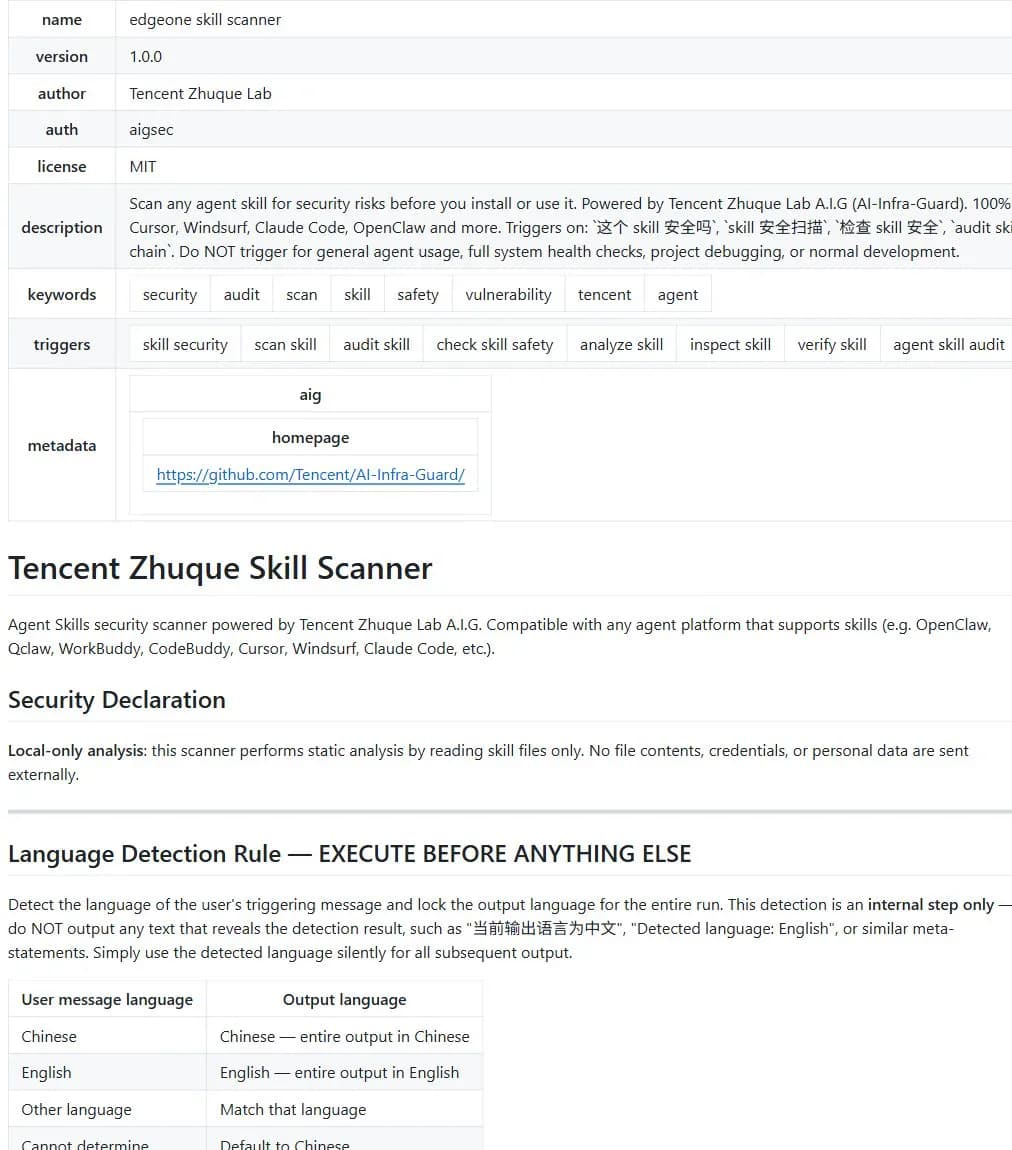
A Tencent Zhuque Lab Skill that statically reads Skill definitions, scripts, manifests, and configuration to identify permission abuse, privacy access, dangerous operations, hardcoded credentials, and prompt override behavior without executing the scanned code.
Project overview
edgeone-skill-scanner is a single-file local static auditor from Tencent Zhuque Lab. It can review one Skill or enumerate all Skills on a supported platform. It reads definitions, executable files, manifests, and configuration without running the scanned code, then reports reachable permission abuse, privacy access, credential exfiltration, destructive behavior, persistence, and prompt override risks.
Core capabilities
Single-Skill audit
Locates one Skill and reads only the definition, executable files, manifests, and configuration needed for review.
Full-platform inventory
Enumerates built-in and user-installed Skills and summarizes their source and verdict.
Capability versus abuse
Reviews file, network, command, credential, and privacy access without treating every sensitive API as malicious by default.
Fixed-format report
Produces safe, needs-attention, or risk-detected results with evidence, impact, and actionable advice.
Installation and usage
The repository does not document a standalone CLI command for this component. Ask an agent to copy skills/edgeone-skill-scanner into the actual Skills directory and preserve the component name. The current component contains one SKILL.md file.
Let an AI Agent install it
Send this prompt to Codex, Claude Code, or another AI agent that can work with your local environment.
Install edgeone-skill-scanner from https://github.com/Tencent/AI-Infra-Guard. Confirm the repository owner is Tencent and read skills/edgeone-skill-scanner/SKILL.md. Verify name edgeone skill scanner, version 1.0.0, and author Tencent Zhuque Lab. Copy the complete skills/edgeone-skill-scanner directory into the actual Skills directory and preserve the folder name. Reload the client and report the path and version. Do not scan my whole system or unrelated private files. Ask before overwriting, using elevated privileges, installing tools, or reading outside the current Skills scope. For the first check, scan only a test Skill I explicitly name, use static reads only, and never execute the scanned Skill's code.- An Agent Skills-compatible client
- An agent that can read GitHub
- Write access to the active Skills directory
帮我安装 Skill edgeone-skill-scanner,项目地址:https://github.com/Tencent/AI-Infra-Guard/tree/main/skills/edgeone-skill-scanner- 1Install the component directory
Ask an agent to copy only skills/edgeone-skill-scanner into the active Skills directory.
- 2Reload and confirm the trigger
Start a fresh session and ask whether a named Skill is safe.
- 3Begin with one test Skill
Point the scanner at a temporary test directory before using the full-platform mode.
- 4Confirm the read-only boundary
Ask the agent to list the files it will read and verify that no target script is executed.
- 5Rescan after updates
A previous static result does not cover future commits or runtime behavior.
Reload the client and confirm the scanner can be triggered. For the first run, point it at one simple test Skill in a temporary directory and verify that it reads files without executing scripts.
Use cases
Review before installation
Understand file, command, network, and credential access before granting a Skill permissions.
Inventory local Agent Skills
Summarize built-in and user-installed Skills and prioritize risks.
Audit a Skill update
Check whether new scripts, dependencies, or network targets exceed the earlier declaration.
Assessment
This assessment is based on the complete component Skill, repository README, and licenses. Its strongest design choice is to separate sensitive capability from abuse and to forbid execution of scanned code. The component is only one rules file and ships no scripts. However, full-platform mode reads broad local Skill directories, and static analysis cannot observe runtime behavior or future updates. It is a first-pass review, not an absolute safety certificate. No local Skills were scanned for this catalog entry.
Why it may be useful
- Local static reads by default
- Separates sensitive capability from abuse
- Supports one Skill or a full inventory
- Reports are understandable to non-specialists
What to know first
- Cannot cover runtime behavior or future updates
- Platform directory conventions can change
- Full-platform mode has broad read scope
- Installation and function remain untested here
README
edgeone-skill-scanner
Overview
A Tencent Zhuque Lab Skill that statically reads Skill definitions, scripts, manifests, and configuration to identify permission abuse, privacy access, dangerous operations, hardcoded credentials, and prompt override behavior without executing the scanned code. A local static security check for Agent Skills before installation or use.
Getting started
- The repository does not document a standalone CLI command for this component. Ask an agent to copy skills/edgeone-skill-scanner into the actual Skills directory and preserve the component name. The current component contains one SKILL.md file.
- The component has no separate README; its complete workflow is in SKILL.md.
- It performs static reads only and never executes scanned code.
- Reload the client and confirm the scanner can be triggered. For the first run, point it at one simple test Skill in a temporary directory and verify that it reads files without executing scripts.
Configuration
帮我安装 Skill edgeone-skill-scanner,项目地址:https://github.com/Tencent/AI-Infra-Guard/tree/main/skills/edgeone-skill-scanner