
video-shotcraft
video-shotcraft is a product-video production Skill for Claude Code and Codex, with 152 shot recipe cards, 209 motion previews, Remotion implementations, the Ink Press template, and sound-design assets.
Project overview
video-shotcraft organizes Claude Code or Codex into a product-video production workflow. It is more than a single prompt: the repository connects product inspection, collaboration-mode selection, shot mapping, Remotion implementation, sound design, beat sync, and final review, with reusable shot cards, motion previews, and a complete template. This page is based on public GitHub files and does not present repository claims as our own render tests.
Core capabilities
Three full-video collaboration modes
The Skill separates direct Ink Press reuse, autonomous creation, and guided co-creation. If no mode is selected, it first performs a minimal read-only product inspection and explains the tradeoffs.
Shot cards and reference implementations
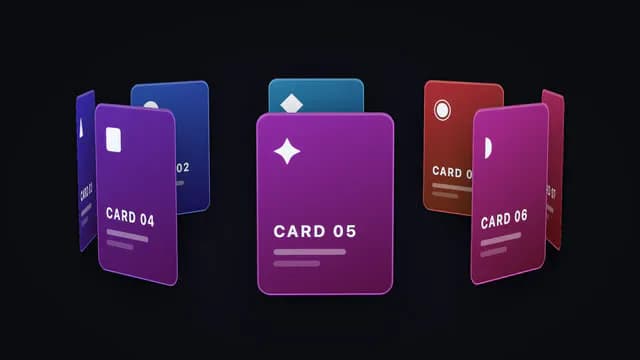
references/shots/ contains 152 shot cards, demos/ contains matching Remotion TSX implementations, and the Gallery presents 209 searchable and filterable motion previews.
Complete Ink Press template
template/ provides a 36.2-second, 1920×1080, 30fps, 10-shot product-promo project whose screenshots, copy, and branding can be replaced.
Sound design, beat sync, and QA
The repository includes BGM, 149 SFX, beat-analysis guidance, visual acceptance rules, and final-review requirements that connect sound, transitions, and camera movement.
JianYing project export
A finished film can be split into shots and written into an editable JianYing draft with captions, SFX, and BGM. The README documents verification with JianYing Pro 11.2 on macOS, while Windows is unverified.
Installation and usage
Prefer the README's Skills CLI command for Claude Code or Codex. After installation, confirm discovery and run a read-only product inspection on a nonsensitive sample before installing rendering dependencies.
Let an AI Agent install it
Send this prompt to Codex, Claude Code, or another AI agent that can work with your local environment.
Help me install video-shotcraft from https://github.com/Vincentwei1021/video-shotcraft. Read README.md, SKILL.md, LICENSE, template/package.json, and assets/audio/ATTRIBUTION.md first, then verify host and licensing boundaries. Run the documented command `npx skills add Vincentwei1021/video-shotcraft`. Ask before replacing an existing Skill, installing Node, Remotion, or browser components, creating links, overwriting files, reading project source, starting a server, or capturing pages. After installation, use only a nonsensitive sample for a minimal read-only product inspection and confirm that the three creation modes are available. Do not render, upload, or publish a video without approval.- A Node.js environment that can run npx
- Claude Code, Codex, or another coding agent with Agent Skills support
- Remotion 4.0.484, React 19.2.7, and the other dependencies declared by template/package.json for rendering
- A test page or screenshots without customer, personal, internal, secret, or live data
npx skills add Vincentwei1021/video-shotcraft- 1Review host, data, and license boundaries
Confirm that Claude Code or Codex can load Agent Skills and prepare a nonsensitive test page. Review the repository license, audio attribution, and Remotion's separate terms before requesting additional permissions, browser downloads, file replacement, or public publishing.
- 2Run the documented installation
Run this command in a terminal available to the target host: npx skills add Vincentwei1021/video-shotcraft If a Skill with the same name exists, compare its source and version before replacing anything.
- 3Run a minimal read-only check
Restart or refresh the agent and ask it to inspect a nonsensitive sample frontend with video-shotcraft. Confirm that it explains Ink Press, autonomous creation, and guided co-creation, including its recommendation and material risks, without modifying the project or rendering.
- 4Choose a mode and prepare rendering
Continue with the corresponding documentation only after the user selects a mode. For template rendering, install the locked dependencies in template/ and verify the Remotion environment with a minimal still or short clip first.
- 5Use owned media and complete acceptance
Replace demonstration screenshots and copy, redact page data, and review every shot, beat, sound, and caption. Confirm product media, trademark, audio, and Remotion rights before public release.
Restart or refresh the agent, confirm that it discovers video-shotcraft, and ask it to perform a minimal read-only inspection of a nonsensitive sample frontend. It should explain Ink Press, autonomous creation, and guided co-creation with their tradeoffs. No render was executed for this page.
- On Windows, replace the README's ln -s example with a supported local link or copy method
- Template rendering executes React and Node code and installs dependencies, so review scripts and lockfiles first
- Review target screenshots, customer data, trademarks, and audio rights separately before publishing
- Check current Remotion and Mixkit terms for commercial use instead of relying only on the repository license
Use cases
Web or desktop product promo
Use real page captures, 2.5D camera moves, and shot cards to produce a launch, marketing, or feature video.
Single feature motion shot
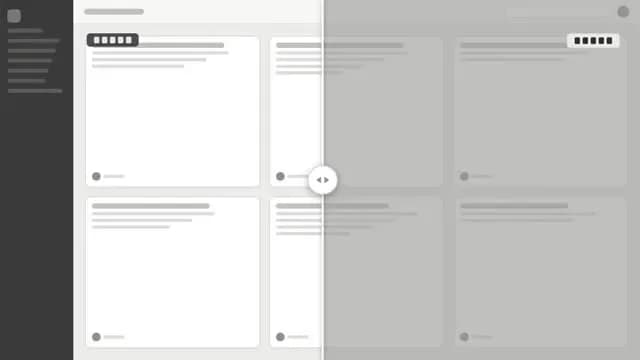
Choose a card such as spotlight-hero-card or before-after-slider-scrub and adapt its recipe and TSX demo to owned media.
Fast Ink Press adaptation
Keep the template's 10-shot structure and pacing while replacing demonstration material with the target product's screenshots, copy, and brand design.
JianYing finishing pass
Export a delivered film into a JianYing draft and continue editing shot speed, captions, color, and separate audio tracks.
Assessment
Based on the README, SKILL.md, template project, and repository structure, video-shotcraft's value is that it combines shot language, Remotion code, sound design, and acceptance rules into one agent workflow instead of offering only prompts. Its limitations center on rendering dependencies, media privacy, and layered licensing. This assessment uses public material without installation or a real render.
Why it may be useful
- 152 shot cards and 209 motion previews make shot selection concrete instead of purely descriptive
- Ink Press provides a complete runnable template with documented shot count, duration, resolution, and dependencies
- The Skill covers product inspection, storyboarding, implementation, sound design, beat sync, and final QA
- The README documents headless-rendering issues, redaction, platform-specific JianYing verification, and third-party licensing
What to know first
- The primary focus is web and desktop product promos; other formats need a new visual and narrative plan
- Installation, browser capture, Remotion rendering, and output quality were not tested for this catalog entry
- The README documents JianYing Pro 11.2 verification on macOS only; Windows export is unverified
- Headless Linux rendering may require reduced concurrency and a user-provided chrome-headless-shell
- Commercial use requires a separate review of current Remotion and bundled-audio terms
README
video-shotcraft
Overview
video-shotcraft is a product-video production Skill for Claude Code and Codex, with 152 shot recipe cards, 209 motion previews, Remotion implementations, the Ink Press template, and sound-design assets. AI video skill for Claude Code & Codex — cinematic product videos with Remotion: 152 shot recipe cards, 209 motion previews, a production-ready template
Getting started
- Prefer the README's Skills CLI command for Claude Code or Codex. After installation, confirm discovery and run a read-only product inspection on a nonsensitive sample before installing rendering dependencies.
- Project focus: a cinematic product-video planning, Remotion implementation, sound-design, and review workflow for Claude Code and Codex.
- Published contents: 152 shot recipe cards, 209 motion previews, corresponding TSX demos, a 36.2-second Ink Press template, and 149 SFX organized into 16 categories.
- Restart or refresh the agent, confirm that it discovers video-shotcraft, and ask it to perform a minimal read-only inspection of a nonsensitive sample frontend. It should explain Ink Press, autonomous creation, and guided co-creation with their tradeoffs. No render was executed for this page.
Configuration
npx skills add Vincentwei1021/video-shotcraft