
book-to-skill
Convert technical books, PDFs, document folders, and source collections into structured Agent Skills that Codex, Claude Code, GitHub Copilot CLI, and Amp can load on demand.
Project overview
book-to-skill turns technical books, PDFs, document folders, or multiple sources into an installable Agent Skill. A local Python extractor produces clean text and chapter metadata, then the agent follows the Skill specification to create a master SKILL.md, chapter files, a glossary, pattern notes, and a cheatsheet. Codex, Claude Code, GitHub Copilot CLI, and Amp can load only the relevant chapter when a question calls for it.

Core capabilities
Multi-format extraction
The Python extractor handles PDF, EPUB, DOCX, HTML, RTF, MOBI, Markdown, plain text, and related formats with the first suitable installed parser.
Structured Skill generation
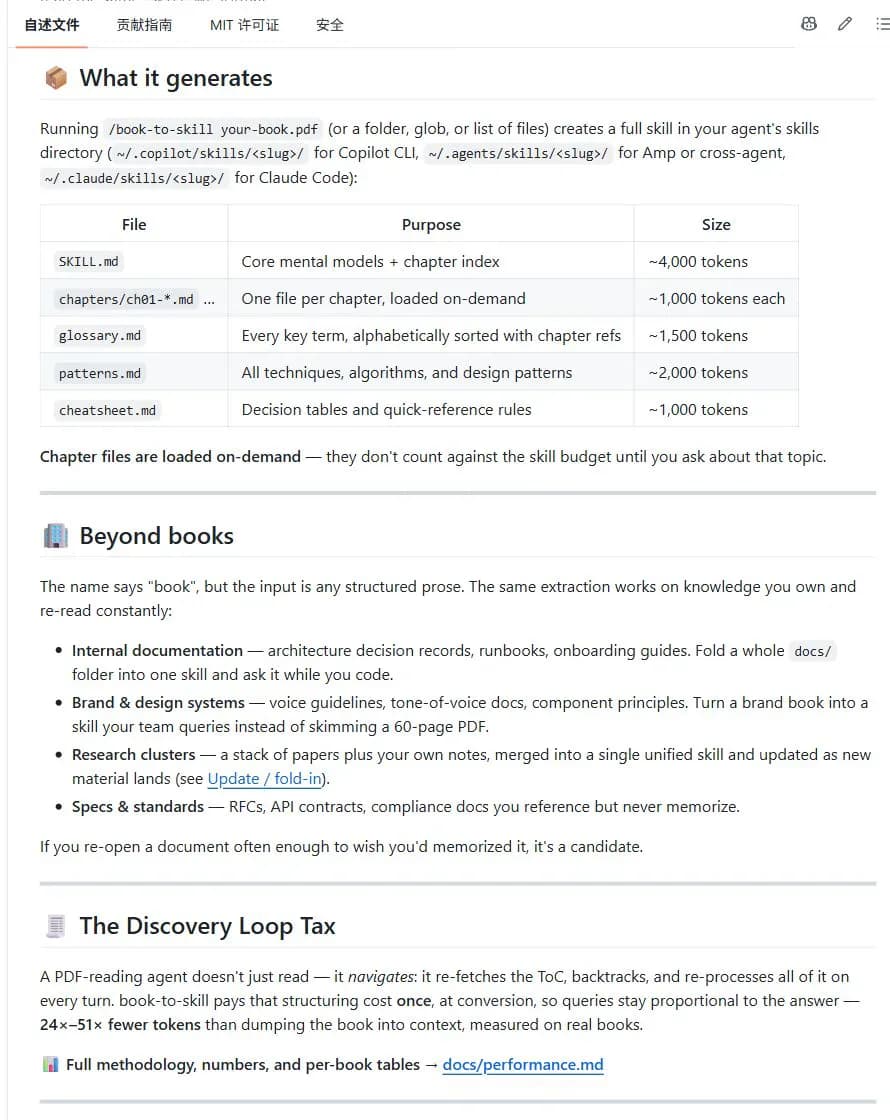
Output includes a master SKILL.md, chapter files, a glossary, patterns, and a cheatsheet, with chapters loaded only when a query needs them.
Analyze, convert, and fold in updates
The Skill defines full conversion, analyze-only, generation from prior analysis, and update or fold-in workflows.
Cross-agent use
The same open Agent Skills structure can be installed for Codex, Claude Code, GitHub Copilot CLI, and Amp.
Installation and usage
Install the complete Agent Skill with the skills CLI, then check the Python extraction environment. Use a small Markdown or plain-text file you are allowed to process for the first conversion.
Let an AI Agent install it
Send this prompt to Codex, Claude Code, or another AI agent that can work with your local environment.
Install and verify book-to-skill from https://github.com/virgiliojr94/book-to-skill. Read README.md, docs/install.md, docs/usage.md, SECURITY-NOTICE.md, and SKILL.md first, and confirm that the repository owner is virgiliojr94. Install the complete Agent Skill with npx skills add virgiliojr94/book-to-skill and select my current agent. Find the actual installation directory, run python3 scripts/extract.py --check, and report the Python version and parser status. Ask me for a small document I am authorized to process, run /book-to-skill <document-path>, and verify the generated SKILL.md, chapter files, and supporting indexes. Ask before installing system dependencies, reading private material, sending text to a cloud model, overwriting a Skill, using the gh CLI, or making generated content public. Do not install an unofficial repository with the same name.- Node.js and npx
- Python 3.9 or newer
- An agent allowed to read the selected document, run Python, and write to a Skills directory
- A local test document you are permitted to process
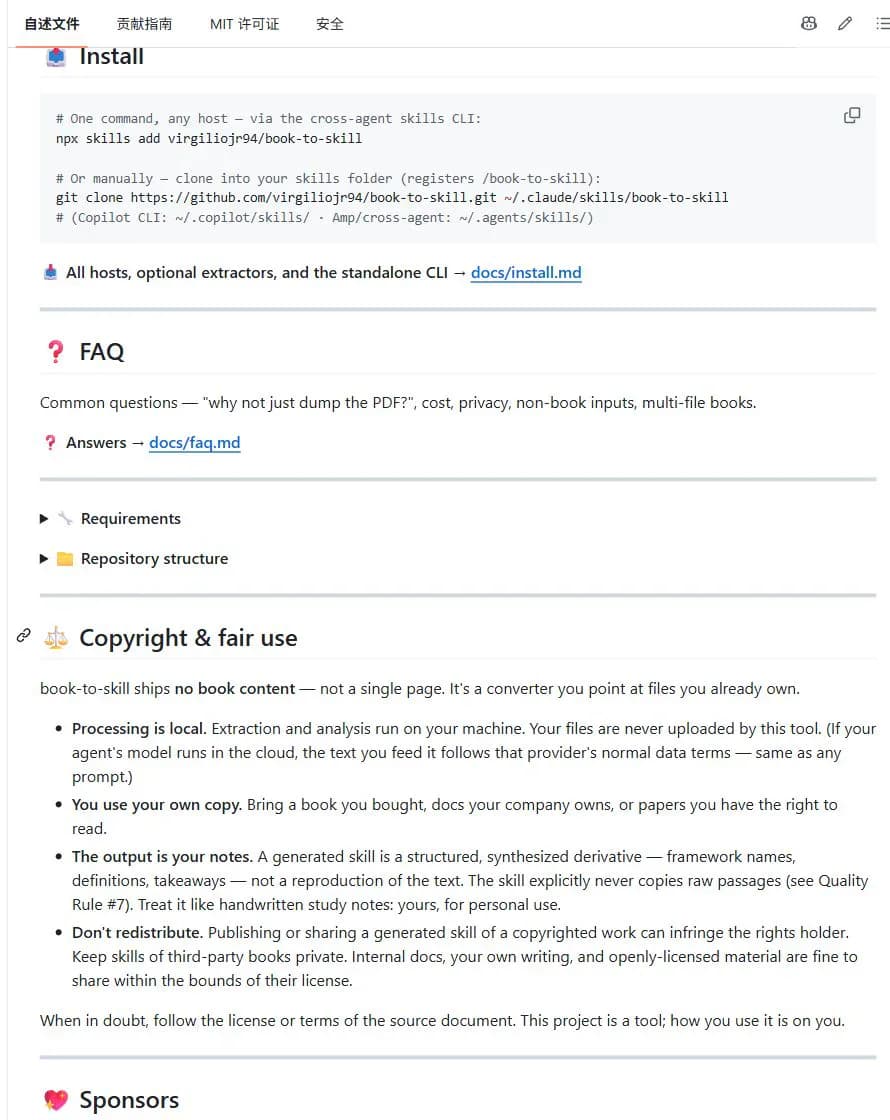
npx skills add virgiliojr94/book-to-skill- 1Install the complete Agent Skill
Run the official command below and select Codex, Claude Code, Copilot CLI, or Amp in the installer. npx skills add virgiliojr94/book-to-skill
- 2Check document extractors
From the installation directory, run python3 scripts/extract.py --check. The command lists the parser available for each format and the exact dependency command when one is missing.
- 3Convert the first source
Prepare a small Markdown, text, or PDF file you are authorized to process, then run /book-to-skill <document-path> <optional-skill-name> in the agent session.
- 4Verify the generated structure
Check the new Skill directory for the master SKILL.md, chapters, glossary.md, patterns.md, and cheatsheet.md, then query one topic with /<new-skill-name> <topic>.
- 5Handle OCR and copyright limits
Run ocrmypdf input.pdf output.pdf before converting a scanned PDF. Keep derivatives from third-party copyrighted sources private unless you have permission to publish them.
From the installed book-to-skill directory, run python3 scripts/extract.py --check and confirm that it reports parser availability. Then run /book-to-skill <file-path> on a small Markdown file and verify that the new Skill directory contains SKILL.md plus chapter and supporting files such as glossary.md, patterns.md, or cheatsheet.md.
- Use only the official virgiliojr94/book-to-skill repository
- The pip package installs the standalone extractor and does not register the /book-to-skill Agent Skill
- Scanned PDFs need OCR before conversion
- Keep Skills derived from third-party copyrighted works private
Use cases
Bring a technical book into development work
Convert a frequently referenced engineering book and load only the relevant framework, chapter, or decision rule while coding.
Organize team documentation and runbooks
Combine a docs folder, architecture decisions, onboarding guides, or runbooks into a queryable team Skill.
Merge papers and personal notes
Build one knowledge Skill from papers and exported notes, then fold new sources into the existing structure.
Convert brand and design guidance
Turn authorized voice guidelines, component principles, and design-system documentation into agent-readable rules.
Assessment
This assessment is based on the repository README, installation and usage documentation, root Skill, Python project configuration, license, releases, and security notice. The project has clear installation paths, broad input support, and an output structure designed for selective loading. Its documentation also describes OCR, model-provider data terms, and copyright boundaries. Actual cost varies with document length, extraction mode, and model choice; technical PDFs may need heavier dependencies such as Docling, and full conversion requires local file and command permissions. This catalog review did not perform a full conversion.
Why it may be useful
- Supports common document formats with a clear dependency check
- Stores generated knowledge in layers that can be loaded on demand
- Can fold new sources into an existing Skill
- Documents privacy, copyright, and publishing boundaries
What to know first
- Scanned PDFs need OCR first
- High-fidelity technical document extraction may add heavy dependencies
- Full generation depends on an agent model and consumes its usage allowance
- Users must determine the license and redistribution rights of source material
README
book-to-skill
Overview
Convert technical books, PDFs, document folders, and source collections into structured Agent Skills that Codex, Claude Code, GitHub Copilot CLI, and Amp can load on demand. Turn technical books and PDFs into Claude Code skills that are ready to study, reference, and use during work.
Getting started
- Install the complete Agent Skill with the skills CLI, then check the Python extraction environment. Use a small Markdown or plain-text file you are allowed to process for the first conversion.
- The README, installation guide, usage guide, and root SKILL.md show that the converter accepts more than books. Inputs include PDF, EPUB, DOCX, HTML, Markdown, plain text, RTF, MOBI, and document folders.
- Generated content is layered by purpose. The master SKILL.md holds core frameworks and the chapter index, while chapters, glossary.md, patterns.md, and cheatsheet.md provide on-demand detail.
- From the installed book-to-skill directory, run python3 scripts/extract.py --check and confirm that it reports parser availability. Then run /book-to-skill <file-path> on a small Markdown file and verify that the new Skill directory contains SKILL.md plus chapter and supporting files such as glossary.md, patterns.md, or cheatsheet.md.
Configuration
npx skills add virgiliojr94/book-to-skill