
WeShop for DSH
Open the WeShop infinite canvas inside DeepSeek Harness so agents can generate and organize product visuals while synchronizing work between the session and canvas.
Project overview
Open the WeShop infinite canvas inside DeepSeek Harness so agents can generate and organize product visuals while synchronizing work between the session and canvas.
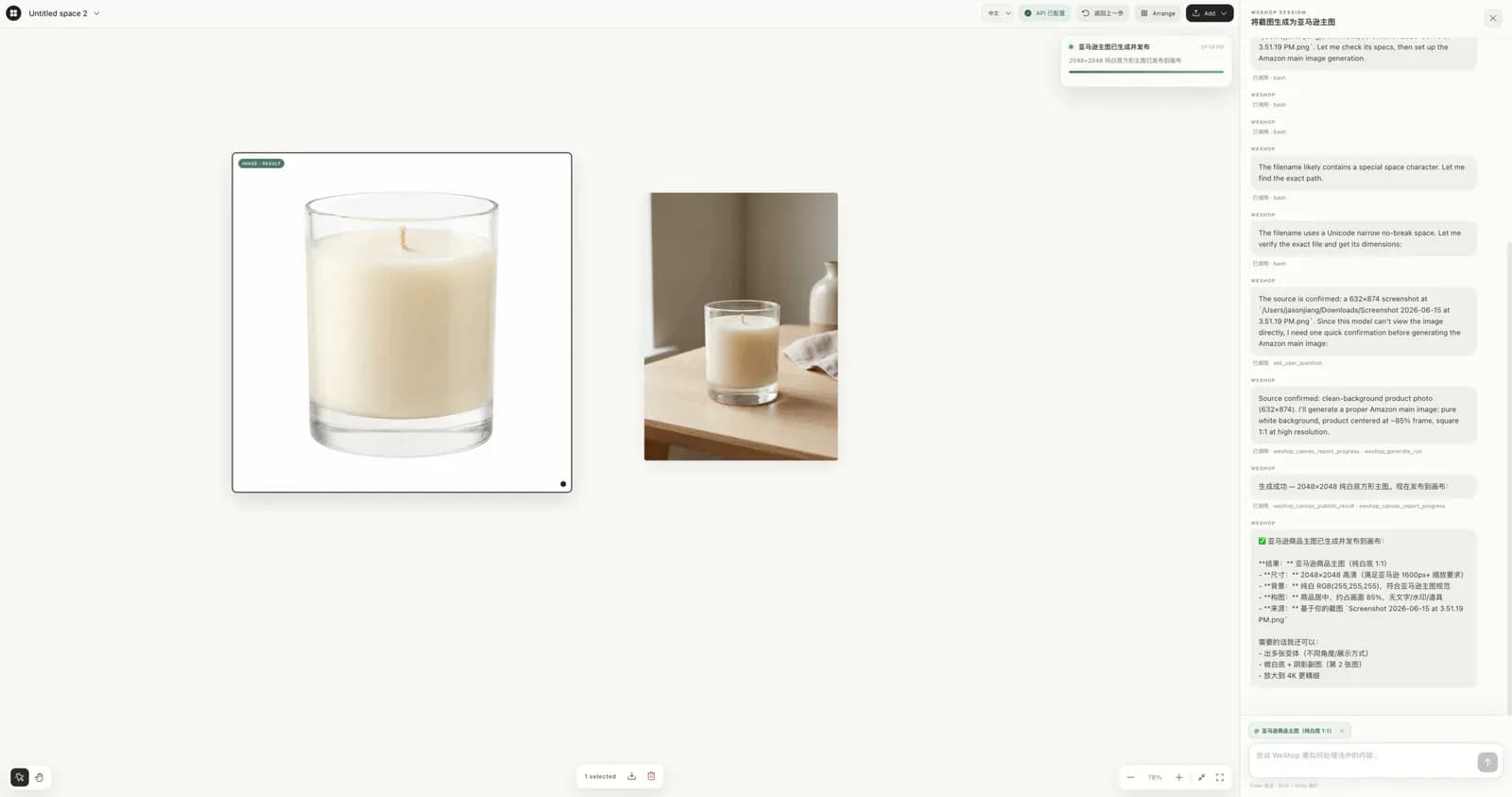
Core capabilities
Open an infinite canvas inside DSH
Open an infinite canvas inside DSH. This capability is documented in the repository README and still requires verification against the target DSH version and profile.
Use WeShop creative capabilities for visual assets
Use WeShop creative capabilities for visual assets. This capability is documented in the repository README and still requires verification against the target DSH version and profile.
Organize and export results from the canvas
Organize and export results from the canvas. This capability is documented in the repository README and still requires verification against the target DSH version and profile.
Connect sessions through the WeShop Canvas preset
Connect sessions through the WeShop Canvas preset. This capability is documented in the repository README and still requires verification against the target DSH version and profile.
Installation and usage
Install in DeepSeek Harness, reload the target environment as documented, and verify it with a low-risk scenario.
Let an AI Agent install it
Send this prompt to Codex, Claude Code, or another AI agent that can work with your local environment.
Help me install WeShop for DSH from https://github.com/weshopai/weshop-dsh-plugin. Read the README, license, and installation files first. Confirm the current DeepSeek Harness version, target profile, and required dependencies. Use the repository's current command `npx @deepseek-ai/dsh plugin --profile web add weshop-dsh-plugin`. Explain the profile, paths, and permissions that will change before running it. Follow the repository verification steps and report commands, changed locations, and visible results. Ask before requesting credentials, enabling extra network access or build scripts, overwriting files, or expanding permissions.- DeepSeek Harness 0.1.0-rc.8 or later
- Node.js and a working dsh command
- WeShop API access and quota for generation services
npx @deepseek-ai/dsh plugin --profile web add weshop-dsh-plugin- 1Check the environment and target profile
DeepSeek Harness 0.1.0-rc.8 or later; Node.js and a working dsh command; WeShop API access and quota for generation services. Record the current configuration and installed plugins before changing anything.
- 2Run the current repository command
Run the following command. `npx @deepseek-ai/dsh plugin --profile web add weshop-dsh-plugin` Stop and ask before enabling build scripts, providing credentials, or overwriting files.
- 3Reload and verify
Start `npx @deepseek-ai/dsh web`, create or open a task, select the WeShop Canvas preset, and confirm that the canvas and basic controls are visible.
Start `npx @deepseek-ai/dsh web`, create or open a task, select the WeShop Canvas preset, and confirm that the canvas and basic controls are visible.
- Image generation depends on WeShop API access and quota
- Sensitive product images enter the configured service workflow
- Users must manage and back up browser-local canvas data
Use cases
Generate product-visual variants in batches
Start with a minimal WeShop for DSH scope in this scenario, then expand only after checking output, permissions, and compatibility.
Organize marketing assets on an infinite canvas
Start with a minimal WeShop for DSH scope in this scenario, then expand only after checking output, permissions, and compatibility.
Move creative work from a session into a visual workspace
Start with a minimal WeShop for DSH scope in this scenario, then expand only after checking output, permissions, and compatibility.
Assessment
This assessment is based on the repository README, installation instructions, license, and maintenance metadata. Combines generation, organization, and export on one canvas; Native plugin setup can create and enable the web profile; Stores canvas data locally in the browser. Image generation depends on WeShop API access and quota; Sensitive product images enter the configured service workflow; Users must manage and back up browser-local canvas data. No local installation or long-term use is claimed.
Why it may be useful
- Combines generation, organization, and export on one canvas
- Native plugin setup can create and enable the web profile
- Stores canvas data locally in the browser
What to know first
- Image generation depends on WeShop API access and quota
- Sensitive product images enter the configured service workflow
- Users must manage and back up browser-local canvas data
README
WeShop for DSH
Overview
Open the WeShop infinite canvas inside DeepSeek Harness so agents can generate and organize product visuals while synchronizing work between the session and canvas. Open the WeShop infinite canvas inside DeepSeek Harness so agents can generate and organize product visuals while synchronizing work between the session and canvas.
Getting started
- Install in DeepSeek Harness, reload the target environment as documented, and verify it with a low-risk scenario.
- Open the WeShop infinite canvas inside DeepSeek Harness so agents can generate and organize product visuals while synchronizing work between the session and canvas.
- The repository documents these main capabilities: Open an infinite canvas inside DSH, Use WeShop creative capabilities for visual assets, Organize and export results from the canvas, Connect sessions through the WeShop Canvas preset.
- Start `npx @deepseek-ai/dsh web`, create or open a task, select the WeShop Canvas preset, and confirm that the canvas and basic controls are visible.
Configuration
npx @deepseek-ai/dsh plugin --profile web add weshop-dsh-plugin