
AI Berkshire
AI Berkshire packages value-investing research into 20 callable Skills for company research, earnings review, industry screening, portfolio review, and data validation, with separate install paths for Claude Code and Codex.
Project overview
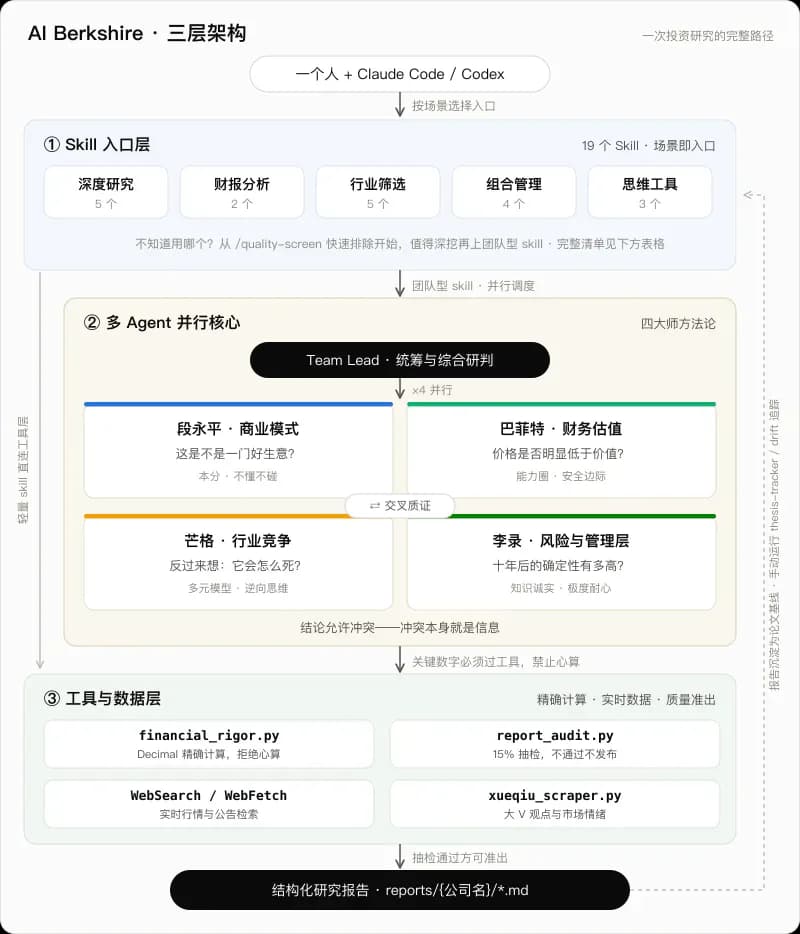
AI Berkshire is an open-source collection that turns value-investing research steps into Agent Skills. It provides separate installable entry points for Claude Code and Codex and covers company research, earnings review, industry screening, investment checklists, portfolio review, thesis tracking, and financial writing. Team-oriented Skills let multiple agents research from different methodological perspectives before a lead workflow synthesizes the result, while Python tools check market-cap, valuation, and cross-source data calculations. It is for users who already work with coding agents and want a more structured research process, not an automated trading or guaranteed-return service.
Core capabilities
Structured company and industry research
investment-research, industry-research, industry-funnel, and related Skills organize business model, moat, management, industry, risk, and valuation work.
Multi-agent adversarial analysis
Team workflows such as investment-team and earnings-team coordinate multiple research perspectives before synthesizing disagreements, risks, and conclusions.
Exact financial calculations and cross-checks
financial_rigor.py checks market cap, valuation, cross-source values, three scenarios, and exact expressions to reduce mental-math and unit errors.
Report data audits
report_audit.py extracts data points from research reports and produces a verification verdict before publication.

Installation and usage
Clone the repository and run the installer for your host; the Codex installer synchronizes generated Skills and copies them into the user's Codex Skills directory.
Let an AI Agent install it
Send this prompt to Codex, Claude Code, or another AI agent that can work with your local environment.
Install AI Berkshire from https://github.com/xbtlin/ai-berkshire. Read README.md, README_EN.md, LICENSE, SECURITY.md, and the install script under scripts that matches my operating system and host. Confirm whether I use Claude Code or Codex, then clone the repository and run only the documented installer for that host. After installation, restart or ask me to restart the host and verify with investment-checklist using a task that only lists research questions and gives no trading advice. Ask before creating or overwriting ~/.codex/skills or ~/.claude/commands, running scripts, using the network, reading portfolio or report files, writing into the working directory, spawning multiple agents, requesting credentials, or escalating permissions.- Git and Python 3
- Claude Code or Codex installed and runnable
- Write access to the user-level Skills or commands directory
- Web access, model budget, and a local working directory for research tasks
Project URL: https://github.com/xbtlin/ai-berkshire
Copy the URL and follow the steps below to complete setup.- 1Choose the host and clone the repository
Confirm Claude Code or Codex, run the README's `git clone https://github.com/xbtlin/ai-berkshire.git`, and enter the repository.
- 2Run the matching installer
Codex users run `.\scripts\install-codex-skills.bat` on Windows or `./scripts/install-codex-skills.sh` on macOS and Linux. Claude Code users run the matching commands installer.
- 3Restart and run a minimal check
Restart Codex or Claude Code, then use investment-checklist for a low-risk test that confirms the structured research questions are available.
- 4Expand from low-cost to deep workflows
Start with quality-screen, news-pulse, or investment-checklist, and only move to investment-research or investment-team when the result deserves deeper work.
After restarting the host, run: `Use investment-checklist to analyze a company I know. Only list missing evidence and do not provide trading advice.` If the host recognizes the Skill and returns its six-gate research questions and evidence requirements, the entry point is loaded; this does not validate any financial conclusion.
- The Windows Codex installer deletes and recreates same-named Skill folders, so inspect any local customization first.
- Codex slash prompts are optional and are not required to run the Skills.
- Verify filings, dates, currencies, and units independently; do not treat example returns or model conclusions as guarantees.
Use cases
Public-company research
Build a consistent memo across business model, moat, management, industry, risk, and valuation.
Earnings review and data verification
Read original filings, cross-check key values, and use Python tools to verify market-cap and valuation calculations.
Industry funnels and company screening
Reduce a broad industry list to a small set of companies worth deeper research while preserving rejection reasons.
Portfolio and thesis review
Review concentration and rebalance conditions, then check whether new facts have changed an investment thesis.
Assessment
The README, Codex Skill packages, install scripts, tools, and security policy show a clear set of research entry points with cross-validation, exact calculation, adversarial review, and auditing built into the workflow. The tradeoff is high resource use for deep tasks, while final quality still depends on source data, model capability, and human review. This is a documentation-based assessment; AgentMatter did not reproduce the example returns or validate investment advice.
Why it may be useful
- Twenty Skills span screening, deep research, earnings, and portfolio review
- Maintains installable formats for both Claude Code and Codex
- Includes Python exact-calculation, cross-validation, and report-audit tools
What to know first
- Multi-agent research can substantially increase tokens, time, and web calls
- Install scripts may replace same-named Skills and need destination review
- Every investment conclusion still requires independent due diligence
README
AI Berkshire
Overview
AI Berkshire packages value-investing research into 20 callable Skills for company research, earnings review, industry screening, portfolio review, and data validation, with separate install paths for Claude Code and Codex. AI-era Berkshire: a value investing research framework built for Claude Code and Codex.
Getting started
- Clone the repository and run the installer for your host; the Codex installer synchronizes generated Skills and copies them into the user's Codex Skills directory.
- The repository groups 20 Skills into deep research, earnings analysis, industry screening, portfolio management, and thinking tools.
- One canonical workflow is synchronized into Claude Code commands, Codex Skills, and optional Codex slash prompts.
- After restarting the host, run: `Use investment-checklist to analyze a company I know. Only list missing evidence and do not provide trading advice.` If the host recognizes the Skill and returns its six-gate research questions and evidence requirements, the entry point is loaded; this does not validate any financial conclusion.
Configuration
Project URL: https://github.com/xbtlin/ai-berkshire
Copy the URL and follow the steps below to complete setup.