
awsdac MCP Server
AWS Labs’ local MCP server lets AI assistants return or save AWS architecture PNGs from YAML, with format guidance and embedded documentation tools.
Project overview
awsdac MCP Server connects AI assistants to the AWS Labs diagram-as-code renderer. The host turns a description into YAML, and the local server returns a PNG or saves it to disk. It is useful for discussing proposed AWS architectures. The documented workflow needs no AWS account credentials and does not discover or deploy account resources. This guide is based on repository evidence, without installation or functional testing.
Core capabilities
Return an architecture image
generateDiagram accepts YAML and returns a base64 PNG for hosts that display image tool results.
Save a diagram to disk
generateDiagramToFile writes a PNG to a new path for design documents and rejects existing files.
Consult the format and docs
getDiagramAsCodeFormat supplies YAML guidance; listDocumentation and getDocumentation expose embedded reference documents for resources and links.
Setup and connection
Install the local binary, configure its actual path in a stdio MCP host, and verify a small architecture before handling real designs.
Let an AI Agent install it
Send this prompt to Codex, Claude Code, or another AI agent that can work with your local environment.
Install awsdac MCP Server from https://github.com/awslabs/diagram-as-code. Read README.md, doc/mcp-server.md, LICENSE, go.mod, CONTRIBUTING.md and cmd/awsdac-mcp-server/main.go. On macOS use brew install awsdac, locate awsdac-mcp-server with which, and configure its actual absolute path as a stdio MCP server in my chosen host. Use the documented Go command only with a suitable Go 1.25.0 toolchain if Homebrew is unavailable. Verify the five tools, read the format guide, then render a simple VPC diagram to a new PNG path and report actual results. Ask before credentials, extra permissions, or overwriting files. Confirm what descriptions and images the host sends to its model and what local paths the server can access.- A documented host such as Claude Desktop or Cline with stdio MCP support
- Homebrew on macOS, or a Go 1.25.0-compatible source build environment
- Permission to write a new PNG and download official definitions and icons
{
  "mcpServers": {
    "awsdac-mcp-server": {
      "command": "/opt/homebrew/bin/awsdac-mcp-server",
      "args": [],
      "type": "stdio"
    }
  }
}- 1Install and locate the binary
On macOS run `brew install awsdac`, then `which awsdac-mcp-server`. For a source installation use `go install github.com/awslabs/diagram-as-code/cmd/awsdac-mcp-server@latest` with the Go version required by go.mod.
- 2Configure the MCP host
Use the supplied stdio configuration and replace `/opt/homebrew/bin/awsdac-mcp-server` with the exact path returned by which. For Claude Desktop on macOS edit `~/Library/Application Support/Claude/claude_desktop_config.json`; Cline has its own MCP settings. Restart the host.
- 3Read the format and request a diagram
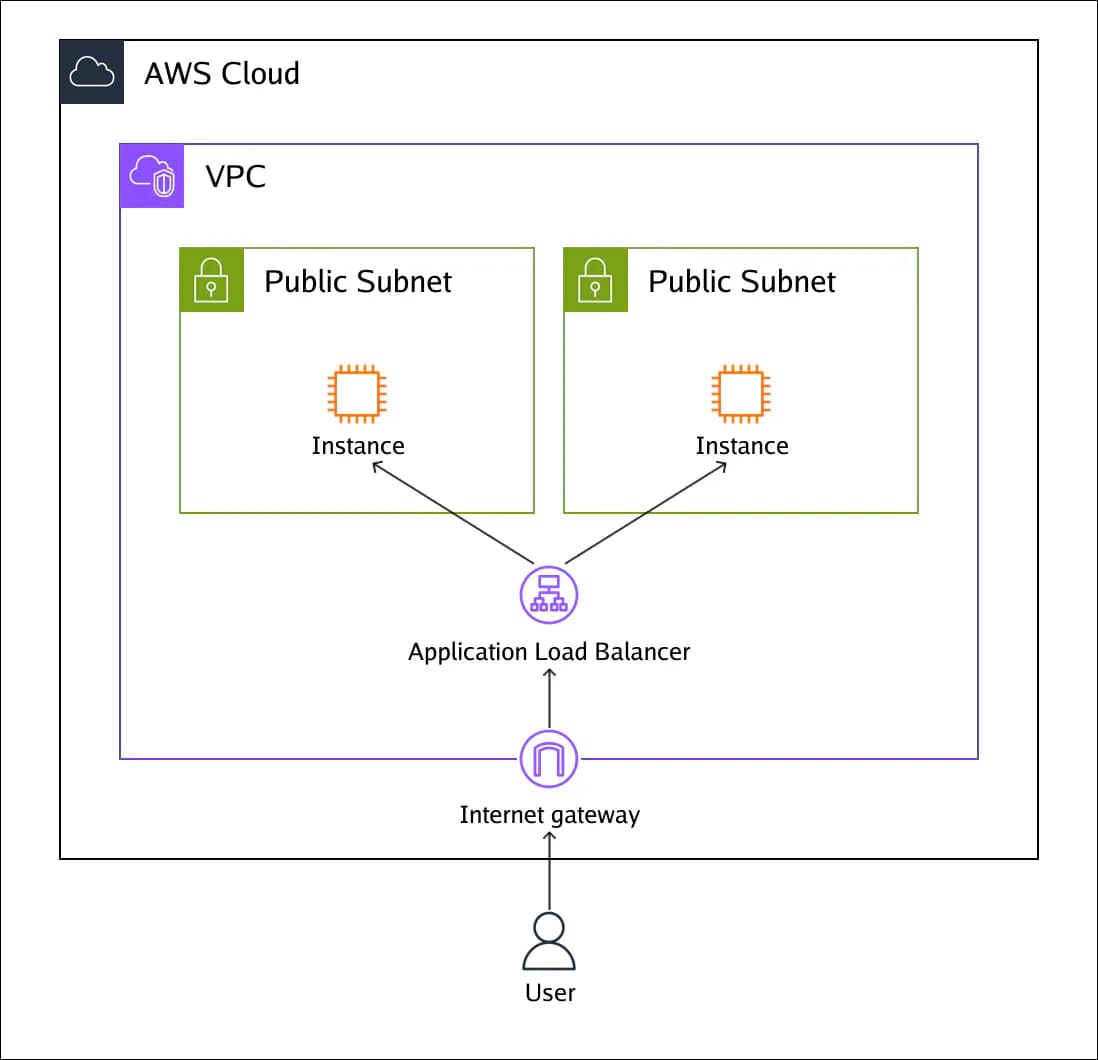
Call getDiagramAsCodeFormat first. Ask for a VPC with two public subnets, an ALB, and two EC2 instances. Inspect the YAML; request generateDiagram for an inline PNG or generateDiagramToFile for an approved, new absolute output path.
- 4Check the result
Confirm all five tools are available, open the returned or saved PNG, and check subnet membership and connections against the requested design. Check logs on failure and report it without claiming success.
Confirm the host lists generateDiagram, generateDiagramToFile, getDiagramAsCodeFormat, listDocumentation, and getDocumentation. Render a simple diagram, open the PNG, and check its resource hierarchy. These are suggested verification steps, not tests performed for this entry.
- The local stdio process inherits the launching user’s filesystem permissions; the source does not restrict output to a workspace.
- generateDiagramToFile can create parent directories and write a PNG to a supplied path. It refuses existing files; confirm a new output location.
- Architecture descriptions, YAML, and returned images enter the MCP host tool context. Remote model transmission depends on host and account settings.
- YAML can reference local definition files. The service writes temporary files, PNGs, and logs in the system temporary directory by default; paths and errors may appear in logs.
- Rendering can download definitions and icons from official GitHub and AWS sources. Assets are usually cached in ~/.cache/awsdac; local stdio does not imply offline execution.
- Only public documentation and source were reviewed. Installation and drawing were not tested. MCP output is PNG only; diagrams still need human review.
- The latest repository release is v0.24, while the MCP handshake reports 0.0.1. The setup guide lists three tools; v0.24 registers five.
- The README says Go 1.21+, but both v0.24 and current go.mod require Go 1.25.0. Follow go.mod when preparing a source build.
- No SECURITY.md was found. CONTRIBUTING points to private AWS security reporting. The repository is not archived; its latest push was 2026-11-04.
Use cases
Discuss an AWS design
Draft a load-balancing diagram and review placement and connections with teammates.
Maintain documentation images
Keep YAML under version control and save a reviewed PNG for a design document.
Assessment
The README, MCP implementation, example YAML, license, releases, and commits show a concrete local drawing workflow with inspectable inputs. Embedded reference tools are useful for checking syntax. Output quality and layout were not tested here; review every generated architecture.
Why it may be useful
- Inspectable YAML input and reusable repository examples
- Inline image return and file output in one local MCP server
What to know first
- Only public documentation and source were reviewed. Installation and drawing were not tested. MCP output is PNG only; diagrams still need human review.
- The latest repository release is v0.24, while the MCP handshake reports 0.0.1. The setup guide lists three tools; v0.24 registers five.
- The README says Go 1.21+, but both v0.24 and current go.mod require Go 1.25.0. Follow go.mod when preparing a source build.
- No SECURITY.md was found. CONTRIBUTING points to private AWS security reporting. The repository is not archived; its latest push was 2026-11-04.
README
awsdac MCP Server
Overview
AWS Labs’ local MCP server lets AI assistants return or save AWS architecture PNGs from YAML, with format guidance and embedded documentation tools. Diagram-as-code for AWS architecture.
Getting started
- Install the local binary, configure its actual path in a stdio MCP host, and verify a small architecture before handling real designs.
- A Go renderer turns YAML resources and links into AWS architecture diagrams.
- The MCP guide documents Homebrew and Go installation, with Claude Desktop and Cline configuration.
- Confirm the host lists generateDiagram, generateDiagramToFile, getDiagramAsCodeFormat, listDocumentation, and getDocumentation. Render a simple diagram, open the PNG, and check its resource hierarchy. These are suggested verification steps, not tests performed for this entry.
Configuration
{
  "mcpServers": {
    "awsdac-mcp-server": {
      "command": "/opt/homebrew/bin/awsdac-mcp-server",
      "args": [],
      "type": "stdio"
    }
  }
}