
LangGPT
LangGPT is a method for writing reusable prompts with separate role, goal, rules and workflow sections. Copy its Markdown template into a chat interface and adapt it for writing, learning or information tasks without installing software.
Project overview
LangGPT helps people who repeatedly explain context, output requirements and constraints to a chat model. The template makes those requirements easier to inspect and reuse. We reviewed the README and structured-prompt guide; the workflow below is documentation-based, not an effectiveness test.
Core capabilities
Make task requirements explicit
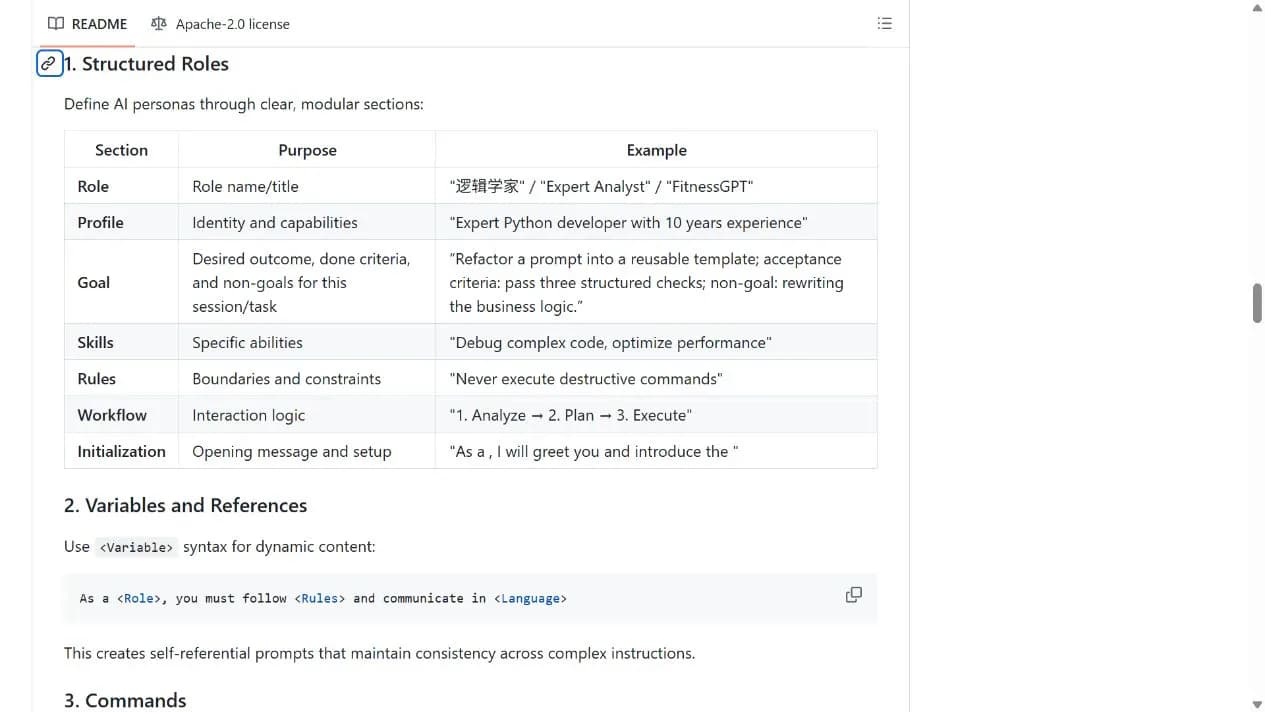
The base template separates Role, Profile, Goal, Rules, Workflow and Initialization. Goal distinguishes desired outcomes, acceptance criteria and non-goals.
Reuse and refine a template
The guide uses headings and variables to organize text. Adapt fields and output requirements while keeping a readable structure; formatting alone cannot guarantee compliance.
Access and usage
Copy the official base template from the acquisition panel, fill in your task and test it with a small sample in a chat interface. No software installation is required for this route.
Let an AI Agent install it
Send this prompt to Codex, Claude Code, or another AI agent that can work with your local environment.
Help me use LangGPT from https://github.com/langgptai/LangGPT. Read README Method 3 and Docs/HowToWritestructuredPrompts.md. Extract the official base template and fill it with my role, language, goals and constraints. Do not install software or request API keys for the basic route. Use a non-sensitive sample I provide to check language, format and factual fidelity and report the result. Ask before credentials, additional permissions, external uploads or overwriting files.- A chat-model interface that accepts long text
- A clear task, desired output and a small non-sensitive sample
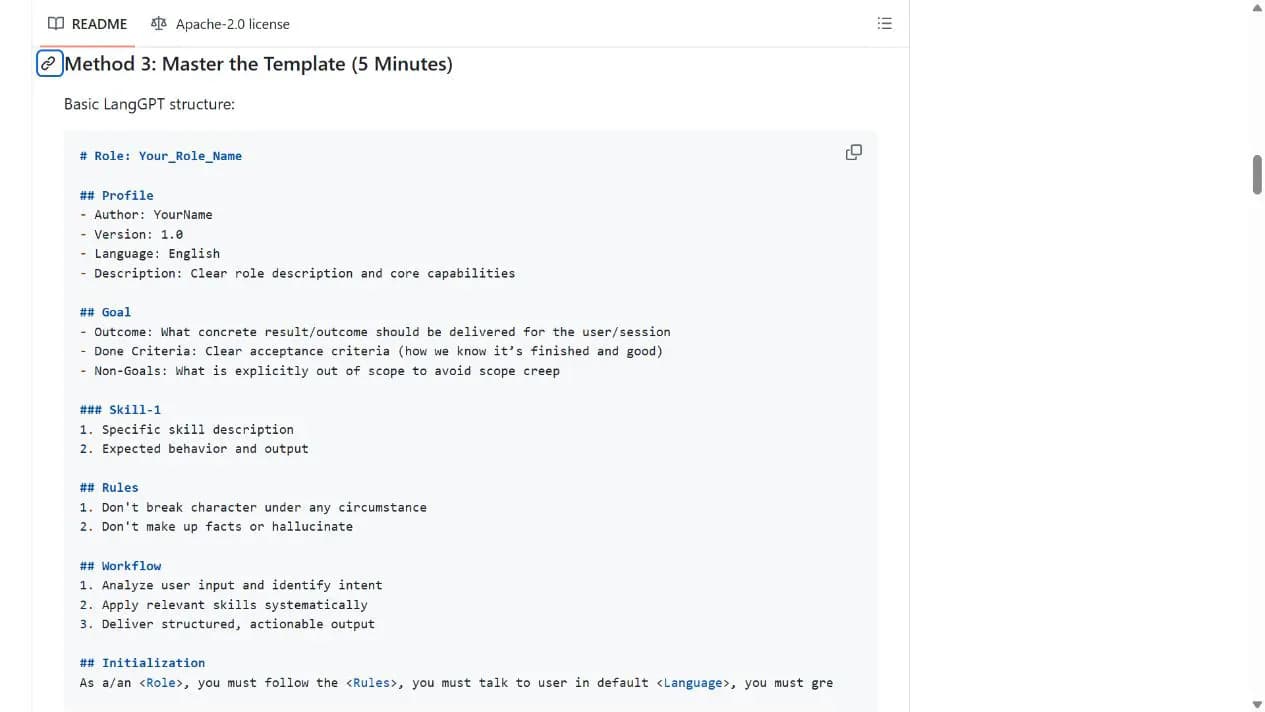
# Role: Your_Role_Name

## Profile
- Author: YourName
- Version: 1.0
- Language: English
- Description: Clear role description and core capabilities

## Goal
- Outcome: What concrete result/outcome should be delivered for the user/session
- Done Criteria: Clear acceptance criteria (how we know it’s finished and good)
- Non-Goals: What is explicitly out of scope to avoid scope creep

### Skill-1
1. Specific skill description
2. Expected behavior and output

## Rules
1. Don't break character under any circumstance
2. Don't make up facts or hallucinate

## Workflow
1. Analyze user input and identify intent
2. Apply relevant skills systematically
3. Deliver structured, actionable output

## Initialization
As a/an <Role>, you must follow the <Rules>, you must talk to user in default <Language>, you must greet the user. Then introduce yourself and introduce the <Workflow>.- 1Copy and fill the template
Copy the Markdown original from the acquisition panel. Set Role and Language, then define the output, acceptance criteria and non-goals in Goal.
- 2Add constraints and workflow
Use Rules for factual limits and information that must be preserved. Set real steps in Workflow, then paste the complete template into the chat interface.
- 3Test before reuse
Use familiar material and compare language, format and factual accuracy. Try a second sample and retain the version that passes your checks; a longer prompt is not proof of quality.
Apply the filled-in template to material you understand. Check language, format and facts against Goal acceptance criteria, then try a second sample. Adjust only the relevant fields when a requirement fails.
- The acquisition panel preserves the original template; Your_Role_Name and YourName are legitimate fields the user must replace.
- An older README badge says MIT, but the current root LICENSE text is Apache-2.0; this guide follows the license file.
- Model pricing and data policies apply separately. Recognition of the LangGPT name by every model is not verified.
Use cases
Writing briefs
Keep audience, tone and required information in fixed fields while replacing the source material for each task.
Learning conversations
Specify the depth of explanation and response format, then revise the rules based on actual answers.
Assessment
The README and guide provide an inspectable template with a low-friction start. Its practical value is clearer requirements, while accuracy still depends on the material, model and review process.
Why it may be useful
- No programming or self-hosting required
- Copyable and editable template
- Explicit goals and non-goals
What to know first
- Models may misunderstand or ignore long templates
- README effectiveness claims were not tested in this run
- The license badge and file disagree; retain the license-file evidence
README
LangGPT
Overview
LangGPT is a method for writing reusable prompts with separate role, goal, rules and workflow sections. Copy its Markdown template into a chat interface and adapt it for writing, learning or information tasks without installing software.
Getting started
- Copy the official base template from the acquisition panel, fill in your task and test it with a small sample in a chat interface. No software installation is required for this route.
- LangGPT provides a structured-prompt approach, a base template and supporting guides.
- The template route needs no CLI; optional Skills and other tools are separate paths.
- Apply the filled-in template to material you understand. Check language, format and facts against Goal acceptance criteria, then try a second sample. Adjust only the relevant fields when a requirement fails.
Configuration
# Role: Your_Role_Name

## Profile
- Author: YourName
- Version: 1.0
- Language: English
- Description: Clear role description and core capabilities

## Goal
- Outcome: What concrete result/outcome should be delivered for the user/session
- Done Criteria: Clear acceptance criteria (how we know it’s finished and good)
- Non-Goals: What is explicitly out of scope to avoid scope creep

### Skill-1
1. Specific skill description
2. Expected behavior and output

## Rules
1. Don't break character under any circumstance
2. Don't make up facts or hallucinate

## Workflow
1. Analyze user input and identify intent
2. Apply relevant skills systematically
3. Deliver structured, actionable output

## Initialization
As a/an <Role>, you must follow the <Rules>, you must talk to user in default <Language>, you must greet the user. Then introduce yourself and introduce the <Workflow>.