
Copilot Prompts
A Microsoft 365 and Power Platform community collection of copyable prompts, Copilot Studio agent instructions, and GitHub Copilot skills.
Project overview
Copilot Prompts is a community-maintained collection from the Microsoft 365 and Power Platform community. It is not a single installable package: the repository brings together copyable prompts, complete instruction sets for Copilot Studio, and SKILL.md files that can be placed in GitHub repositories. Inclusion is based on inspectable sample structure, per-item documentation, MIT licensing, a security policy, and continuing commits—not on star count.
Core capabilities
Prompt catalog across Copilot products
Prompt folders provide text, purpose, prerequisites, and steps for Microsoft Copilot, Microsoft 365 Copilot, and GitHub Copilot scenarios.
Copilot Studio agent instructions
Agent samples include identity, workflows, guardrails, output formats, and setup steps suitable as a starting point in Agent Builder after tenant-specific review.
GitHub Copilot skills
Skill samples use SKILL.md for triggers, inputs, stepwise workflows, and validation, while the accompanying README documents repository installation.
Traceable per-sample documentation
Contribution rules require a README, source content, repository-hosted screenshots, and confirmation that contributors have the right to share the material.
Access and usage
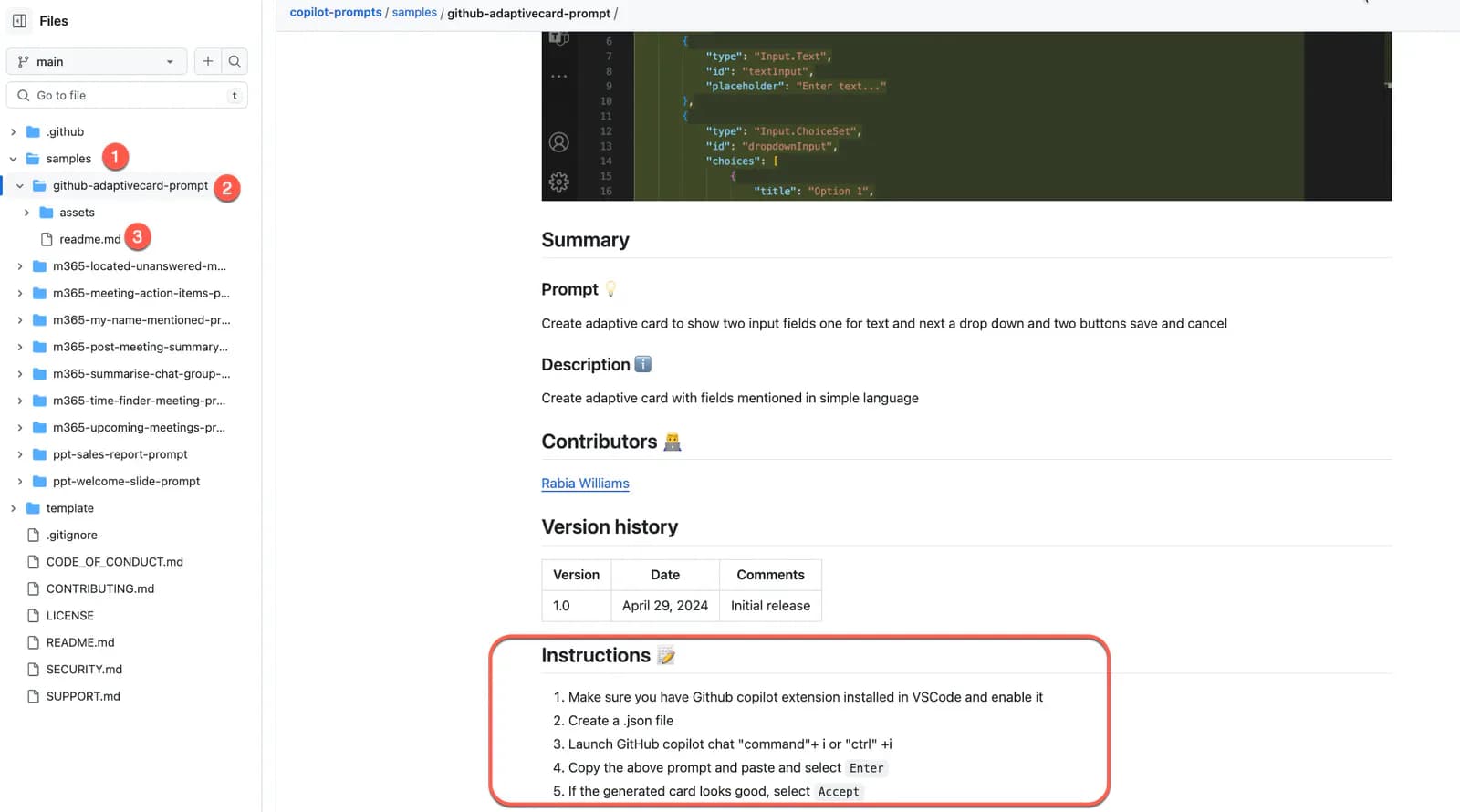
There is no single installation command. Select a prompt, agent instruction, or skill and follow the individual sample README; use non-sensitive test data for the first validation.
Let an AI Agent install it
Send this prompt to Codex, Claude Code, or another AI agent that can work with your local environment.
Help me adopt one sample from Copilot Prompts safely.
Project URL: https://github.com/pnp/copilot-prompts

Read the root README, SECURITY, and LICENSE plus the selected sample's README, prerequisites, and core prompt, instructions, or SKILL.md. State the target Copilot product, required licenses, files to copy or change, and external boundaries for prompts, open files, chat context, knowledge sources, and business data. Do not sign in, publish an agent, connect SharePoint, broaden tenant permissions, or use real business data; stop for confirmation before those actions. Replace every placeholder, validate once with non-sensitive test input, and report actual changes, data flows, limitations, and unverified items.- Identify the target product: Microsoft Copilot, Microsoft 365 Copilot, GitHub Copilot, or Copilot Studio
- Confirm account licensing, tenant policy, and sample-specific prerequisites
- Map data that may appear in prompts, knowledge sources, open files, and chat context
- Obtain organizational security, privacy, or compliance review before production use
Project URL: https://github.com/pnp/copilot-prompts/tree/main/samples/prompts
Copy the URL and follow the steps below to complete setup.- 1Choose the product and sample type
Decide whether the task needs a direct prompt, Copilot Studio agent instructions, or a GitHub Copilot skill, then open the matching samples directory.
- 2Read the individual documentation
Check the sample README, license, target application, tenant requirements, knowledge sources, and author record instead of copying only a root-page snippet.
- 3Copy while reducing data scope
Replace placeholders and remove unnecessary mail, file, site, or knowledge-source references. For a skill, copy only the reviewed SKILL.md into the target repository.
- 4Validate with non-sensitive input
Run one low-risk test and verify output facts, citations, and action scope. Clear the context first if old chat or open files are unexpectedly referenced.
- 5Complete organizational review
Have security and business owners review the prompt, instructions, knowledge sources, actions, permissions, and retention rules before publication or sharing.
Run the selected sample once with a small, non-sensitive input. Confirm the intended Copilot product is used, no old chat or open file is unexpectedly referenced, and verify every generated claim or action. This checks only the basic path, not production suitability.
- Direct prompts are generally pasted into the relevant Copilot chat and require no package installation
- Agent instructions go into Copilot Studio's Instructions field; review knowledge sources and actions before publishing
- Skill samples copy SKILL.md to .github/skills/<skill-name>/ in the target repository
- Products, data sources, and permissions vary by sample, so one sample's prerequisites do not apply to all others
Use cases
Draft Microsoft 365 workflows
Start from meeting, mail, document, or task samples and adapt fields and approval rules to the organization.
Assist GitHub Copilot coding work
Use code-fixing, documentation, or review examples to make the technology, objective, and expected output explicit.
Prototype a Copilot Studio agent
Start with a community identity, workflow, and guardrail set, then adapt it to tenant governance and business accountability.
Study prompt and instruction structure
Compare how samples declare inputs, steps, boundaries, output formats, and validation to inform an internal template.
Assessment
Copilot Prompts is useful because it places three levels of Copilot content in one traceable repository: lightweight prompts, complete agent instructions, and installable SKILL.md files. Samples usually have their own documentation, prerequisites, and repository-hosted screenshots, and the collection continues to receive updates. It is not a uniformly tested product: Copilot licenses and data sources differ, the security policy requires production review, and there is no collection-wide release version. This entry verifies public evidence and structure only and does not claim testing in a Copilot product.
Why it may be useful
- 113 prompts, 31 agent instruction sets, and 9 skills cover several Copilot usage patterns
- Individual folders record purpose, authors, prerequisites, and usage instructions
- Contribution rules require repository-hosted screenshots and the right to share
- MIT licensing, SECURITY, SUPPORT, and recent commits are publicly inspectable
What to know first
- Sample quality and prerequisites vary and require per-item review
- Copilot products may use content from the account, tenant, open files, chat, or knowledge sources
- Demonstration content does not replace security, privacy, compliance, or business acceptance review
- There is no single release version or compatibility promise for the full collection
README
Copilot Prompts
Overview
A Microsoft 365 and Power Platform community collection of copyable prompts, Copilot Studio agent instructions, and GitHub Copilot skills. A community collection of prompts, agent instructions, and skills for Microsoft Copilot, Microsoft 365 Copilot, GitHub Copilot, and Copilot Studio.
Getting started
- There is no single installation command. Select a prompt, agent instruction, or skill and follow the individual sample README; use non-sensitive test data for the first validation.
- The root README describes a sample collection for Microsoft Copilot, GitHub Copilot, and Microsoft 365 Copilot. It directs users into the samples tree to select one item and read its README and prerequisites.
- The recursive tree matches the README counts: 113 prompt samples, 31 agent instruction samples, and 9 GitHub Copilot skills. Prompt folders provide copyable text, agent folders provide Copilot Studio instructions, and skill folders provide README plus SKILL.md.
- Run the selected sample once with a small, non-sensitive input. Confirm the intended Copilot product is used, no old chat or open file is unexpectedly referenced, and verify every generated claim or action. This checks only the basic path, not production suitability.
Configuration
Project URL: https://github.com/pnp/copilot-prompts/tree/main/samples/prompts
Copy the URL and follow the steps below to complete setup.